7
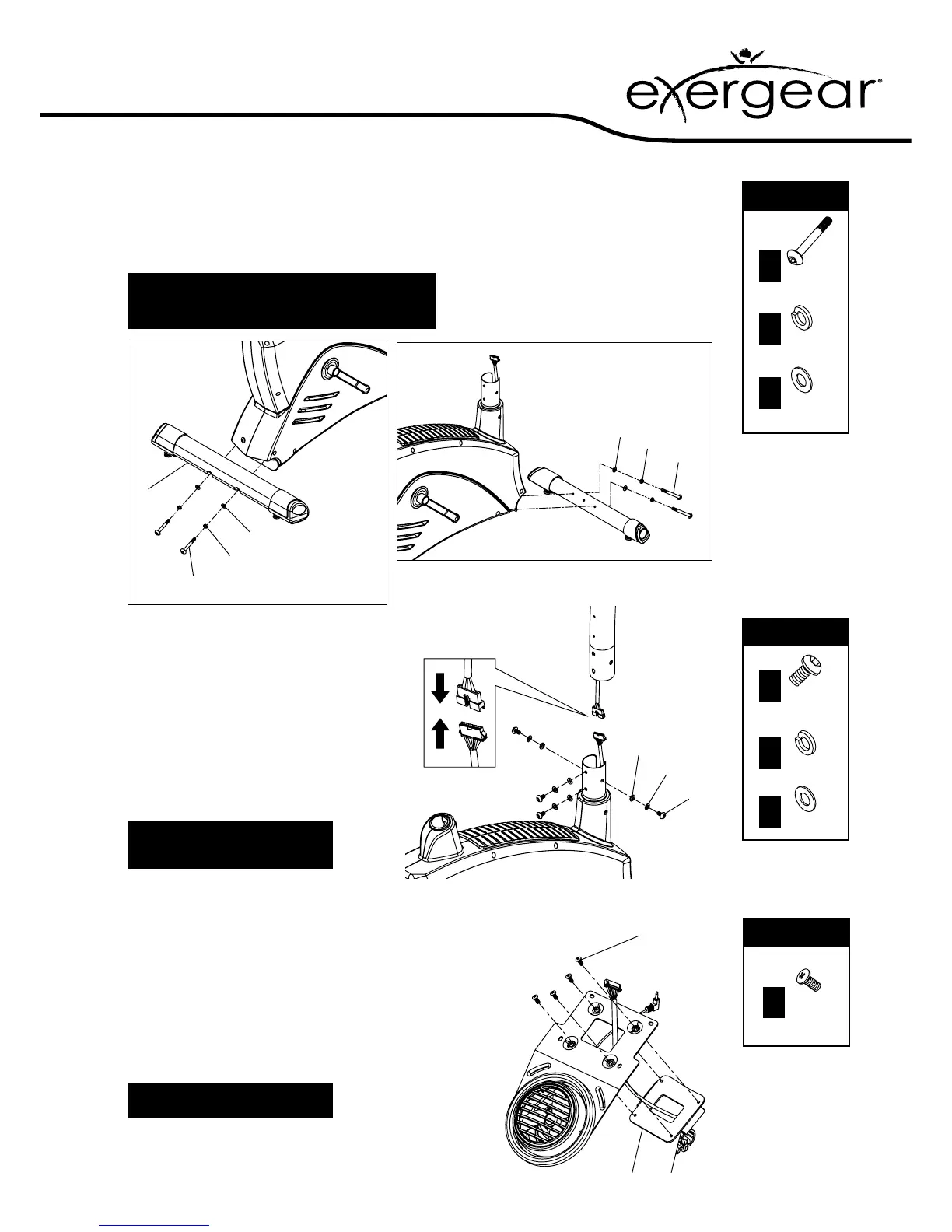
2. Attach the stabilisers
1. Attach the front and rear stabilisers with the bolts and
washers as shown in the diagram
2. Be sure to t the parts in the same order as the diagram
Check the bolts are fully tightened by making sure
they penetrate
through the top of the nut
!
3. Attach the front post
1. Connect the computer cables as shown
– make sure it’s fully connected
2. Slide the front post tube over the front
post mounting
3. Secure in place using the bolts and
washers as shown – be sure to t them
in the same order as the diagram
Make sure the bolts are fully
tightened with the allen key
!
FIXINGS:FIXINGS:
x 4
Part
No.
37
x 4
Part
No.
11
x 4
Part
No.
10
FIXINGS:FIXINGS:
x 4
Part
No.
23
x 4
Part
No.
11
x 4
Part
No.
10
4. Attach the fan to the front post
1. Slide the computer cable pass through the fan xing
bracket hole
2. Make the fan wire pass over the fan xing bracket hole
underneath as shown
3. Secure the fan bracket onto the front post using screws
as shown
FIXINGS:FIXINGS:
x 4
Part
No.
19
13
10
11
37
10
11
37
10
11
23
19
Take care not to trap the wires
!


 To Next Page