EasyManua.ls Logo

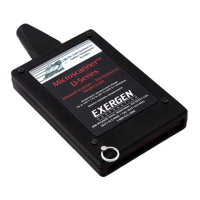
Exergen Microscanner D Series - User Manual

Exergen Microscanner D Series
16 pages
Print Icon
To Next Page IconTo Next Page
Loading...
Instruction Manual
Microscanner
D-Series
D501-RS
D501
High-Performance Models
Question and Answer IconNeed help?

Do you have a question about the Exergen Microscanner D Series and is the answer not in the manual?

Summary

Exergen Microscanner D-Series

Operations and Controls

On;Off, Lock and Reset

Instructions for turning the unit on, locking the display, and resetting readings.

Operation Modes

Details on SCAN, MAX, and MIN modes for temperature measurement.

Understanding Microscanner Operation

Measurement Techniques

Exact Surface Temperature Measurement

Step-by-step guide for taking precise surface temperature readings.

Thermal Scanning

Display Messages and Indicators

Maintenance

Troubleshooting

Warranty and Repair

Specifications

Summary

Exergen Microscanner D-Series

Operations and Controls

On;Off, Lock and Reset

Instructions for turning the unit on, locking the display, and resetting readings.

Operation Modes

Details on SCAN, MAX, and MIN modes for temperature measurement.

Understanding Microscanner Operation

Measurement Techniques

Exact Surface Temperature Measurement

Step-by-step guide for taking precise surface temperature readings.

Thermal Scanning

Display Messages and Indicators

Maintenance

Troubleshooting

Warranty and Repair

Specifications

Exergen Microscanner D Series Specifications

General IconGeneral
Measurement SiteTemporal Artery
Accuracy±0.2°F (±0.1°C)
DisplayLCD
Power Source9V Battery
Automatic ShutoffYes
ModelD Series
TypeInfrared
Storage Temperature–4°F to 122°F (-20°C to 50°C)
Battery LifeApproximately 1 year
Dimensions15.2 x 5.1 x 3.8 cm (6 x 2 x 1.5 inches)

Related product manuals