4
English
10
11
12
13
14
15
16
1 6
2 7
3
4 8
5 9
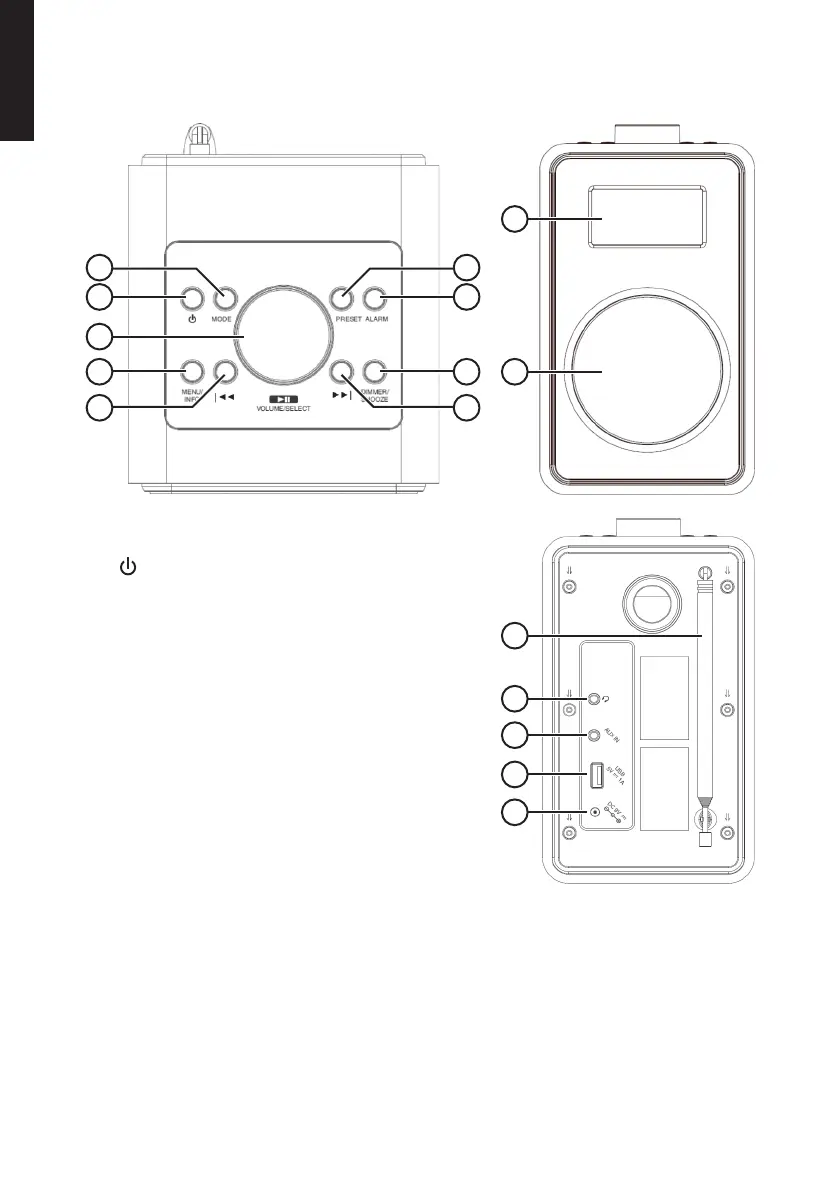
Product description
1. [ MODE ] Select audio source: FMradio, DAB
radio, Bluetooth or Auxiliary Input.
2. [ ] On/off
3. [ VOLUME/SELECT ►ll ] Volume, search for
radio channel, menu navigation, confirm,
Bluetooth, play/pause.
4. [ MENU/INFO ] Hold in for menu, quick-press for
info and to back out of thecurrent menu selection.
5. [ l◄◄ ] Search for radio channel on lower
frequency, menu navigation, change track on
aBluetooth-connected device.
6. [ PRESET ] Save radio channels as presets,
select preset radio channel.
7. [ ALARM ] Set-up for alarm 1 and 2
8. [ DIMMER/SNOOZE ] Set-up of dimmer function
and snooze function.
9. [ ►►l ] Search for radio channel on higher
frequency, menu navigation, change track on
aBluetooth-connected device.
10. Display
11. Loudspeaker
12. Aerial
13. 3.5 mm headphone socket
14. 3.5mm AUX IN socket for external audio sources
15. USB port for charging external devices
16. Mains adaptor socket


 To Next Page