Need help?
Do you have a question about the Exodus LIFT II and is the answer not in the manual?
A table outlining the different menu options and their configurations.
Details the primary operational modes: Photo, Video, Time Lapse, and Hybrid.
Configuration for camera clock, image resolution, and burst shot count.
Options for video size/length and delay/sensitivity for motion triggers.
Adjusting IR flash range, time lapse interval, and time format.
Settings for operating hours, timestamps, camera name, and password protection.
Options for formatting the SD card, resetting defaults, and system updates.
Instructions on how to safely remove the SD card to transfer photos and videos.
Procedure for downloading pictures and videos directly from the camera via a USB cable.
How to view photos and videos directly on the camera's viewfinder.
Instructions on how to register your camera for warranty validation within 30 days of purchase.
Steps to follow for contacting support, returning the unit, and verifying warranty coverage.
Details the conditions and circumstances that are not covered by the product warranty.
Specifies the compatibility, size limits, and recommended class for SD cards.
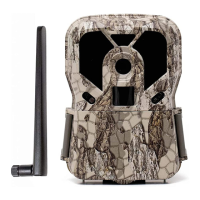
The Exodus Lift II is a trail camera designed for outdoor use, primarily for hunting and wildlife monitoring. It is built to capture still images and videos, offering a range of features to optimize its performance in various environments. The camera is housed in a camouflage casing, making it blend in with natural surroundings.
The primary function of the Exodus Lift II is to automatically capture photos or videos of wildlife based on motion and heat detection. It operates through a Passive Infrared (PIR) sensor that triggers the camera when movement and heat signatures are detected within its range. The camera can be set to different modes: Photo, Video, Time Lapse, and Hybrid. In Photo mode, it captures still images, while Video mode records video clips. Time Lapse mode allows the camera to take a series of photos at predetermined intervals throughout the day, regardless of motion. Hybrid mode combines both photo and video capture, taking a still image followed by a video clip upon activation.
The camera is equipped with an LED IR Flash Unit for night vision, enabling it to capture clear images and videos in low-light conditions without scaring away wildlife. Indicator LEDs provide visual feedback on the camera's status. A 2-inch view screen allows users to navigate the menu, adjust settings, and review captured images and videos directly on the device.
The Exodus Lift II offers a user-friendly interface with several buttons for navigation and control. The On/Off/Test Toggle Switch has three positions: "On" initiates a startup countdown, arming the camera for operation; "Off" shuts down the camera; and "Setup" puts the camera into setup/aim mode, where users can access the menu and perform test functions.
The Menu button opens the camera's settings menu when in "Setup" mode. Directional keys (Up, Down, Left, Right) are used to navigate through the menu options. The "Up" directional key also doubles as the "Playback" button for reviewing pictures in test mode. The Enter button serves as a selection key within the menu and can also be used to take a test photo in test mode. An Eject button is provided to easily remove the battery tray.
Setting up the camera involves installing 8 AA batteries (lithium recommended for optimal performance, especially in cold weather) into the battery tray and inserting an SD card (up to 32GB, Class 4 or higher recommended) until it clicks into place. Once powered on in "Setup" mode, users can format the SD card through the menu, which is recommended every time a new card is inserted.
Aiming the camera is facilitated by the "Setup" mode. Users can walk through the target area, and a red indicator light will blink when motion is detected, helping to determine the optimal placement. A test photo can be taken by pressing the "Enter" button, and then reviewed using the "Up" directional key.
The camera offers extensive customization through its menu settings:
Retrieving and viewing pictures can be done in three ways:
The Exodus Lift II is designed for durability and ease of maintenance.
Exodus offers a comprehensive 5-year warranty for the Lift II. This warranty covers repairs or replacements for cameras that stop working under normal use, free of charge. Additionally, if the camera is stolen or accidentally damaged within the first 5 years, Exodus offers a replacement camera at 50% off the full retail price (one per purchase). To validate the warranty, the camera must be registered within 30 days of purchase.
Warranty exclusions include damage from incorrect installations, abuse, alterations not performed by Exodus, poor handling, misuse, accidents, abnormal use, shock, power failures/surges, battery failure, lightning, or weather-related conditions. It also does not cover products with altered or removed serial numbers, cosmetic wear, depreciation, or damage/loss during transportation. However, the 5-year theft/accidental damage policy covers some of these scenarios.
For support, users can contact Exodus by texting "Call" to 330-400-3034. During normal business hours (Mon-Fri, 8 AM-6 PM EST), a callback is typically received within 5 minutes. Support is also available outside these hours. To make a warranty claim, users should contact customer support via phone or email (info@exodusoutdoorgear.com) to receive a return label. Once the camera is received and the problem verified, it will either be repaired or a new unit shipped.
 General
| Detection Range | 80 ft |
|---|---|
| Video Resolution | 720P |
| Battery Type | AA |
| Flash Type | Low Glow |
| Memory Card Support | Up to 32GB SD card |

 To Next Page