三、
Hardware install
Important note: after all the hardware installed, and then start the notebook
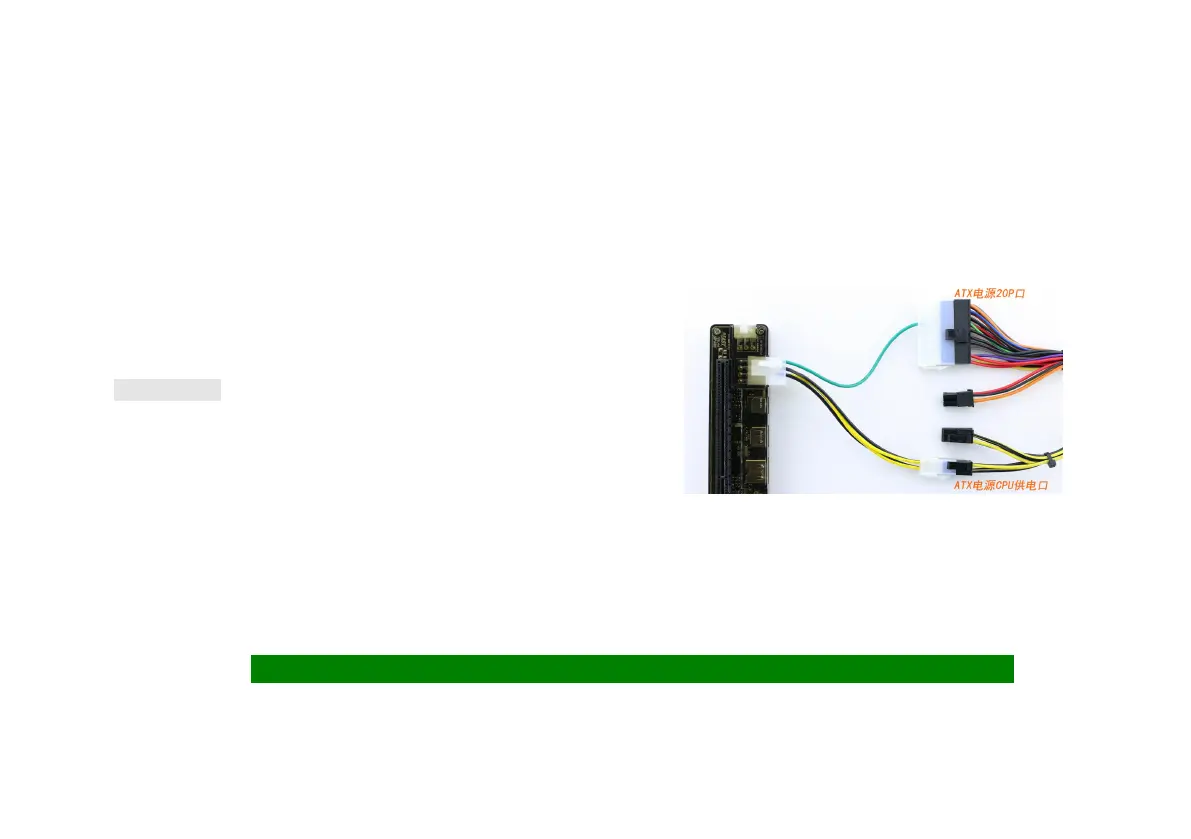
1、 ATX POWER
Note: when using the ATX power supply, the graphics card 8PIN 6PIN/ power
supply directly from the power supply connection. Graphics card
The power supply interface must be connected to the. (cable reference right)
四、
Graphics driver installation and settings
1、Graphics driver installation
2、Log-in,NVIDIA Control panel-Configure Surround,PhysX-Processor:-GTX***,Check Only use Physx。Manage 3D settings-Global Settings-High
performance mode,Multi-display/mixed-GPU acceleration-Single display performance mode。
Set up, start to enjoy, please install DX11.NET4 DX9 and other necessary patches
(If you can't open the video card control panel, Device manager - the display adapter, right - click to view the external graphics card error code)
Error12 Install DIY EGPU Set hardware conflicts,
Error43 Check the power supply or replace the drive version
NO error Use 2G memory。


 To Next Page