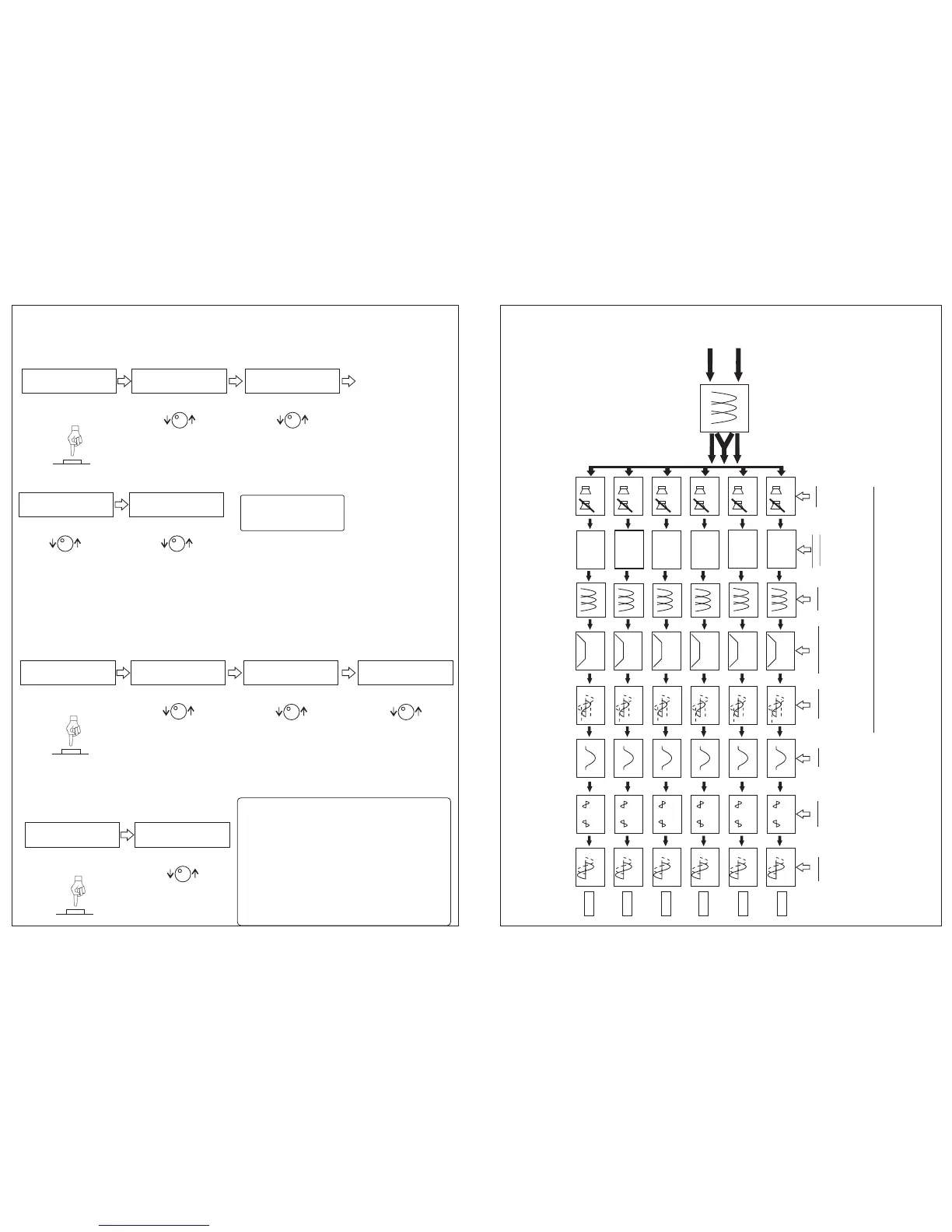
5. HOW TO CONFIGURE THE CROSSOVER:
Press the ESC button to go initial display.
Turn the Encoder until the Crossover function.
Press the encoder to
choose the attenuation.
Choose the
attenuation, Press the
Encoder to go to Low
Pass filter.
Choose the frequency.
Press the Encoder to
choose attenuation.
Choose the
attenuation. Press
ESC to go back at
previous function.
Repeat the steps 1, 2, 3,
4 and 5 to configure
others ones.
6. LIMITER Ch1, Ch2, Ch3, Ch4, Ch5, Ch6):
Press the ESC button to go initial display.
Turn the Encoder until the Limiter function:
Press the channel to
configure:
Choose the Threshold
value. Press the
Encoder to choose the
Attack.
Choose the Attack
value. Press the
Encoder to go Decay.
Choose the release.
Press the ESC button
to go back previous
function.
7. GAIN (Ch1, Ch2, Ch3, Ch4, Ch5, CH6):
Press the ESC button to go initial display.
Turn the Encoder until the Gain function:
Choose and press the
CH button to configure.
Choose the gain. Press
ESC button to go back.
The Reset button when pressed, for a certain
time, returns to factory configurations,
memories and parameters.
For use the Reset function, keep pressed the
Reset button until restart the PX-2.
ALWAYS DISCCONECT THE REMOTE
BEFORE USING THE RESET FUNCTION.
L / R
L+R
L / R
L+R
L / R
L+R
L / R
L+R
L / R
L+R
L / R
L+R
ROUTING
CHANNEL
IN L
IN R
EQ
28 Bandas
CH1
CROSSOVER
CH2
CH3
CH4
CH1
GAIN
CH1
PHASE
0º 180º
CH2
0º 180º
CH3
0º 180º
CH4
0º 180º
CH2
CH3
CH4
CH1
DELAY
CH2
CH3
CH4
OUT 1
-12dB +12dB
6 Vpp máx
12 Vpp máx.
CH1
LIMITER
CH2
CH3
CH4
CH1 =>HPF: 500 Hz
ATEN:12 dB/8
2º Step: freq HP
Turn the Encoder:
3º Step: Choose the attenuation
Turn the Encoder:
CH1 HPF: 500 Hz
=> ATEN:12 dB/8
5º Step: Choose the attenuation
Turn the Encoder:
CH1 LPF: 2000 Hz
=> ATEN:12 dB/8
2º Step: TRESHOLD
Turn the Encoder:
3º Step: Attack
Turn the Encoder:
CH1>T: 0 dB
A:45ms D:12 dB/s
CH1>A: 45 ms
D:12dB/s T:0 dB
4º Step: Decay (release)
Turn the Encoder:
CH1>D: 12 dB/s
T:0dB A:45ms
2º Step: Distance
Turn the Encoder:
CH1>GAIN: 06 dB
CH5
CH6
CH5
0º 180º
CH6
0º 180º
CH5
CH6
CH5
CH6
-18 dB +6dB
0 - 10 ms
CH5
CH6
-24 a 0dB
EQ
-12dB +12dB
EQ
EQ
EQ
EQ
EQ
EQ CH
OUT 2
OUT 3
OUT 4
OUT 5
OUT 6
CH1
MUTE
CH2
CH3
CH4
CH5
CH6
OFF - ON
1
5
2
FUNCTIONAL DIAGRAM
CROSSOVER
1º Step: Filters
Press the channel to
configure:
4º Step: freq LP
CH1 =>LPF: 20000 Hz
ATEN:12 dB/8
Turn the Encoder:
LIMITER
1º Step: LIMITER
GAIN
1º Step: Delay
RESET
Configuration and installation processor guide Configuration and installation processor guide


 To Next Page
 Loading...