EN
IT
DE
FR
ES
NL
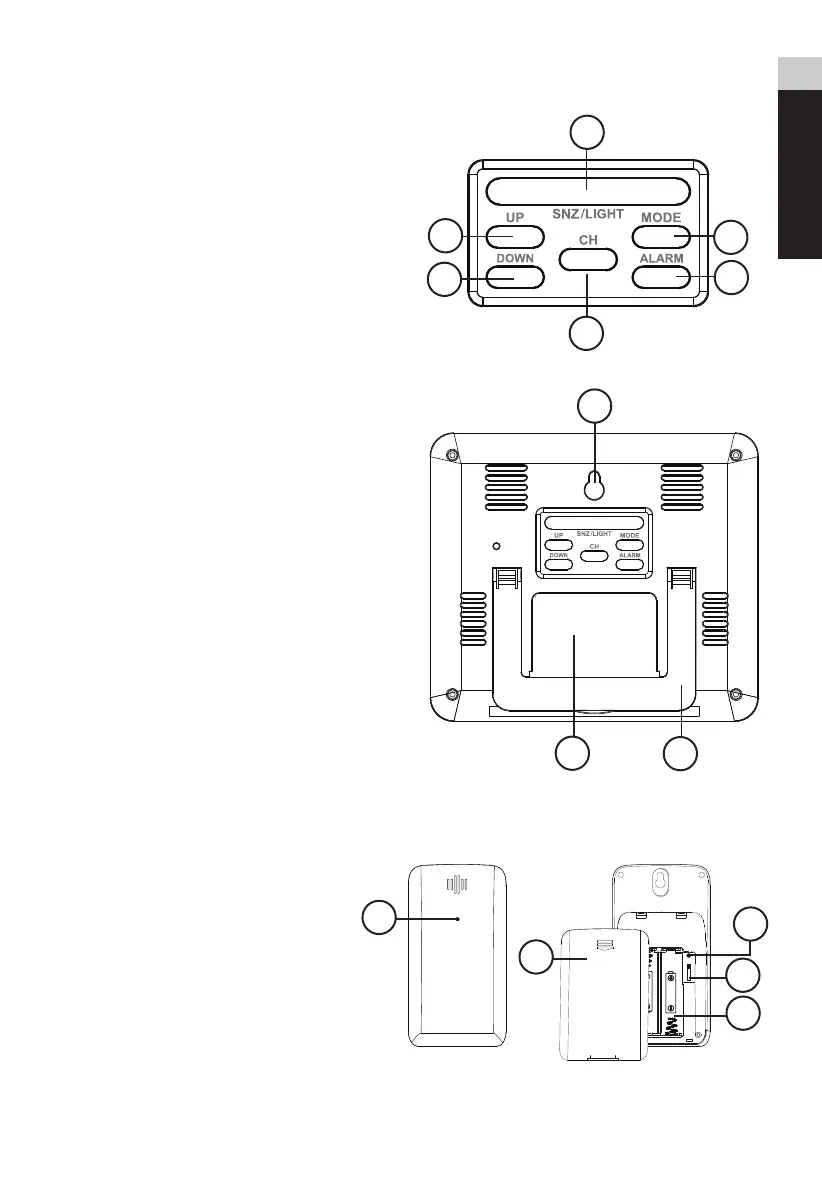
PRODUCT OVERVIEW
1.Press [ SNZ / LIGHT ] to activate the backlight
or to activate the snooze function to delay the
alarm for 5 minutes.
2.While in normal display mode, press [ UP ] to
check max. and min. temperature. While
displaying max. and min. data, press and hold
[ UP ] to clear all memory and return to normal
display mode. While in setting mode, press
[ UP ] to increase one unit, press and hold to
increase rapidly.
3.While in normal display mode, press [ DOWN ]
to select °C
or
°F. Press and hold [ DOWN ] to
initiate or exit RCC receiving. While in setting
mode, press [ DOWN ] to decrease one unit,
press and hold to decrease rapidly.
4.Press [ CH ] to toggle between outdoor sensor
channel 1-3. Press and hold to clear present
channel.
5.Press [ MODE ] to enter time setting mode.
6.Press [ ALARM ] once to check alarm time.
Press [ ALARM ] once more to turn on/off the
alarm. Press and hold [ ALARM ] to enter alarm
setting mode.
7.Wall Mount.
8.Battery compartment.
9.Table stand.
OUTDOOR SENSOR
1.Battery compartment door.
2.Battery compartment.
3.RESET button (reset all settings).
4.Channel switch.
5.Data transmission light
LCD DISPLAY
2
3
4
RESET
1 2 3
AAA 1.5V
AAA 1.5V
5
1
3
1
2
3
4
5
6
7
8
9



 To Next Page