EasyManua.ls Logo

Expolite ELF24 - Page 13

Expolite ELF24
23 pages
Print Icon
To Next Page IconTo Next Page
To Previous Page IconTo Previous Page
Loading...
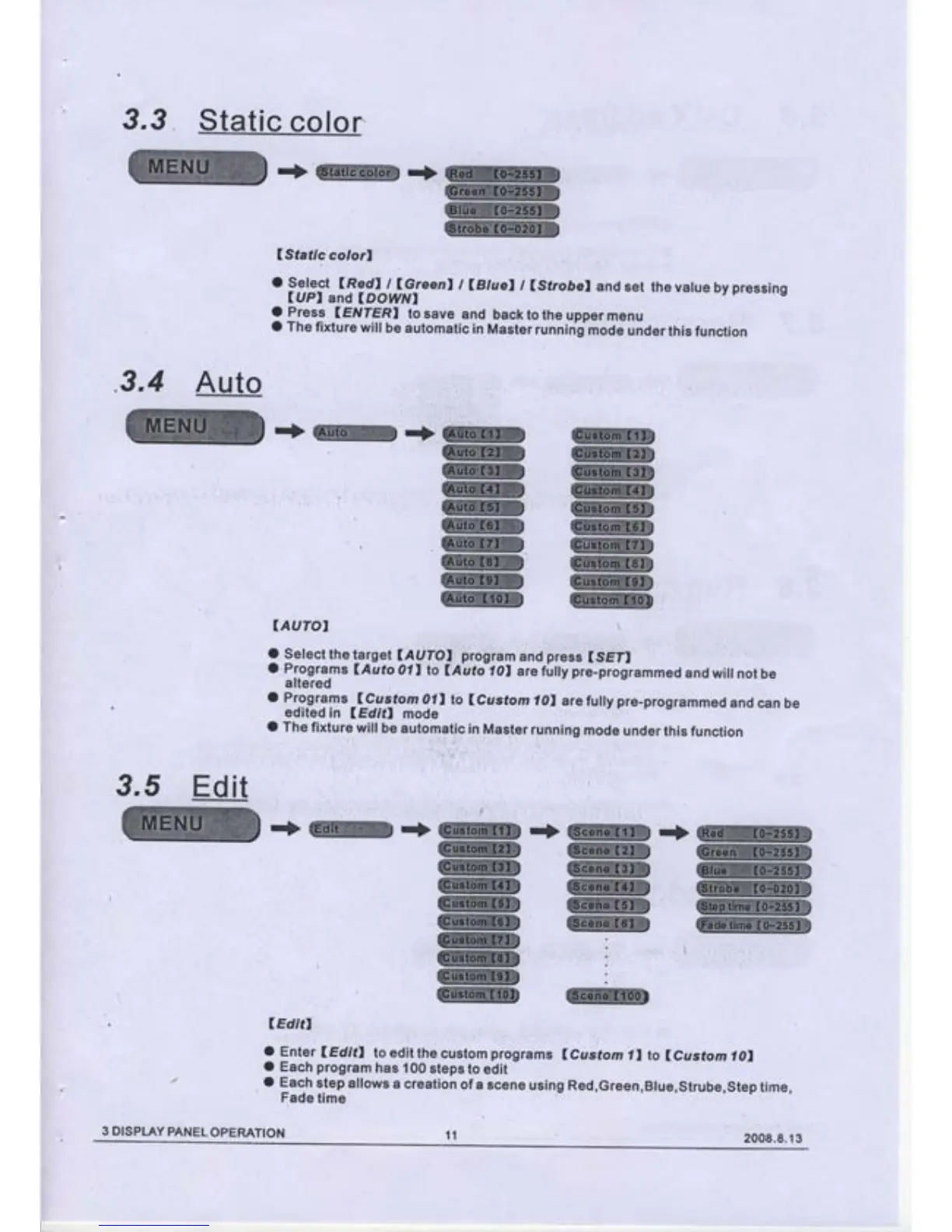
3.3
.3.4
3,5
.'>W->ffiS
(Stafic
colorl
o
sef ect
(RedI
t
lGreenl t
lBluel
/
(sfroöel
and
set
the value
by
pressing
(UPI
and
lDOwNl
O
Press
(E
VIERI
to
save
and
back
to
the upper
menu
o rhe
fixture
will
be
automatic
in
Master
running
mode
under
this
function
.+|ffi.+{ffiffi
IAUTOI
\
O
Selectthelarget
l4yTOI
program
and
press
ISEII
o
Programs
lAuto
011
to
lAuto
lol
are
fully
pre-progiammed
and wiil
not
be
altered
o Programs
_lcus_tom
011
lo
(cusfom
i0l
arefully pre-programmed
and
can
be
edited
in
IEdifl
mode
o
rhe
fixture
will
be
automatic
in
Master
runnirig
mode
under
this
function
lEdit,
o
Enter
lEditl
to
edit the
custom
programs
lcus;tomll to
(custo
m 101
O
Each
program
has 100
steps
to edit
o
Each
step
allows
a creation
of a
scene
using Red,Green,Blue,strube,step
time,
Fade
time
ffi
W
W
Auto
WffiD
W
W
@
W
W
WS
W
W
W
WW
W
W
W
W
W
Ed
it
->w+@.+w-f
w|ffiffi
W
WKW
W W
ffiffi
W
W
|ffi
:
ffi
:
l
ffiw@
11
3 DISPLAY
PANEL
OPERATION
2008.8.1
3

Related product manuals