EasyManua.ls Logo

Expolite ELF24 - Page 14

Expolite ELF24
23 pages
Print Icon
To Next Page IconTo Next Page
To Previous Page IconTo Previous Page
Loading...
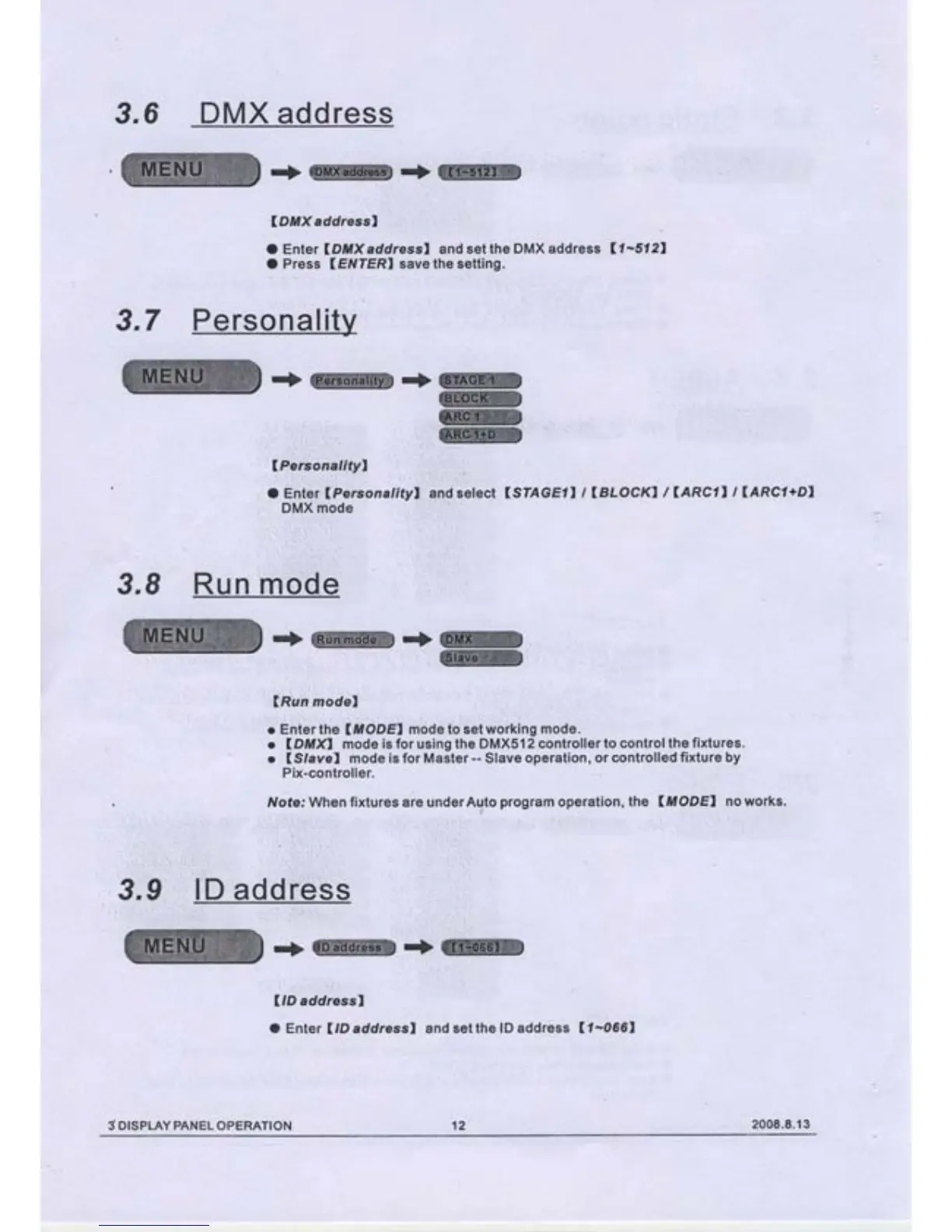
3.6
DMX address
-+@.+@
\DMX
addressl
O Enter
lDtüX
addressl and
set the DMX address
U-5121
O Press
(ETVIERI
save the setting.
w
W
w
tffi
:.
,:.rrrr-
i;:
r:.
;l
lPersonalityl
l:1,::t:,i,,.:;.,
llil
ö Enter
lPeirsonatityl
DlvlX mode
1
|
.'..'.:;',:::.
I
.:
änd ielect
(STAGEII
t
LBLOCKI
/
lARCl,
t
IARCI+DI
3.8
Run
ffi'öö'e,
:+@+ru
t;,
,:,::';1,,,
',
,,,,,'18ffi,
'
...
',:r
::i
:
'
:,
lRun
model
o Eöterthe
U,IODEI
mode to
setwörking mode.
o
IDMXI
mode
is for
using
the DMX512
controller to
control the
fixtures.
r
lSlavel
mode is for Master
--
Slave
operation,
or controlled
fixture by
Pix-controller.
Note: When fixtures are underAuto
program
operation, the
(ttöDEI
no works.
3,9
ID address
r
l...::l
:
,
'.'.'
':
(lD
addressl
O Enter
ItD
addressl and
set the
lD address
(
t-066I
3 DISPLAY
PANEL
OPERATION
't2
2008.8.13

Related product manuals