EasyManua.ls Logo

Expolite ELF24 - Page 15

Expolite ELF24
23 pages
Print Icon
To Next Page IconTo Next Page
To Previous Page IconTo Previous Page
Loading...
'3.7
0
ffi
ffi
W
w
W
ffi
ffi
iffiTTÜ
W
3.71
Password
-+ffi
w
-)|ffi
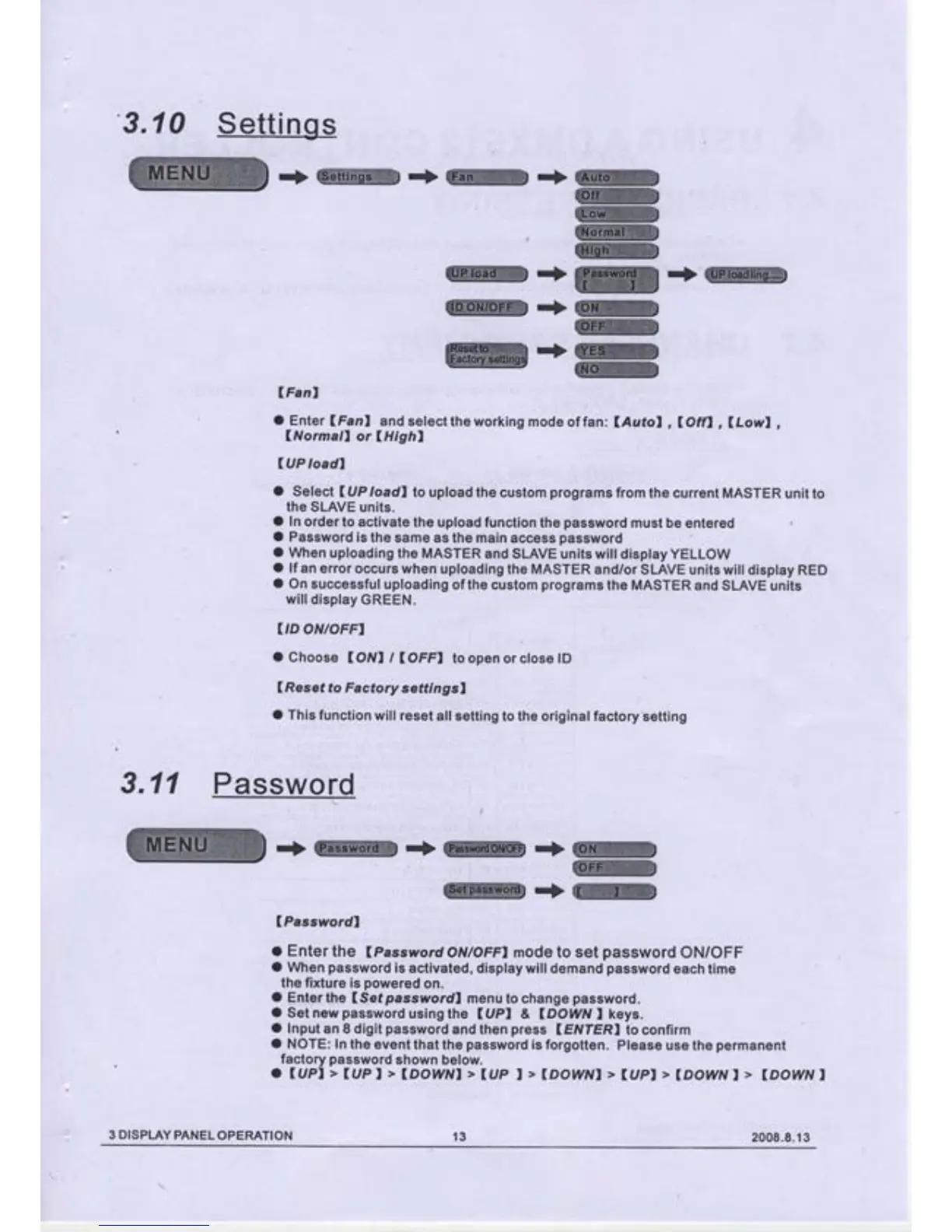
(Passwordl
I Enter
the
(Pass
word
ONTOFFI mode to set
password
ON/OFF
O
When
password
is activated, display will
demand
password
each
time
the fixture
is
powered
on.
O
Enler
t$e
(Setpasswordl
menu
to
change
password.
O
Set new
password
using
the
(UPI
&
IDOWN
I
keys.
O
Input
an
8 digit
password
and
then
press
(EIVIER)
to confirm
O
NOTE:
In the
event that
the
password
is forgotten.
Please use
the
permanent
factory
password
shown
below.
a
luPl>Iupl>lDowNl>lup
t>lDowNI
>
(upl
>lDowvt>
lDowvl
.+W*ffi..>ffi
lFanl
O
Enter
lFanl
and
select the working
mode of fan
:
lAutol
,
l}ffl
,
lLowl
,
lNormall
or
lHighl
IUP
ioadl
O
Select
UIP
loadl
to uptoad
the custom
programs
from the
current MASTER
unit to
the SLAVE
units.
O ln
order
to activate
the upload function
the
password
must be entered
O Password
is
the
same as
the
main
access
password
O
When
uploading
the MASTER
and SLAVE
units will display YELLOW
O
lf an
error occurs
when
uploading
the MASTER and/or
SLAVE units will
display RED
O
On successful
uploading
of
the custom
programs
the MASTER
and SLAVE
units
willdisplay
cREEN.
IID
ONIOFFI
o
Choose
(OIVI
/
IOFFI
toopen orclose lD
(Resef
fo Factory
settrngsl
,
O
This function
will
reset all setting
to the original
factory'setting
3
DISPLAY
PANEL
OPERATION
13
2008.8.13

Related product manuals