2.3
SETTING UP WITH A
DMX512
tuw
ilililI
I
I
o*rr,,
I
CONTROLLER
ffiwd
oüre.1.
'tv.ret-
ERJ11)
-üE-h{
2.3-2 DMX512 ADDRESSTTVG WITH
lD ADDRESS
(STAGE
I MODE)
oConnectthe DMXS12
controllertothe
units in series
o
Each unit
has 10 DMX
channels so the
DMX Addresses should
increase by
increments of
10
(e.g.
1,11,21,31...)
o Each DMXAddress may be
used
as many times
as required.
rAny DMX address in the range from 001 lo 512
may be used.
r
Each
DMX address may carry up to 66 separate
lD addresses.
o
(lDI
should be set in the
menu on
each
unit in ascending
values
(i.e.
1,2,3...)
o lD addresses are accessible from Ch9 on the
DMX512 controller.
2.3.1 DMX,| 2ADDRESS''VG WITHOUT ID ADDRESS"VG
(srAGE
I MODE)
o Connect
the
DMX512 controller
to the
units in series.
o Each unit has 1O DMX channels so the DMX
Addresses
should
increase by
increments of
10
(e.g.
1,'11121,31...)
,
: ,
tThe lD address has not been set so therefore
when using the controller
Ch9 must
be inactive
(
GH9=0
).
o Each DMX Address may be used
as
many times as
required.
o
Any DMX
address
in
the range from 001 to 512
may be used:
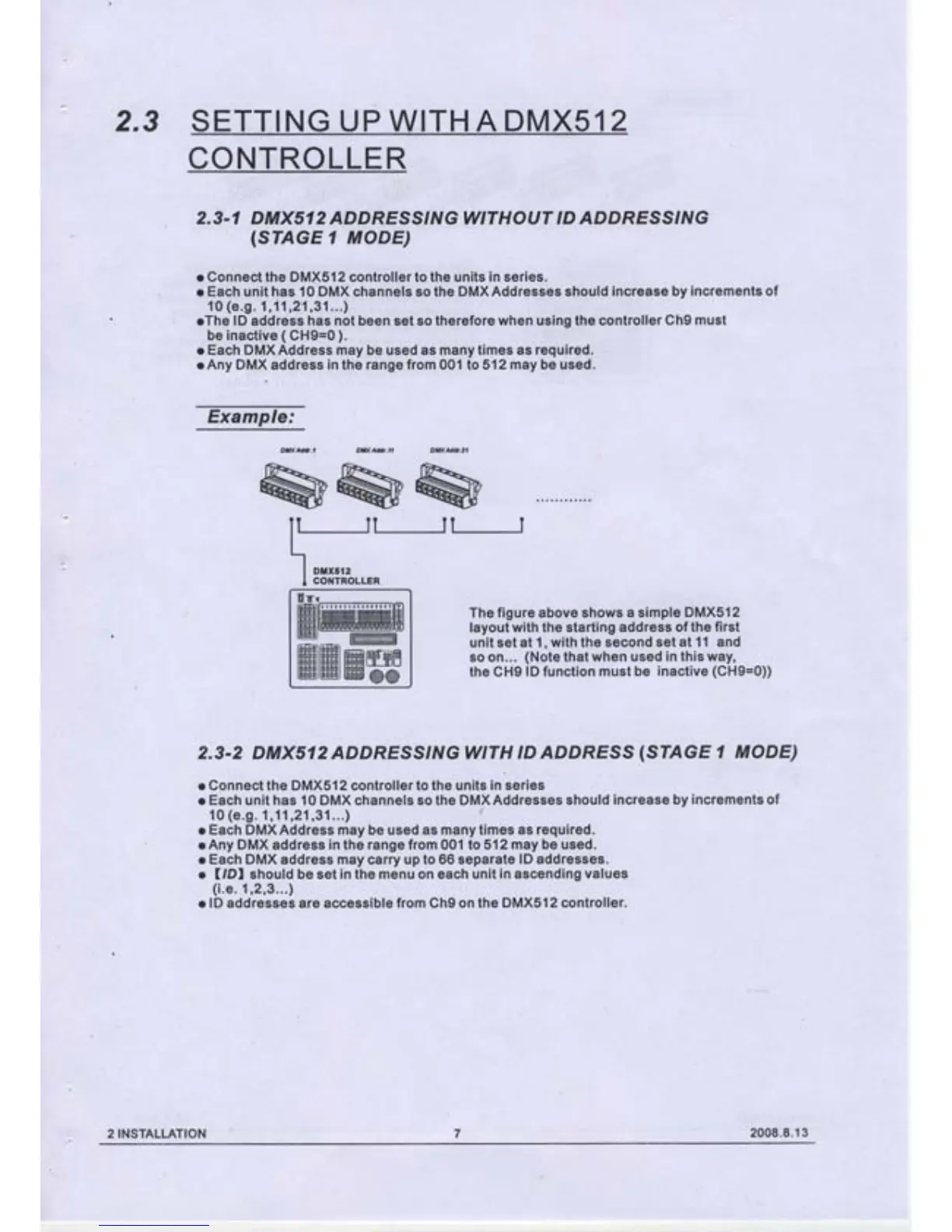
Example:
The
figure above shows
a simple DMX512
layout with the starting
address of the
first
unit set at 1,
with the second set
at 11 and
so on...
(Note
that
when used
in
this
way,
the
CH9
lD
function
must be
inactive
(CH9=0))
2INSTALLATION
2008.8.13


 To Next Page