EasyManua.ls Logo

Extech Instruments 445715 - User Manual

Extech Instruments 445715
2 pages
Print Icon
To Next Page IconTo Next Page
Loading...
1 445715-en-US_V1.7 12/21
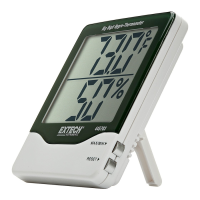
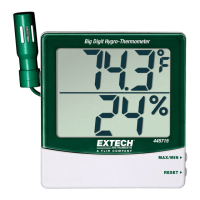
Big Digit
Remote Probe
Hygro-Thermometer
Model 445715
Introduction
Congratulations on your purchase of the Extech Big Digit Remote Probe Hygro-Thermometer. It features Humidity and Temperature
readouts and can be calibrated using the optional calibration salt bottles (order no. 445580-C). The remote probe conveniently mounts on
the meter (1) or extends for measurements in ducts or other remote locations.
Operation
1. Open the battery compartment (7) by pushing the cover (11) on the rear of the instrument downward as indicated by the arrow and
remove battery safety strip.
2. Remove the protective cover on the LCD display (2) and take the Probe out of the probe compartment (6). The meter is now ready for
use.
3. The temperature units (
o
F/
o
C) can be selected via the switch (9) located in the battery compartment.
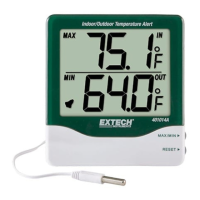
4. The upper display indicates the temperature. The lower display indicates humidity.
5. Displaying the minimum and maximum values:
a. Press the MAX/MIN button (3). The highest value measured since the Reset button (4) was last pressed appears on the display.
b. Press the MAX/MIN button again to display the lowest value measured since the Reset button was last pressed.
c. Press the MAX/MIN button again to return to normal display operation.
6. Resetting (clearing) the MAX/MIN memory. Press and hold the RESET button (4) for 1 second while in the MAX/MIN display mode to
clear the memory and start recording new max/min values.
7. User can select wall-mounting (5) or flat surface use with fold-out footing (7).
8. The low battery icon will appear on the display when the battery voltage is low. Replace the battery when this occurs.
Battery Replacement
Slide the rear battery cover (11) downward as indicated by the arrow. Replace the 1.5V ‘AAA’ battery and replace the cover.
Calibration
The following verification and calibration procedure requires a humidity chamber or the optional 33% and 75% RH reference bottles (order
no. 445580-C).
RH Accuracy Verification (Checking the 33% or 75% RH Calibration)
1. Insert meter’s sensor (1) into the 33% or 75% salt bottle or humidity chamber.
Note: Slowly rotating the bottle will assist in placing it over the sensor.
2. Allow the meter to stabilize for 1 hour at the reference RH and then verify that the reading is within the accuracy specification.
RH Calibration
1. Insert meter’s sensor into a 75% salt reference bottle or humidity chamber.
2. Check the reading after 1 hour.
3. Adjust the RH calibration pot (8) in ½ turn increments, waiting for the display to update after each adjustment, until the reading is
within specification.
4. Repeat the RH accuracy verification procedure.
Note: Replace bottle if the salt at the bottom of the calibration bottle appears dry.
Temperature Calibration
1. Place the sensor in a stabilized environment of approximately 70°F (21°C).
2. Check the reading after 1 hour.
3. Adjust the temperature calibration pot (10) in ½ turn increments, waiting for the display to update after each adjustment, until the
reading is within specification.


Other manuals for Extech Instruments 445715

Question and Answer IconNeed help?

Do you have a question about the Extech Instruments 445715 and is the answer not in the manual?

Summary

Introduction to Extech Hygro-Thermometer

Operating the Hygro-Thermometer

Battery Replacement Procedure

Hygrometer Calibration

RH Accuracy Verification

Verifies the meter's RH reading using a salt bottle or humidity chamber.

RH Calibration Adjustment

Adjusts the meter's RH reading using a salt bottle.

Temperature Calibration

Adjusts the meter's temperature reading in a stabilized environment.

Product Specifications

Two-year Warranty Information

Calibration and Repair Services

Customer Support Contact

Overview

The Extech Model 445715 is a Big Digit Remote Probe Hygro-Thermometer designed for accurate measurement of humidity and temperature. This device features a large LCD display for easy readability and a remote probe that offers flexibility in measurement applications.

Function Description

The primary function of the Extech 445715 is to measure and display both temperature and humidity. The upper display shows the temperature, while the lower display indicates humidity. It can display temperature in either Fahrenheit or Celsius, selectable via a switch in the battery compartment. The device also includes a MAX/MIN function, allowing users to view the highest and lowest temperature and humidity values recorded since the last reset. This feature is particularly useful for monitoring environmental conditions over time. The remote probe can be conveniently mounted on the main meter unit or extended for measurements in ducts or other remote locations, enhancing its versatility.

Important Technical Specifications

  • Temperature Range: 14 to 140°F (-10 to 60°C)
  • Temperature Accuracy: ±1.8°F within 14°F to 122°F (±1.0°C within -10°C to 50°C)
  • Humidity Range: 10% to 99% RH
  • Humidity Accuracy: ±4% RH within 25% to 85% RH and 32 to 122°F (0 to 50°C)
  • Battery: 1.5V 'AAA' cell
  • Display: Big Digit LCD with separate readouts for temperature and humidity.
  • Probe: Remote probe for flexible measurement placement.

Usage Features

The Extech 445715 is designed for user-friendly operation.

  • Power On/Off: The device is activated by removing the battery safety strip and the protective cover from the LCD and probe.
  • Temperature Unit Selection: A switch in the battery compartment allows users to toggle between °F and °C.
  • MAX/MIN Function: Pressing the MAX/MIN button (3) cycles through the highest, lowest, and current readings for both temperature and humidity.
  • MAX/MIN Memory Reset: To clear the recorded MAX/MIN values and start a new recording cycle, press and hold the RESET button (4) for 1 second while in MAX/MIN display mode.
  • Mounting Options: The meter can be wall-mounted (5) or used on a flat surface with its fold-out footing (7).
  • Low Battery Indicator: A low battery icon appears on the display when the battery voltage is low, prompting the user to replace the battery.
  • Remote Probe: The probe can be detached from the main unit and extended, making it suitable for measurements in hard-to-reach areas or specific environments like air ducts.

Maintenance Features

The device includes features for both routine maintenance and calibration to ensure continued accuracy.

  • Battery Replacement: The battery compartment (11) is easily accessible by sliding the rear cover downward. The device uses a single 1.5V 'AAA' battery.
  • Calibration: The Extech 445715 supports both humidity and temperature calibration.
    • RH Calibration: This procedure requires a humidity chamber or optional 33% and 75% RH reference salt bottles (order no. 445580-C). Users insert the sensor into the reference environment, allow it to stabilize for an hour, and then adjust the RH calibration pot (8) in ½ turn increments until the reading is within specification. Regular verification of RH accuracy is also recommended.
    • Temperature Calibration: For temperature calibration, the sensor is placed in a stabilized environment at approximately 70°F (21°C). After an hour of stabilization, the temperature calibration pot (10) is adjusted in ½ turn increments until the reading matches the known reference temperature.
  • Warranty: Teledyne FLIR LLC provides a two-year warranty for the Extech brand instrument, covering defects in parts and workmanship. Sensors and cables have a six-month limited warranty.
  • Calibration and Repair Services: Teledyne FLIR LLC offers NIST traceable calibration and repair services for Extech products. Annual calibrations are recommended to verify meter performance and accuracy.
  • Disposal: Users are legally bound to return used batteries and accumulators to collection points, as disposal in household garbage is prohibited. The device itself should be disposed of according to valid legal stipulations at the end of its lifecycle.

Extech Instruments 445715 Specifications

General IconGeneral
BrandExtech Instruments
Model445715
CategoryThermometer
LanguageEnglish

Related product manuals