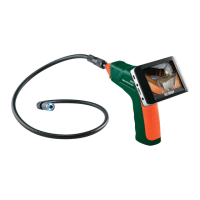
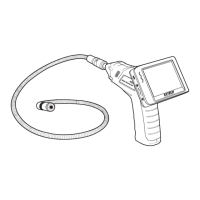
The Extech BR200 and BR250 Video Borescope is a remote inspection device designed for peering into tight spaces and providing real-time video and images for recording. It is suitable for various applications including HVAC inspection, automotive inspection, cable routing, and automotive/boat/aircraft inspection.
Function Description:
The borescope captures video and images through a camera head attached to a flexible tube. These visuals are displayed on a 3.5" TFT-LCD palm monitor, which also records the data to a Micro SD card. The device offers both wireless and hard-wired functionality for the monitor. The camera head and flexible cable are water-resistant when fully assembled, though the monitor and camera itself are not. The BR200 model features a 17mm camera head, while the BR250 has a 9mm camera head.
Important Technical Specifications:
Camera:
- Imaging Sensor: CMOS
- Total Pixels (NTSC): BR200: 712 x 486; BR250: 640 x 480
- Horizontal View Angle: BR200: 50 degrees; BR250: 45 degrees
- Transmission Frequency: 2468MHz
- Focus Point: BR200: 20cm (8"); BR250: 10cm (4")
- Minimum Illumination: 0 Lux
- Modulation Type: FM
- Bandwidth: 18MHz
- Power Supply: 4 x AA batteries
- Unobstructed Effective Range: 10m
- Waterproof Capacity: IP67 (imager head only)
- Dimensions (W D H): 186 x 145 x 41(mm) (Exclude Flexible Tube)
- Weight (approx): BR200: 530g; BR250: 450g
- Camera head Diameter: BR200: 17mm (0.67"); BR250: 9mm (0.36")
- Operating Temperature: -10°C~+50°C (+14°F~+122°F)
Monitor:
- LCD Screen Type: 3.5" TFT-LCD
- Effective Pixels: 320 (R.G.B.) x 240
- Video System: PAL/NTSC
- Transmission Frequency: 2468MHz (CH 4)
- Exterior Supply Voltage: 5VDC
- Consumption Current (Max.): 500mA
- Charge Time: 3 hours
- Work Time: 2 hours
- Video Output Level: 0.9-1.3VP-P@75Ω
- Receiving Sensitivity: <-85dBm
- Dimensions (W x D x H): 100 x 70 x 25(mm)
- Weight (Approx): 140g
- Operating Temperature: -10°C~+50°C (+14°F~+122°F)
- Operating Humidity (Max.): 15~85%RH
Usage Features:
- High-Resolution Display: A 3.5" TFT-LCD palm monitor with high resolution for clear viewing.
- Water-Resistant Components: The image head and cable are water-resistant when the unit is fully assembled, allowing for inspection in damp environments.
- Wireless and Hard-Wired Functionality: The monitor can operate wirelessly or be hard-wired to the main unit.
- Video and Image Recording: The monitor records both video and still images.
- Expandable Memory: Supports Micro SD card memory up to 16GB (Class 6 or higher TF Flash memory card recommended).
- Adjustable LED Lighting: The ON/OFF dial switch also functions as a dimmer for the two LEDs on the imager head, allowing adjustment of light intensity.
- Flexible Tube: The tube can be easily maneuvered and bent into various shapes to access different areas.
- Accessories: Includes a magnet, hook, and mirror for retrieving small items or changing viewing angles.
- Monitor Adaptor: Allows the monitor to be connected to the main unit.
- Magnetic Bracket: A magnetic bracket slides onto the rear of the monitor for convenient placement and viewing.
- USB Connectivity: The monitor can be connected to a PC via USB cable to access recorded files, appearing as a "Mobile Disk."
- Video Output: Features a VIDEO OUT socket to connect to a TV or other monitor for a high-quality video image.
- Settings Mode: Allows users to adjust various settings including language, video system (NTSC/PAL), format/erase media, restore factory defaults, view version, frame rate (10, 15, 20, 25, or 30 FPS), and time stamp ON/OFF.
- Date/Time Setting: Users can set the date and time for recordings.
- Playback and Deletion: Recorded photos and videos can be viewed and deleted directly from the monitor. Folders can also be deleted, but only if they are empty.
Maintenance Features:
- Battery Installation: Requires 4 AA batteries for the instrument body. The monitor has a rechargeable battery that charges via an AC adaptor.
- Battery Status Indicator: The monitor's power indicator lights red or blinks to indicate charging status and turns off when fully charged.
- Battery Replacement: All batteries should be replaced at the same time.
- Cleaning: Batteries should be removed when cleaning the instrument.
- Power Reset: If the LCD monitor fails to power on or powers off during use, a power reset procedure can be performed by un-docking the LCD module, connecting the AC adapter, and momentarily pressing the reset button on the reverse side of the module.
- SD Card Insertion/Removal: Cards are inserted by gently applying pressure until they lock into the spring-loaded slot and removed by pushing inward again to eject.
- Disposal: Users are legally bound (EU Battery ordinance) to return all used batteries/accumulators to collection points. The device itself should be disposed of according to valid legal stipulations at the end of its lifecycle.
- Safety Precautions: Do not expose the instrument to moisture. Shut off the instrument when not in use. Avoid subjecting the flex tube to narrow radius or sharp angle bends to prevent permanent damage.

 Need help?
 General

 To Next Page