2
TLP Pro 725M • Setup Guide (Continued)
Mounting
The TLP Pro 725M can be wall-mounted, either using a UL-listed junction box, an external wall box, or directly into drywall or furniture.
Suitable mounting accessories can be found at www.extron.com.
ATTENTION:
• Do not install the TLP Pro 725M in a re resistant rated wall or partition assembly.
• Ne pas installer le TLP Pro 725M dans un mur résistant au feu ou une cloison.
• All structural steps and electrical installation must be performed by qualied personnel in accordance with local and
national building codes and electrical codes.
• Toute étape structurelle et installation électrique, doit être effectuée par un personnel qualié, conformément aux
codes du bâtiment, aux codes incendie et sécurité, et aux codes électriques, locaux et nationaux.
With a Wall Box or Junction Box
Some local building codes require the touchpanel to be
mounted in a junction box. Junction boxes or wall boxes
must be purchased separately.
With a wall box
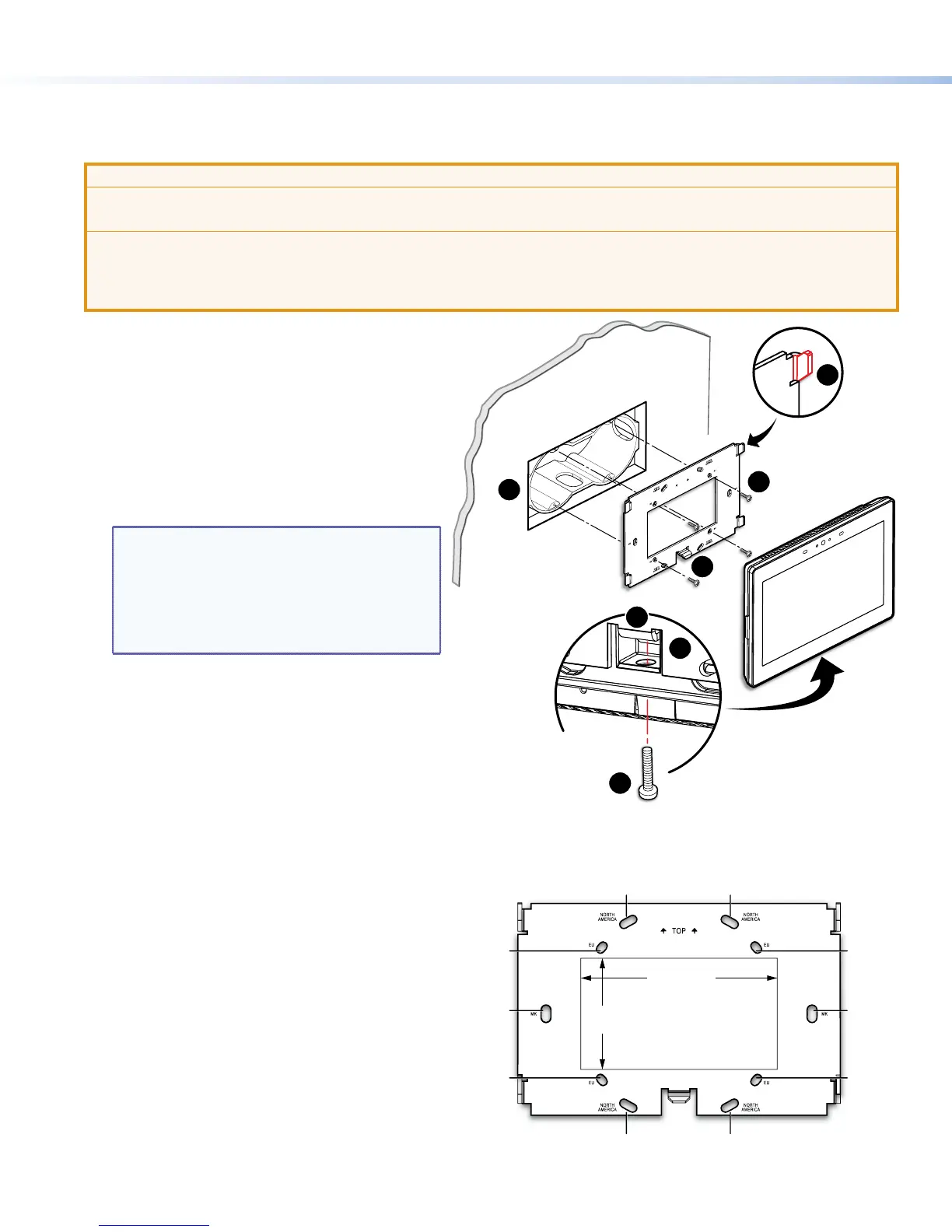
1. Install a junction box or wall box (see gure 1,
1
),
following the instructions provided by the manufacturer.
2. Fasten the mounting plate to the wallbox (
2
) with
the provided screws. Use the mounting holes that
are appropriate to the junction box you are using (see
gure 2).
NOTES: Extron provides:
• Four 3/4" #6-32 Philips pan head screws for
mounting to US junction boxes
• Two 16 mm M 3.5 Philips pan head screws for
mounting to MK junction boxes
• EU junction boxes are usually provided with
their own screws.
3. Run and connect cables to the back of the touchpanel
(see Rear Panel Features on the following page).
4. The mounting plate has four hooks (
3
), one in each
corner. Position the touch panel so that the four
mounting slots (see figure 4,
D
) in the rear of the
touchpanel align with these hooks.
5. Move the touchpanel inward and downward so that
touchpanel sits securely on the hooks and the tongue
at the bottom of the mounting plate (
4
) sits in the
groove in the bottom of the touchpanel (see inset,
gure 1,
5
).
6. Fasten the touchpanel to the mounting plate with the
lock screw (
6
).
Without a junction box
If the wall box is not required by local building codes, you
can mount the touchpanel directly into drywall.
1. Place the mounting plate against the wall or furniture
in a suitable location and ensure that it is level. Use the
mounting plate as a template to mark the wall.
2. Cut a hole 3.5 inches (89 mm) wide x 2.0 inches
(51 mm) high to pass cables through the wall.
3. Use the MK slots and drill the two pilot holes
(gure 2). Extron recommends using two Molly bolts or
SnapToggle bolts.
4. Secure the mounting plate to the wall (gure 1,
2
).
5. Complete the installation as described in steps 3
through 6 in the previous section.
gure 1
TOP
e
Back View
1
2
3
4
5
6
4
Figure 1. Mounting the TLP Pro 725M with a Junction Box
AMERICAN
AMERICAN
NORTH
NORTH
EU
MK
EU
EU
EU
3.5" (89 mm)
2.0"
(51 mm)
Figure 2. TLP Pro 725M Mounting Plate


 To Next Page
 Loading...