- 1 -
● Contents of the product
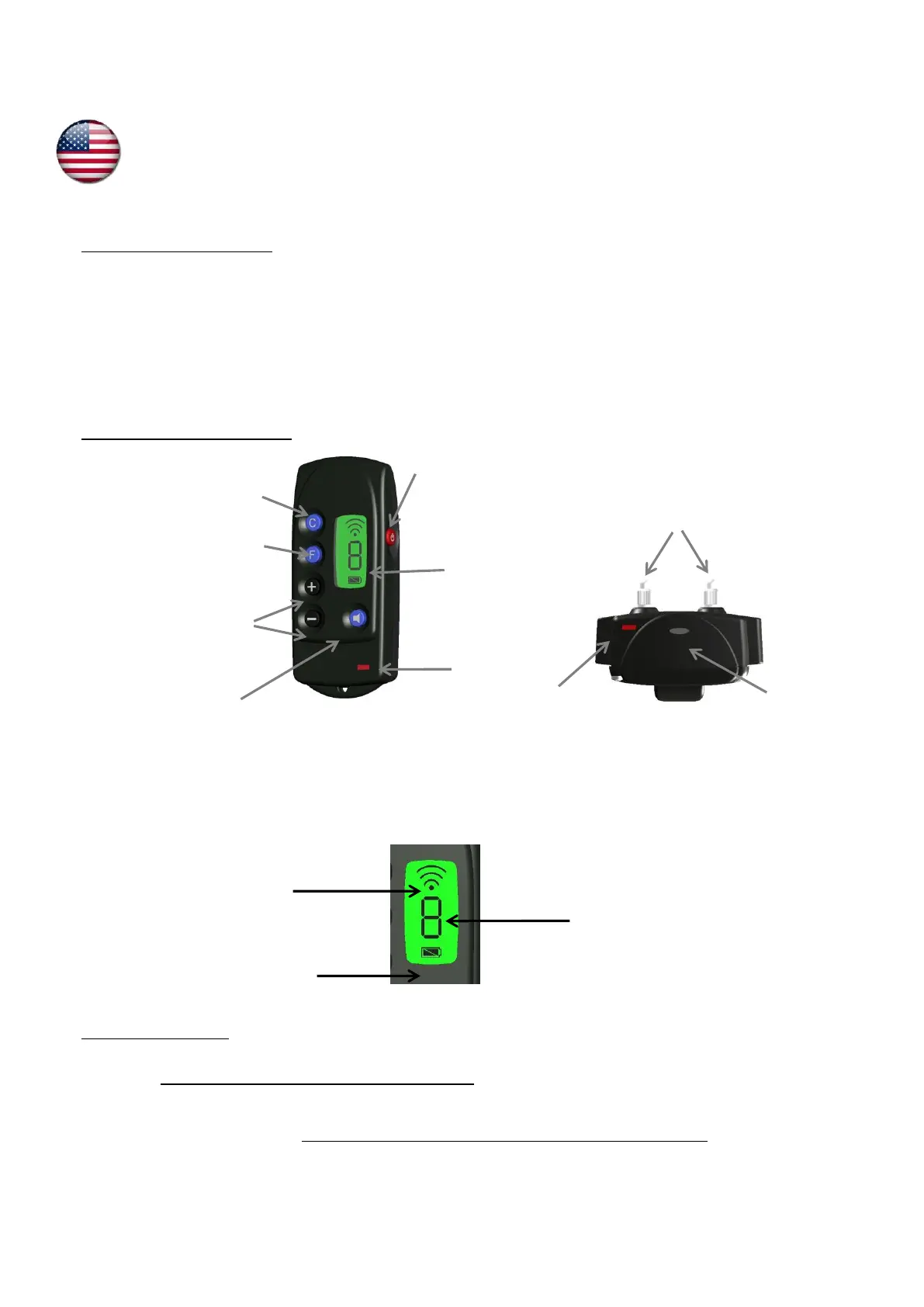
▪ 1 350 Remote Trainer receiver collar fitted with short contact points and a strap
▪ 1 3-V CR2 lithium battery for the collar
▪ 1 350 REMOTE TRAINER remote control fitted with a 3-V CR2430 lithium battery
▪ 1 neon test lamp
▪ 1 pair of long contact points
▪ 1 carry strap
▪ This user’s guide
● Description of the product
● First use from new
Fitting the battery in the receiver collar
▪ Unscrew the 4 screws of the top of the collar using a screwdriver.
▪ Insert the battery (3V Lithium CR2) paying attention to follow polarity indicated on the battery housing (ref. Diagram 4).
▪ A beep sound (low pitch) is emitted, indicating the correct installation of the battery.
If you do not hear any beep after having inserted the battery, remove it immediately from its housing. Check the polarity before trying
again.
▪ Before putting the lid back in place, check that the rubber seal is in its groove.


 To Next Page