Need help?
Do you have a question about the Eyevision Intelli Series and is the answer not in the manual?
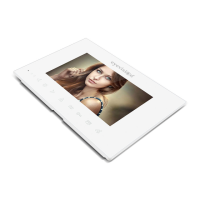
Visual layout and key component identification for the indoor monitor.
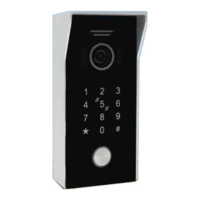
Details the components and features of the outdoor units (DS 21, KP 21).
Instructions for mounting the outdoor unit using an angle bracket.
Instructions for mounting the outdoor unit directly without an angle bracket.
Details the intercom line connections for the KP 21 outdoor station.
Explains the meaning of the different colored LEDs on the KP 21 door station.
Describes wiring for both Fail Secure and Fail Safe electric striker configurations.
Wiring guide for connecting an automatic gate to the KP 21.
How to wire the exit button for door release on the KP 21.
Details intercom line connections for the DS 21 outdoor station.
Explains the meaning of the different colored LEDs on the DS 21 door station.
Wiring for Fail Secure and Fail Safe electric striker configurations for DS 21.
Wiring guide for connecting an automatic gate to DS 21.
How to control automatic gates and electric strikers directly from the monitor.
Guides for connecting CCTV cameras using different wiring methods.
Information on integrating alarm sensors with the system.
Settings for DVR mode on DS 21 and KP 21 outdoor stations.
Procedures for changing admin PINs and common unlock PINs.
Adding, managing, and programming user tags for access.
Configuring unlock duration and system security levels.
Procedures for deleting users by ID, tag, or all tags.
Steps to reset the system to defaults using the admin PIN.
Steps to reset the system to defaults without the admin PIN.
Detailed explanation of each touch button's function and operation.
Handling visitor calls, call transfers, and intercom communication.
Using monitoring features and understanding different standby modes.
Setting up the digital photo frame and adjusting display settings.
Setting monitor ID and managing second outdoor station status.
Configuring unlock times, room unlock, and recording modes.
Enabling motion detection and message recording functions.
Setting system language, date, and time formats.
Adjusting intercom ring volumes and custom ringtone settings.
Viewing firmware, MAC, SD card info, and rebooting the system.
Setting individual surveillance cameras to be ON or OFF.
Configuring recording types and sensor types for alarm events.
Adjusting the ringing duration for camera alerts.
Playing music files and managing MP3s on the SD card.
Viewing photos and understanding photo file placement.
Deleting files, managing DCIM/USER folders, and firmware upgrades.
How to view recorded video files from the system.
How to view recorded photo files from the system.
Identifies the icons and functions available on the smart app interface.
Steps for downloading, installing, and registering the Tuya Smart app.
Setting up home details and configuring Wi-Fi connection for the monitor.
Step-by-step instructions to connect the monitor to the mobile app via Wi-Fi.
Details on connecting to the monitor's hotspot and completing the pairing.
How to share the device with users who have limited access.
How to share the device with users who have full control, including unlocking.
Instructions for re-setting up or removing a device from a user's app.
 General
| Brand | Eyevision |
|---|---|
| Model | Intelli Series |
| Category | Intercom System |
| Language | English |

 To Next Page