switch to DATA mode – will show you DATA and USB drive picture on screen, then you can find out the Micro SD Card
disk on your computer. Open it, and find your recorded video files like ezcap0001.avi … Copy them into your computer
and play by media software. Long time press again will back to RECORD mode – will show you TVIN and preview
video on screen.
Or, remove the Micro SD Card from device, and copy the recorded files from Micro SD Card to your computer or other
digital devices.
SPECIFICATIONS:
CVBS analogue video by 3.5mm to 3RCA cable, HDMI
Analogue L/R audio by 3.5mm to 3RCA cable, HDMI
Video Tape, Camcorder Tape, VHS, VCR, DVD Player, DVR, Hi8, Game Player ...
Two indicator lights for power and record.
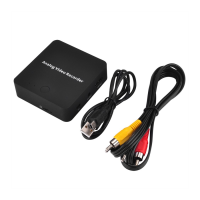
ezcap272 Analog Video Recorder
USB cable for power or data, 3.5mm to 3RCA cable for AVOUT, Manual, USB power
adapter (option)
Supports extra Micro SD Card
Max 16GB, doesn't support NTFS format
480 30fps, PAL:720×576, NTSC: 720×480
About 9.3MB/Minute, 0.56GB/Hour.


 To Next Page
 Loading...