7. Switch:
ON / Record – Device works at standalone mode (record video to Micro SD card)
OFF / Transfer –When connect to PC (with USB cable) and the switch at this option, can
download video from Micro SD card (Card reader).
Or if you only connect USB cable to a DC adaptor, switch to this option means power off the
device.
8. Mornitor
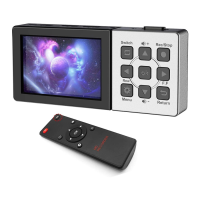
9. Buttons:
MODE – Switch between Record and Playback mode
RECORD – Press to record, again to stop (at record mode)
MENU – Setup
Return – Back
OK – Confirm button when work with other 4 direction button to operate menu.
Snapshot – take a photo when preview or record video.
Pause – Pause and play when playback video.
--Direction
--When at preview or playback video, press this to turn down the volume of HDMI video source.
--When at recording, press this to pause, press again to restart.
--Direction
--When plug in a microphone, press this to turn down the microphone volume.
--Rewind when playback recorded video.
--Direction
--When plug in a microphone, press this to turn up the microphone volume.
-- Fast forward when playback recorded video.


 To Next Page
 Loading...