This document describes the CYBERDINE™ TURNIR DARTS rev.2011, an electronic, entertainment, and sport darts machine designed for playing traditional games like 301 and Cricket, as well as modern and new games with various options.
Function Description:
The CYBERDINE™ DART machine is an electronic dartboard that automatically calculates points and darts thrown. It aims to make gameplay easy and guides players through the game with light and sound effects. The machine supports both traditional and modern dart games, offering a wide range of options for each.
Important Technical Specifications:
- Power Supply: 90V - 260V
- Max. Consumption: 100W
- Internal Voltage: All electronic parts use 5V and 12V (not dangerous for life).
- Grounding: All CYBERDINE™ darts are grounded; the power supply source should also be grounded.
- Player Capacity: Supports up to 8 players and 8 Crickets (a specific game variant).
- Coin Mechanism: Standard Alberici AL 55 electronic coin selector with 12 programmable channels for various coins or tokens.
- Target Distance: Start line should be set 298 cm or 293 cm (depending on tournament rules) diagonally from the center of the target (inner bull).
- Bull's Eye Value: Configurable via microswitch no. 2. Outer Bull's Eye can be 25 points and inner Bull's Eye 50 points (ON position), or both parts 50 points (OFF position).
Usage Features:
- Auto-changing players: Simplifies player rotation during games.
- Sensor of missed darts: Detects darts that miss the target.
- Light and Sound Signaling and Effects: Enhances the gaming experience and guides players.
- Text and Voice Effects: Available in several languages.
- Electronic and Mechanical Bookkeeping: Provides simple reading of game statistics.
- Center Options: Supports both single (both center 50) and double Center (25-50).
- Advertising in Demo Mode: Allows for promotional content when the machine is idle.
- Credit Addition: Credits can be added via a key or various coin mechanisms, with remote control capability.
- Lottery Feature: Offers a chance for players to win free credits based on game results matching a lottery number.
- Self-standing and Wall-version: Available in two physical configurations.
- Simple Test and Setup Parameters: Easy configuration for games and game costs.
- FAIR PLAY Options:
- EQUAL: Ensures all players have the same number of rounds.
- PLAY OFF: Players with the same number of points proceed to a play-off round.
- Standard Value Setting: Simple adjustment of default game values.
- Attractive Demo Mode: Engages potential players with visual and auditory demonstrations.
- Attract Melodies: Sounds played when no one is playing to draw attention.
- Skip Round: A player can skip a round by holding the "Players" button for 3 seconds.
- Microswitches (CPU Board): 8 microswitches on the lower left corner of the CPU board are used to access different menus (test, setup parameters, bookkeeping). The machine must be turned off and on to activate a microswitch setting.
- No 1. Test menu (for testing devices, peripheral units, and segments).
- No 2. Bull's Eye value.
- No 3. Attract melodies activation/deactivation.
- No 4. Main (security) bookkeeping (non-erasable).
- No 5. Secondary (customer) bookkeeping (erasable).
- No 6. External view of secondary (customer) bookkeeping (prevents external viewing of secondary bookkeeping).
- No 7. Factory Set Up (reset/initialization to default values).
- No 8. Set up (adjusts prices, rounds, lottery, pulse settings, credits, play off, publicity, free games).
- Game Options:
- '01 Games (180/301/501/701/901): Players reduce their score to exactly 0. Options include DOUBLE IN, DOUBLE OUT, MASTER OUT, TEAM, PAIR, EQUAL, END.
- RUN & GUN: Players reduce score to 0 as fast as possible, with a time countdown.
- 301 PARCHESSI: Players start from 0 and aim for exactly 301. Hitting another player's exact score knocks them down to zero. Options include Team, Pair, Equal, End.
- HIGH SCORE: Players start from 0, winner has the highest score.
- LOW SCORE: Players start from 0, winner has the lowest score. Missing the target incurs a 50-point penalty.
- SUPER SCORE: Similar to High Score, but only double and triple segments count.
- PUB GAME: Players start from 0, one round (three darts). Cricket diodes show a decreasing number (10 to 0). Dart shots are multiplied by the current number on cricket diodes. Winner has the highest score.
- SUPER 100: Players start with 100 points. The board lights move clockwise. Players hit segments in the lighted zone. Correct hits grant 10 points from each player with points. Missing one dart means no points for that dart. Missing all three darts in a round disqualifies the player.
- SOLO HIGH SCORE: High score game for one player, with a handicap setting (00-99).
- SOLO 301: 301 game for one player, with a handicap setting (00-99).
- SCRAM: For 2, 4, 6, or 8 players. The "stopper" throws three darts to "stop" numbers. The scorer then tries to score high with three darts, avoiding stopped numbers. Winner has the highest score.
- SHANGAI: Players hit numbers 1 to 20 and then the center in order. A "SHANGAI" (momentary victory) is achieved by hitting a single, triple, and double of the target number in any order. Winner has the highest score.
- CRICKET: Players hit numbers 15 to 20 and Bull Eye three times to "close" them. Players can score on closed numbers until opponents close them. Winner closes all numbers and has the highest score.
- CRICKET RANDOM: Same as Cricket, but the machine randomly determines shooting numbers.
- CRICKET PICK IT: Same as Cricket, but players choose shooting numbers before the game starts.
- CRICKET MIX UP: Same as Cricket Random, but the machine changes all unhit numbers at the beginning of each round.
- CUT THROATH (Cricket Option): Players who close a number add points to opponents who haven't closed it. Winner closes all numbers and has the lowest score.
- NO SCORE (Cricket Option): Same as Cricket, but no scoring. Winner closes all numbers first.
- MASTER (Cricket Option): Same as Cricket Cut Throat, but players get penalty points for missed targets (25 points) or hitting closed/unspecified numbers.
- ROULETTE: Players start from 0. Machine determines target numbers each round. Single hit = 1 point, double = 2 points, triple = 3 points. Winner has the highest score.
- BASEBALL: Players start from 0. Rounds 1-9 target numbers 1-9 respectively. Single hit = 1 point, double = 2 points, triple = 3 points. Winner has the highest score.
- SPLIT SCORE: Players start with 40. Rounds 1-9 target specific numbers (15, 16, any double, 17, 18, any triple, 19, 20, Bull Eye). If "Quadro" option is active, an extra 10th round targets any quadro segment. Missing all three darts halves the score. Winner has the highest score.
Maintenance Features:
- Transport Protection: Dart is protected during transport by screwed metal plates and five-ply hard paperboard.
- Assembling: Involves removing transport metal plates, rotating the trestle (legs), accessing the coin box for screws and accessories (keys, darts, power cord, peaks, start line), and assembling the upper part with the stand.
- Target Maintenance:
- After several thousand games, broken dart peaks may fill segments, requiring cleaning.
- Peaks should be removed with pliers; stubborn ones can be picked from the internal side after disassembling the target.
- Disassembly Steps:
- Switch off power, open upper doors, disconnect target switch membrane.
- Unwind 4 nuts and pull out the whole target.
- Unwind 4 round nuts from the back wooden part and remove it.
- Carefully remove target switch membrane and protective rubber.
- Remove broken peaks.
- Assemble in reverse order.
- After reassembly, check target switch membrane function in test menu or game.
- Electronic Parts Replacement: Maintenance and cleaning of dart targets and replacement of electronic parts (CPU, display, peripheral units) are simple. Connectors are designed to prevent incorrect re-connection.
- Sensor of Missed Darts Adjustment: In the "test tup" submenu, the sensitivity of the missed darts sensor can be adjusted using potentiometer P1 on the CPU board (clockwise for more sensitive, counter-clockwise for less sensitive).
- Bookkeeping Reset: Secondary (customer) bookkeeping can be erased by pressing the "Roulette-Baseball" button for 5 seconds while microswitch no. 5 is ON. Main (security) bookkeeping cannot be erased.
- Factory Reset: Activating microswitch no. 7 (ON position) and pressing "Roulette" for approximately 5 seconds will refresh setup with default factory information, erasing secondary accounting and temporary credits/games.

 Need help?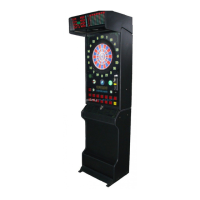

 To Next Page
 General