Automatic Pinpointing:
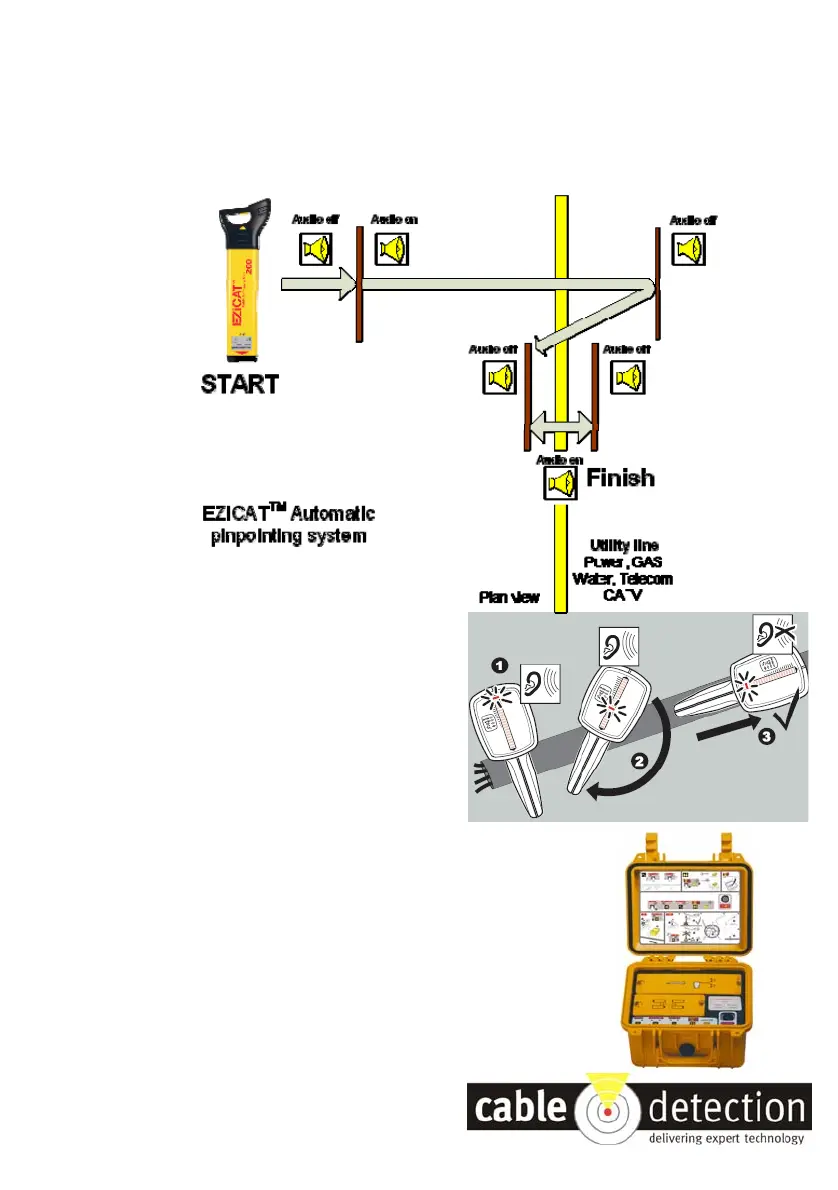
The EZiCAT™ has automatic pinpointing which accurately pinpoints the position of the service
without manual adjustment. Always walk right across the service, from ‘no detection’ through
the detection area, then to ‘no detection’ again. As you retrace your steps the EZiCAT™ audio
signal automatically adjusts, reducing the service footprint at each pass until the service has
been accurately pinpointed. Peak reading on the visual display occurs when directly over the
service.
Service Direction:
Once the service has been pinpointed, rotate the
EZiCAT™ until the signal display reduces to a
minimum - this will indicate service direction.
Depth :
The EZiCAT™ 200 will indicate the depth of the
Service when used in conjunction with the
EZiTRACE Signal Generator.
• Ensure that the EZiCAT™ and EZiTRACE™ are
both set to 33kHz.
• Pinpoint the service and position the EZiCAT™ at
90° to its direction.
• Press the depth key to display the depth reading.
Please note the depth is to the CENTRE of the
buried service



 To Previous Page
 Loading...