The Ezlo VistaCam 1203 is a video doorbell designed to enhance home security and convenience. It integrates with Ezlo's Vera app, allowing users to monitor and interact with visitors at their door remotely. The device is intended for indoor use and requires connection to an existing doorbell circuit.
Function Description:
The VistaCam 1203 functions as a smart video doorbell, providing real-time video and audio communication with individuals at the user's door. It features a camera for video capture, a light sensor, and a microphone for audio input, as well as a speaker for two-way communication. A doorbell button allows visitors to alert the homeowner. The device connects to the home's existing doorbell wiring and integrates with the Vera app for setup, monitoring, and control. Users can talk to people at their door through the app, enhancing security. The doorbell also includes a reset button, which can be used to change the Wi-Fi connection by pressing and holding it for 5 seconds and repeating the device adding process.
Important Technical Specifications:
- Power Requirements: The output of any newly installed wiring for the doorbell should be between 8-24 VAC.
- Mounting Height: A good mounting location for the doorbell is at least 59 inches (1.5m) high from the ground.
- Connectivity: The doorbell connects to the home's Wi-Fi network and is controlled via the Ezlo Vera app, available on iOS App Store and Google Play.
- Storage: It includes a Micro SD Card Slot for local storage (Micro SD card not included).
- Ports: Features a Type-C Port and a Power Input Port.
- FCC Compliance: The device complies with Part 15 of the FCC Rules, ensuring it does not cause harmful interference and accepts any received interference.
- Operating Distance: The equipment should be installed and operated with a minimum distance of 20cm between the radiator and the user's body.
- Battery: The battery is not user-replaceable, and there is a risk of explosion if replaced by an incorrect type. Used batteries must be disposed of according to instructions.
Usage Features:
- Remote Monitoring: Through the Vera app, users can view live video from their doorbell and communicate with visitors from anywhere.
- Two-Way Audio: The integrated microphone and speaker enable clear two-way communication with visitors.
- Easy Setup: The Vera app guides users through a step-by-step setup process, offering options for both wired and wireless configurations.
- Flexible Mounting: The package includes various mounting brackets (standard, 5° vertical angle, 15° horizontal angle) and different screw options (22mm, 35mm, 45mm) to accommodate different installation needs and wall types. A drill hole position template is also provided for accurate installation.
- Anti-Theft Security: An anti-theft screw is included to secure the doorbell to its mounting bracket, deterring unauthorized removal.
- Chime Integration: The doorbell is designed to work with existing mechanical or electronic chimes. A power kit is provided for installation with mechanical chimes, ensuring proper operation. For electronic chimes, users are directed to consult their chime's manual for power kit installation.
- Wi-Fi Reconfiguration: The reset button allows users to easily change the doorbell's Wi-Fi connection if needed.
Maintenance Features:
- Software Updates: As an app-controlled device, the VistaCam 1203 is likely to receive software updates through the Vera app, ensuring continued functionality and security enhancements.
- Troubleshooting: The manual provides basic troubleshooting advice, such as reorienting or relocating the receiving antenna, increasing separation between equipment and receiver, connecting to a different circuit, or consulting a technician for FCC-related interference issues.
- Power Kit Installation: The power kit is designed to be installed within the existing chime unit, which helps protect the doorbell's internal components and ensures stable power delivery.
- Security Screw: The anti-theft screw not only secures the device but also helps maintain its position, reducing the need for frequent adjustments.
- Indoor Use: The designation for indoor use suggests that the device is designed to be protected from harsh outdoor elements, potentially extending its lifespan and reducing maintenance related to weather damage.
- Battery Disposal: Clear instructions are given regarding battery disposal, emphasizing environmental responsibility and safety.

 Need help?
 General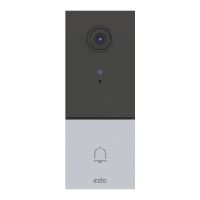

 To Next Page