The Ezlo PlugHub Energy is a smart home control solution designed to make homes safer and lives easier by allowing users to control multiple devices from a single app. It functions as a central hub for a Vera smart home system, enabling the integration and management of various smart devices such as lights, thermostats, sensors, and door locks.
Function Description:
The Ezlo PlugHub Energy acts as a gateway for your smart home, connecting to your home's Wi-Fi network and allowing you to manage connected devices remotely through the Vera mobile application. It provides a comprehensive platform for home automation, offering features like:
- Centralized Control: Manage all your smart devices from a single interface within the Vera app.
- Remote Access: Control your home from anywhere, ensuring peace of mind whether you're at work or on vacation.
- Modes: Utilize pre-set modes (Home, Away, Night, Vacation) to control all your devices with a single tap, adapting your home's behavior to your current needs.
- Scenes: Create custom automation routines to schedule actions for your devices. For example, you can set lights to turn off when you leave for work or gradually fade up as day turns to night. This feature allows for personalized and efficient energy management and convenience.
- Notifications: Receive alerts via text or email about events happening in your home. This could include notifications when a front door opens, motion is detected, or any other custom alert you set up, enhancing security and awareness.
- Energy Monitoring (Implied by "Energy" in the name): While not explicitly detailed in the provided pages, the "Energy" in "Ezlo PlugHub Energy" strongly suggests that the device includes features for monitoring and managing energy consumption of connected appliances, helping users optimize energy usage and potentially reduce utility bills. This would typically involve tracking power usage of devices plugged into the PlugHub or other integrated smart plugs.
Important Technical Specifications (Inferred):
- Connectivity: The PlugHub connects to your home's Wi-Fi network. It creates a temporary Wi-Fi network (PlugHub_XXXX) during setup for initial configuration.
- Power: The device plugs directly into a standard electrical outlet. It powers on automatically when plugged in.
- Indicator Light: A blue LED on the device indicates its status:
- Blinking once per second: Initial power-on and ready for setup.
- Blinking once every three seconds: Connecting to the home Wi-Fi network.
- Steady color: Successfully set up and connected.
- Compatibility: Works with the Vera mobile app, available on iOS (App Store) and Android (Google Play). It integrates with various smart home devices (lights, thermostats, sensors, door locks) that are compatible with the Vera system.
Usage Features:
- Easy Setup Process: The Quick Start Guide outlines a straightforward, step-by-step setup process using the Vera mobile app.
- Install Vera App: Download the Vera app from the App Store or Google Play.
- Select PlugHub: Open the app and choose "PlugHub" from the controller list.
- Plug In Device: Insert the PlugHub into an electrical outlet.
- Connect to Temporary Wi-Fi: Connect your mobile device to the PlugHub's temporary Wi-Fi network (PlugHub_XXXX) via your phone's settings.
- Complete Setup in App: Return to the Vera app and follow the prompts to connect the PlugHub to your home Wi-Fi.
- Account Creation: Create a Vera account, which will automatically link to your PlugHub.
- Add Devices: Use the Device Pairing Wizard in the Vera app to add lamps, sensors, thermostats, and other compatible smart devices to your system.
- Intuitive Mobile App Interface: The Vera app is designed for user-friendly control, allowing for easy navigation and management of devices, modes, scenes, and notifications.
- Scalability: The system allows for the addition of multiple devices, enabling users to expand their smart home ecosystem over time.
- Automation Capabilities: Users can create custom "Scenes" to automate actions based on schedules, events, or other triggers, enhancing convenience and energy efficiency.
- Security and Monitoring: The notification feature provides real-time alerts, contributing to home security and allowing users to monitor their home's status remotely.
Maintenance Features:
- Troubleshooting Support: The app includes a "Need Help" option for troubleshooting if the temporary Wi-Fi network is not visible during setup.
- Customer Care: Access to customer support via phone (6am - 10pm US Central Time at 866.966.2272) or email (support@getvera.com) for assistance with setup or operation.
- Personalized Setup Assistance: Option to purchase a "Vera Easy Start" service for one hour of personalized setup assistance from experienced agents, indicating a commitment to user support and ease of use.
- Software Updates (Implied): As a smart home device, it is highly probable that the PlugHub and Vera app receive regular software updates to improve functionality, add new features, and address security vulnerabilities, ensuring the system remains current and reliable.
The Ezlo PlugHub Energy is presented as a foundational component for building a smart, secure, and energy-efficient home environment, offering both basic remote control and advanced automation capabilities.

 Need help?
 General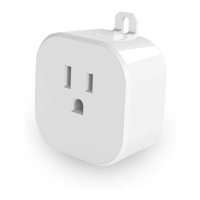

 To Next Page