EasyManua.ls Logo

Ezonetronics RM-LC2010 - Product Panel Description

Ezonetronics RM-LC2010
8 pages
Print Icon
To Next Page IconTo Next Page
To Previous Page IconTo Previous Page
Loading...
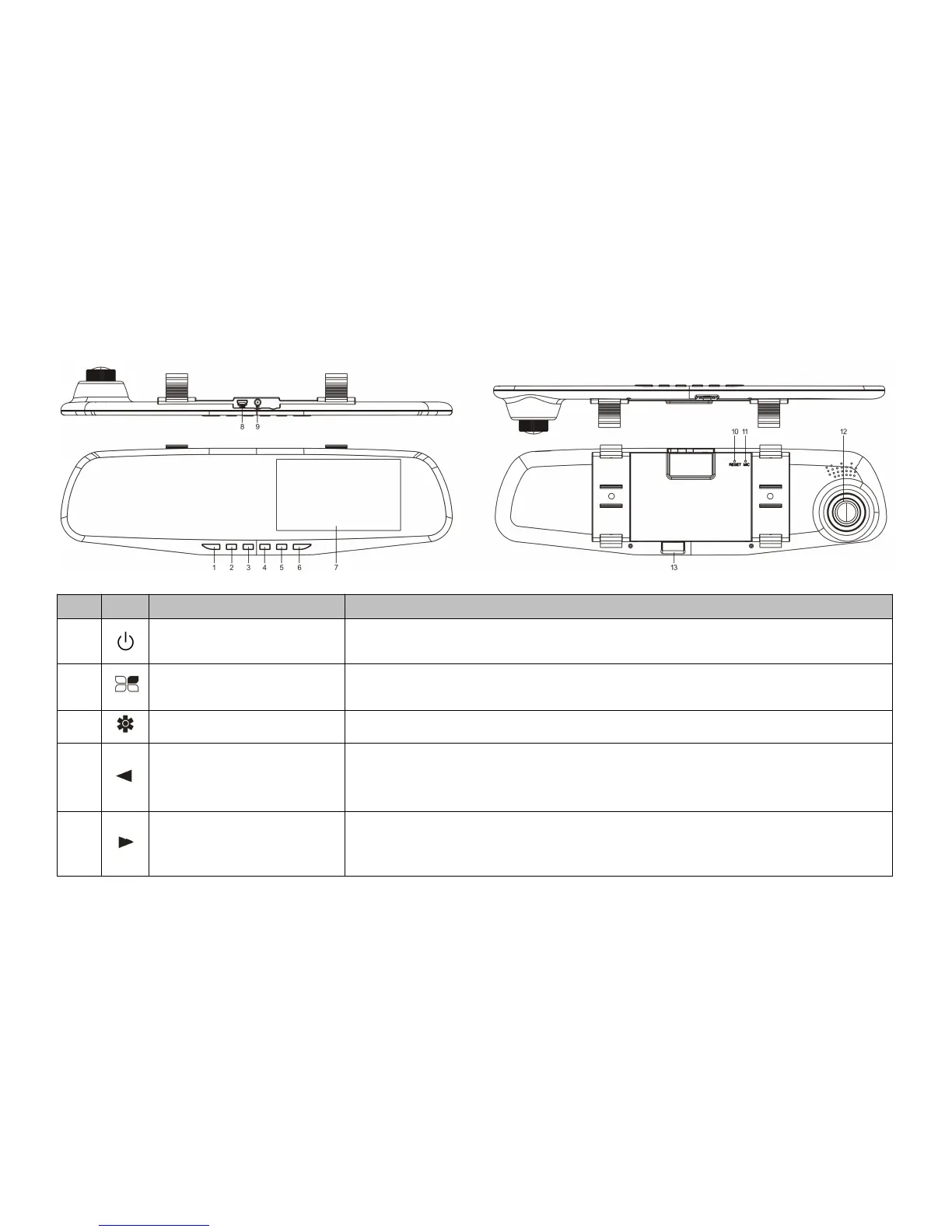
Product Panel description
No.
Icon
Name
Operation instructions
1
Power button
In any mode, Long press to power on / off the unit; short press to on / off the
screen backlight;
2
The menu button
In recording standby / photo mode: press this button to go to setup menu;
In video replaying mode: press this button to go to the delete choice of the file.
3
Mode button
Press this button to switch from video record / photo / video replay mode .
4
Page up / Camera view
switch
Video recording/standby/picture mode: press this key to switch the front/rear
camera view.
Menu mode: press this key to select the up one
5
Turn down / audio
recording control button
Video recording mode: press this button to open/close the audio recording
feature.
Menu mode: press this key to select the down one;