▲ Function Introduction
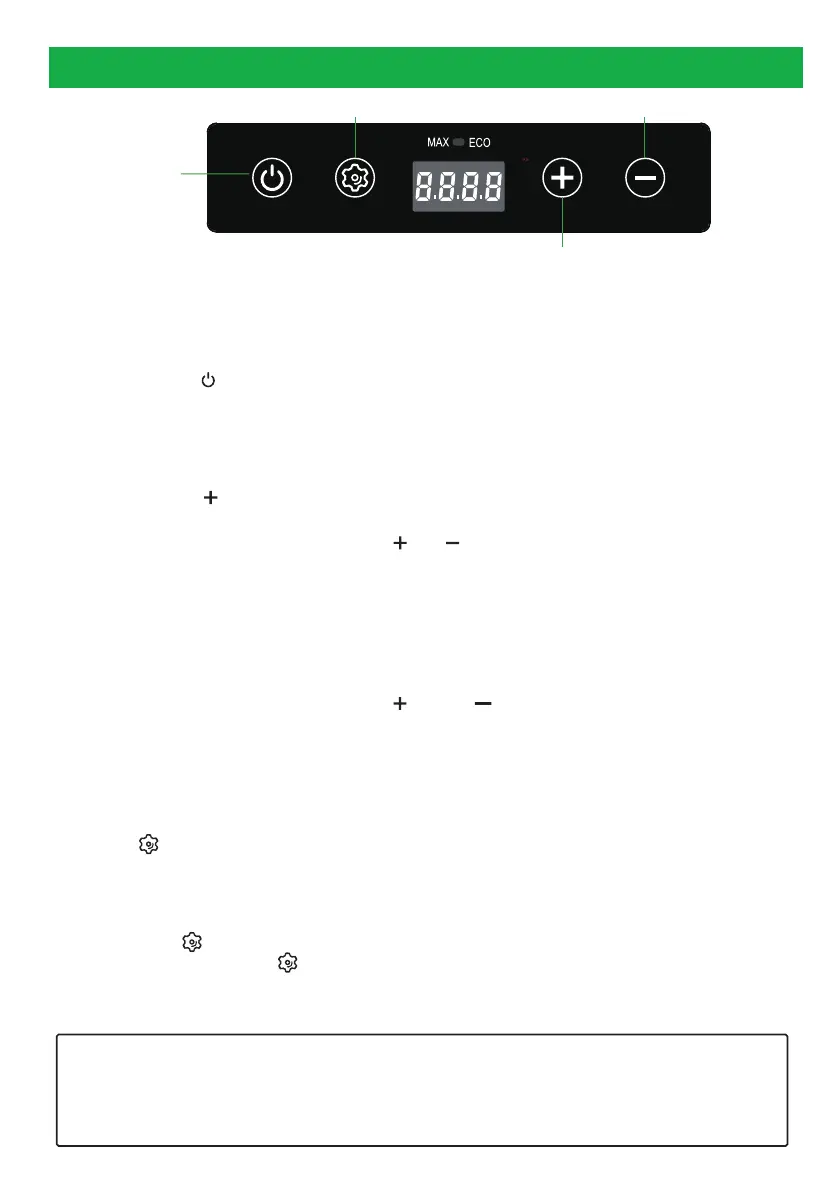
After power on, the digital control panel will light up for 1 second, and then display normally. The
default settings remain as the last time set. In the standby mode, the ECO/MAX light flashes.
▲ ON/OFF
1. Long press the " " button, the refrigerator will be in the turn on/standby mode.
Turn on mode: Display the whole screen for 1 second, and then display the current inner box tempera-
ture.
Standby mode: The ECO/MAX light flashes.
▲ Temperature Adjustment Setting
① Short press the " " button to increase the temperature by 1 °C, the maximum temperature can
reach up to +10 °C; short press the "-"to reduce the temperatureby 1 °C, the minimum temperature
can be turned down to -20 °C; long-press the " "/" " button, it would increase/decrease by 3 °C
per second.
②After setting the temperature, if there is no further operation on the panel within 3 seconds, the
temperature display will stop flashing and save the currently set temperature.And then the display
panel will show the current temperature of the inside box.
③ The initial startup default Fahrenheit is 32°F, and the default Celsius is 0°C.
▲ Celsius/Fahrenheit Switch
①After turning on the refrigerator, press the " " and " " buttons at the same time to switch
Fahrenheit / Celsius.
②When switching between Fahrenheit and Celsius, the displayed value is related to the set tempera-
ture. For example, when the temperature is set to 0 °C, the panel will display as 32°F when switching
to Fahrenheit.
▲ ECO/MAX Mode Switch
Press the" "button to switch between ECO (energy-saving) mode and MAX (fast cooling) mode.
The indicator light is red in ECO mode while it is blue in MAX mode.
▲ Battery Protection Voltage Setting
Note: The factory default battery protection level is H (high level).
Long press the " "button to enter the battery protection voltage setting. When the current level
icon flashes, short press the " "button to switch between H1/N2/L3 level (according to your
needs). If there is no operation on the panel for 3 seconds, it would automatically save andexit the
level setting mode.
The portable refrigerator has a power-off memory function. The fridge state (On / Off, ECO / MAX mode, or H / M
/ L
level) will be restored automatically before power-off, so there is no need to reset the settings the next time
you turn on the freezer.
ECO: Energy Saving and Cooling Mode
MAX: Fast Cooling Mode
ON/OFF
Switch/Setting
Temperature UP
Temperature Down
OPERATION INSTRUCTION
4
_ _


 To Next Page
 Loading...