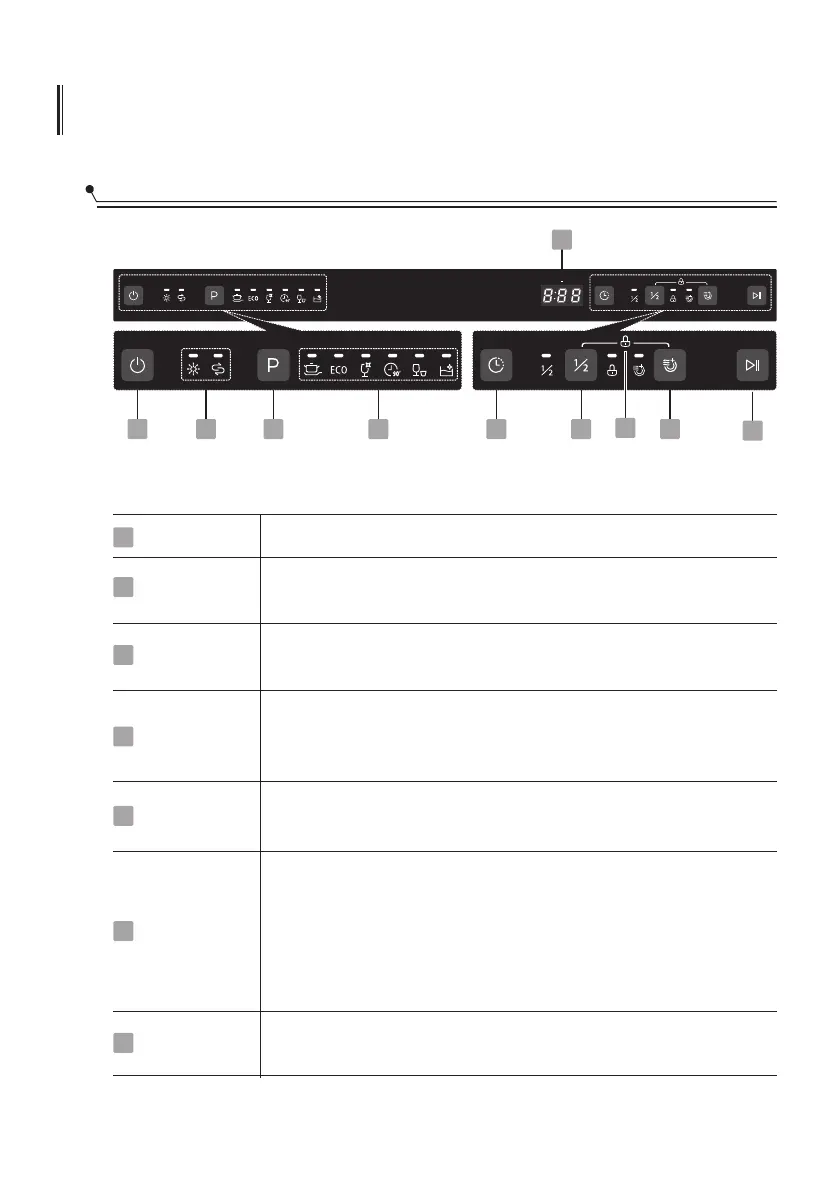
USING YOUR DISHWASHER
Control Panel
Operation (Button)
Power
Child lock
Half-load
Press this button to turn on your dishwasher.
This option allows you to lock the buttons on the control panel -
except the Power button - so children cannot accidently start the
dishwasher by pressing the buttons on the panel.
To lock or unlock the buttons on the control panel, press and
hold the Half-load button + Extra drying button for 3 seconds
simultaneously.
When you have about or less than 6 place setting dishware to
wash, you can choose this function to save energy and water.
(It can only be used with Intensive, ECO, Glass and 90 min.)
4
1
6
4
Program
Select the appropriate washing program, the selected program
indicator will be lit.
2
Delay
Press the Delay button to increase the delay start time. Delay a
cycle for up to 24 hours in one-hour increments.
3
1 2 3 4 5
7
6
8 9
10
Extra Drying
For better drying result. (It can only be used with Intensive,
ECO, Glass and 90 min.)
5
To start the selected washing program or pause it when the
dishwasher is working.
Start/Pause7



 To Next Page