Range Hood Operations (Continued)
Page 13
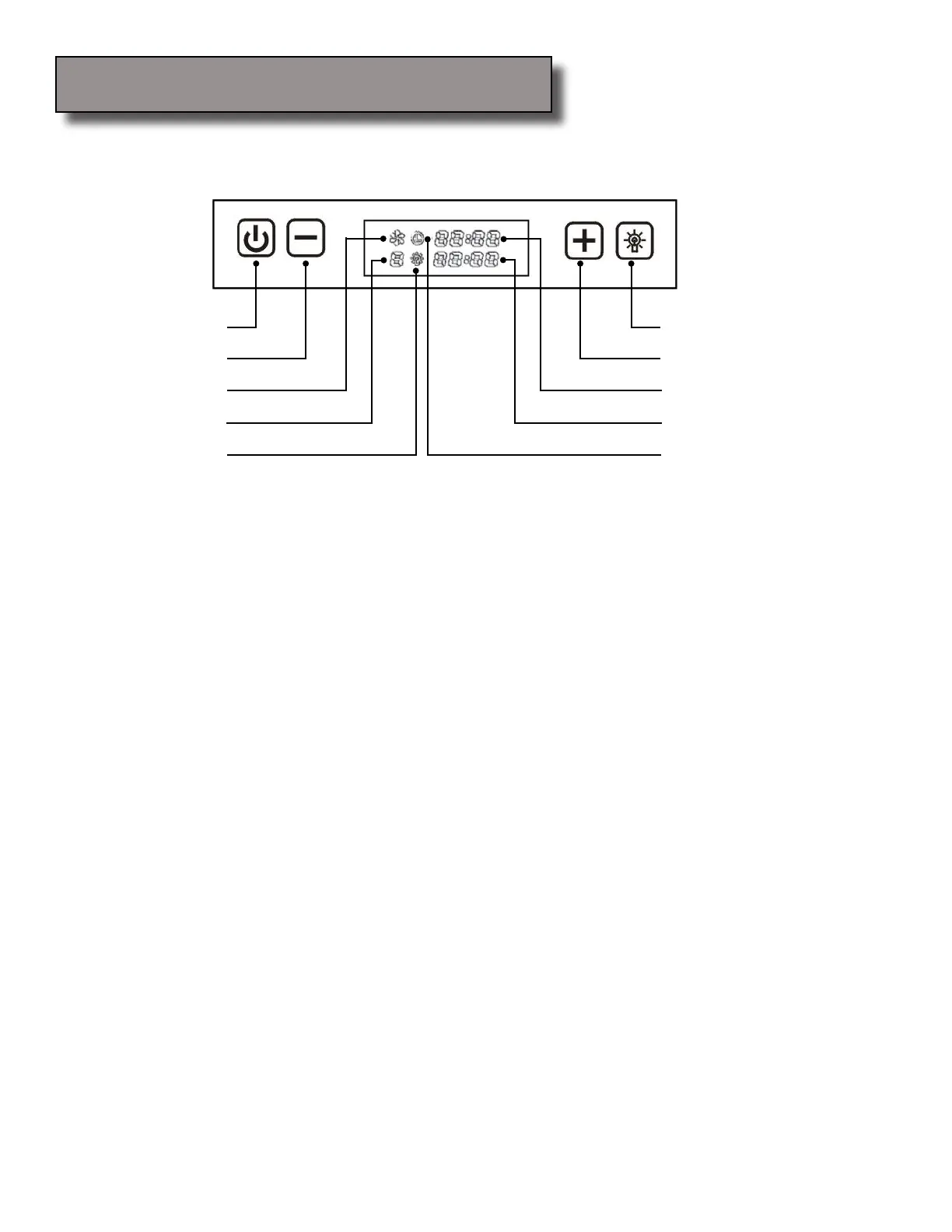
Power
Decrease Value
Control Panel Layout and Buttons Congurations:
Light
Increase Value
Blower Power Indicator
Blower Speed Indicator
Power-On Elapsed Digital Timer
Power-Off Delay Digital Timer
Power-Off Delay Timer Indicator
Light Power Indicator
Controls:
Adjusting the timer function:
While the blower (motor) is not running, press and hold Decrease Value button over 3 seconds to
enter timer mode. Adjust to desired period of delay off timer by pressing Increase Value or Decrease
Value button (minimum 1 minute to maximum 15 minutes). This setting will be saved immediately.
Activating the timer function:
While the blower (motor) is running, press and hold Power button for over 3 seconds to activate
delay off timer. Power-off delay indicator will lit up and power-off delay digital timer will begin to
countdown, when it reaches zero, the blower (motor) will shut down.
Adjusting the light:
Press Light button once to turn on the lights, and once again to turn off the lights.
While the lights are off, press and hold Light button for over 3 seconds to dim the lights from low to
high. Level of brightness will be stored in system’s memory.
•
•
•
•
•
•
•
•
Note: Light settings are independent from other settings (including power-off delay) and lights has to be
manually turned on or off.
Note: The system saves user congurations, hence settings such as light, timer and blower (motor) speed
will remain the same the next time it is turned on.



 To Next Page