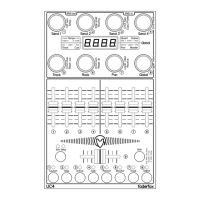
- encoder 4: macro 4
- encoder 5: macro 5
- encoder 6: macro 6
- encoder 7: macro 7
- encoder 8: macro 8
Pan (group 7) controls panorama for 8 tracks
GLob (group 8) Global controls
- encoder 1: tempo coarse, push button 1: nudge down
- encoder 2: tempo fine, push button 2: nudge up
- encoder 3: quantization, push button 3: stop scene
- encoder 4: scene select, push button 4: start scene
- encoder 5: track select, push button 5: global play
- encoder 6: cue volume, push button 6: global stop
- encoder 7: master pan, push button 7: global record
- encoder 8: master volume, push button 8: view arrangement/session
Fader/button groups:
Faders control 8 track volumes in all 8 groups (same function in each group).
Buttons:
group 1 - launch clips (blinking LED = running clip, LED lit = clip available, LED off = no clip)
group 2 - stop clips (LED lit = stopped clip)
group 3 - tracks active (LED lit = active track)
group 4 - tracks solo (LED lit = track in solo)
group 5 - tracks arm (LED lit = record arm active)
group 6 - tracks monitor (LED lit = monitor in or auto)
group 7 - track control (the 8 buttons control following functions of the selected track:
1=launch, 2=stop, 3=active, 4=solo, 5=arm, 6=monitor, 7=device view, 8=clip view)
group 8 - tracks select (LED lit = track is selected)


 To Next Page
 Loading...