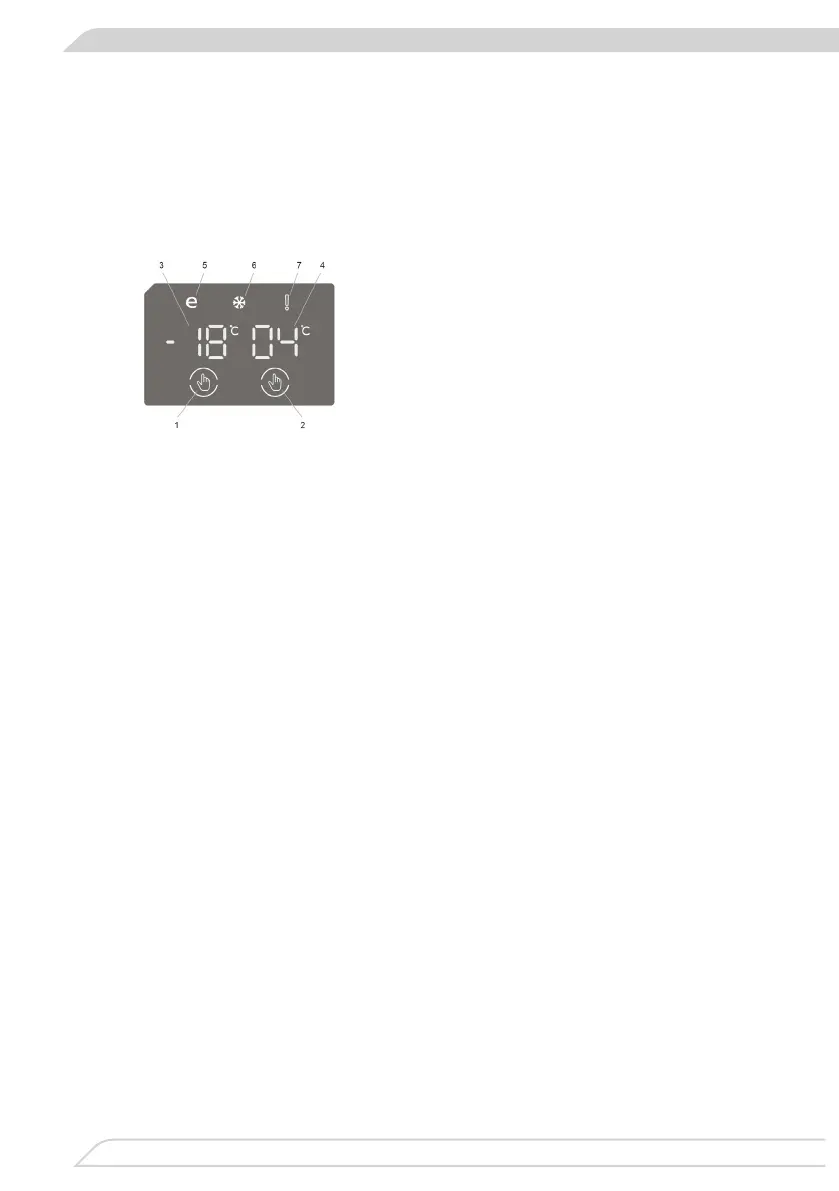
The control panel is shown in gure 10. For reference it is also shown below:
1. Enables the setting of the freezer.
2. Enables the setting of the cooler.
3. Freezer set value screen.
4. Cooler set value screen.
5. Economy mode symbol.
6. Super freeze symbol.
7. Alarm symbol.
Lighting (If available)
When the product is plugged in for the rst time, the interior lights may turn on 1
minute late due to opening tests. Once you have plugged in the product, all symbols
will be displayed for 2 seconds and the initial values will be shown as -18 °C on the
freezer adjustment indicator, and +4 °C on the fridge adjustment indicator.
• The initial temperature value for the freezer setting indicator is -18 °C.
• Press the freezer set button once. When you rst press the button, the previous
value will blink on the screen.
• Whenever you press the same button, a lower temperature will be set (-16 °C,
-18 °C, -20 °C, -22 °C or -24 °C).
• If you continue to press the button, it will restart from -16 °C.
NOTE: Eco mode gets activated automatically when the temperature of the freezer
compartment is set to -18°C.
• The initial temperature value for the cooler setting indicator is +4 °C.
• Press the cooler button once.
• Whenever you press the button, a lower temperature will be set (+8 °C, +6 °C,
+5 °C, +4 °C, or +2 °C).
• If you continue to press the button, it will restart from +8 °C.
Purpose
• To freeze a large quantity of food that cannot t on the fast freeze shelf.
• To freeze prepared foods.
• To freeze fresh food quickly to retain freshness.


 To Next Page