EasyManua.ls Logo

Fairland IDHR96 - User Manual

Default Icon
23 pages
Print Icon
To Next Page IconTo Next Page
Loading...
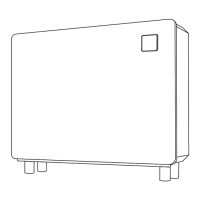
R32 Full-inverter Dehumidifier
INSTALLATION & USER MANUAL
Question and Answer IconNeed help?

Do you have a question about the Fairland IDHR96 and is the answer not in the manual?

Summary

General Information

Name of Parts

Identifies and labels the main components of the dehumidifier.

Spare Part Lists

Lists the spare parts included with the dehumidifier.

Dimension

Provides the physical dimensions of the dehumidifier models.

Operation

Instruction for Controller

Explains how to use the controller, its functions, and modes.

Installation and Maintenance

Notice before installation

Important precautions and guidelines to follow before installation.

Installation Instruction

Details the installation requirements, procedures, and connection steps.

Electrical Installation Wiring

Outlines the procedures for safe and correct electrical wiring.

Post-Installation Procedures

Inspection Before Use

Lists essential checks to perform before operating the dehumidifier.

Operational Trail

Explains the start-up sequence and checks for abnormal noise.

Daily Maintenance Notice

Troubleshooting Common Faults

Failure Code

Summary

General Information

Name of Parts

Identifies and labels the main components of the dehumidifier.

Spare Part Lists

Lists the spare parts included with the dehumidifier.

Dimension

Provides the physical dimensions of the dehumidifier models.

Operation

Instruction for Controller

Explains how to use the controller, its functions, and modes.

Installation and Maintenance

Notice before installation

Important precautions and guidelines to follow before installation.

Installation Instruction

Details the installation requirements, procedures, and connection steps.

Electrical Installation Wiring

Outlines the procedures for safe and correct electrical wiring.

Post-Installation Procedures

Inspection Before Use

Lists essential checks to perform before operating the dehumidifier.

Operational Trail

Explains the start-up sequence and checks for abnormal noise.

Daily Maintenance Notice

Troubleshooting Common Faults

Failure Code

Overview

This document provides the installation and user manual for the Fairland R32 Full-inverter Dehumidifier, covering both user-specific information and details for professional installers.

The dehumidifier is designed for use in swimming pool environments to control humidity levels. It offers both dehumidifying and optional heating functions.

Function Description:

The Fairland R32 Full-inverter Dehumidifier operates by removing excess moisture from the air, contributing to a more comfortable environment and preventing issues associated with high humidity. The full-inverter technology allows for variable compressor speed, which can lead to more efficient operation and precise humidity control.

The device features a controller with a digital display showing humidity, temperature, and time. Users can power the unit on or off, select operating modes, set a timer for switching on and off, and adjust desired humidity or temperature values.

Operating Modes:

  • Dehumidifying Function Only: Users can select between "Smart" mode and "Silence" mode.
  • Dehumidifying and Heating Functions (with optional electric heater): Users can choose from "Heating," "Dehumidification," or "Heating + Dehumidification" modes by pressing the mode button for 3 seconds.

Humidity/Temperature Setting:

  • Dehumidifying Function Only: Humidity can be set between 30-95%, with a default of 70%.
  • Both Dehumidifying and Heating Functions:
    • In dehumidifying mode, humidity can be set between 30-95%, with a default of 70%.
    • In heating mode, temperature can be set between 18-35°C, with a default of 26°C.
    • In heating + dehumidifying mode, both humidity and temperature can be set. The dehumidification function takes priority, and the electric heating runs when the compressor operating frequency is below 50%.
    • An overheat protection system is in place: if the air outlet temperature reaches ≥65°C, the compressor and electric heating will stop. Normal operation resumes when the outlet temperature is ≤50°C.

Timer Setting:

The dehumidifier allows users to set a timer for both "ON" and "OFF" operations, or a combination of both. This enables scheduled operation, enhancing convenience and energy efficiency. The timer can be cancelled if no time is set.

Important Technical Specifications (for IDHR60, IDHR96, IDHR120 models):

Specification IDHR60 IDHR96 IDHR120
Advised pool surface (m²) ≤25 ≤40 ≤50
Advised room size (m²) 120 200 240
Operating air temperature (°C) 10~38
Capacity (l/h) (Air 30℃, RH 80%) 2.5 4.0 5.0
DER (l/h.kW) (Air 30℃, RH 80%) 4.00~3.40 4.53~4.05 4.50~3.68
Capacity (l/h) (Air 30℃, RH 70%) 2.1 3.3 4.2
DER (l/h.kW) (Air 30℃, RH 70%) 3.34~3.00 4.00~3.50 3.86~3.25
Heat recovered (kW) 2.4 3.3 4.4
Electric heater optional (kW) 2 2 2
Rated power (kW) (Air 30℃, RH 80%) 0.11~0.73 0.17~0.99 0.22~1.36
Rated current (A) (Air 30℃, RH 80%) 0.48~3.17 0.74~4.30 0.96~5.91
Power supply 230V/1Ph/50Hz
Sound pressure at 1 m dB(A) 35.3~45.6 35.6~46.1 35.9~46.4
Air flow (m³/h) 600 800 1000
Net dimension (mm) 850×291×850 1120×291×855 1220×291×855
Net weight 52 65 70

Note: The performance parameters are subject to change based on working conditions and technical improvements. The operating temperature range is 10°C to 38°C.

Usage Features:

  • Installation Flexibility: The dehumidifier can be placed on the ground or mounted on a wall.
  • Drainage System: Condensed water is discharged from the bottom board. A drainage kit and pipe must be connected to ensure smooth water removal.
  • Safety Precautions:
    • Professional installation is mandatory.
    • The unit must be kept upright during storage or movement.
    • It should not be used with flammable or turbid gases.
    • Ensure proper air circulation by not blocking air inlets or outlets.
    • Do not insert hands or objects into the air inlet/outlet.
    • Avoid using or storing flammable gases/liquids near the unit.
    • In case of abnormal conditions (noise, odor, smoke, leakage), immediately cut off power and contact the dealer.
    • The main power switch should be out of reach of children.
    • Disconnect power during thunderstorms.
    • Do not wash the equipment directly with water.
    • Not suitable for preserving fine arts or academic materials.
  • Start-up Delay: To protect the dehumidifier, it has a start delay function. The fan starts for 3 minutes before the compressor begins operation.

Maintenance Features:

  • Annual Maintenance: Maintenance should be carried out annually by a qualified professional technician.
  • Power Disconnection: Always cut off the power supply before inspection or when the unit is not in use.
  • Dust Protection: Cover the unit with a plastic sheet or cloth when not in use to prevent dust accumulation.
  • Cleaning: Clean the dehumidifier with household detergents or clean water. NEVER use volatile oil, gasoline, thinner, or sassafras powder.
  • Troubleshooting: A troubleshooting guide is provided for common faults, including "No power," "Power switch is off," "Fuse burned," "Breaker is off," "Evaporator blocked," "Air outlet blocked," "3 minutes start delay," "The set humidity too low." Solutions include checking power, fuses, breakers, removing obstacles, and adjusting humidity settings.
  • Failure Codes: A comprehensive list of failure codes (E1, E2, E5, E8, E9, EA, Eb, P0-P9, PA, F1-F9, FA) is provided to assist technicians in diagnosing specific issues such as high/low pressure, sensor failures, module failures, and overcurrent protection.
  • Self-Repair Warning: Users are strongly advised not to attempt to repair the dehumidifier themselves to avoid any risks.

Fairland IDHR96 Specifications

General IconGeneral
BrandFairland
ModelIDHR96
CategoryDehumidifier
LanguageEnglish

Related product manuals