2322
Settings shortcuts. The icon at the top right gives
quick access to important settings and functionality.
Here you can enable functions like Airplane Mode,
Wi-Fi, Bluetooth, GPS and auto-rotation, switch to your
preferred data connection, check your data usage and
battery charge, and adjust your audio prole and screen
brightness.
Dual SIM functionality. Dual SIM is almost like having
two phones for the price of one! The Pull-down menu is
the easiest way to access the dual SIM control. You can
switch between SIM cards whenever you are using a SIM-
related app (Phone, Messages and People).
By default, your phone will make calls and send text
messages using the SIM card in SIM slot 1. If you’d prefer
to use the other card, open your Phone, Message or
People app and then open the Pull-down menu. Press
and then to choose SIM 1 or 2 or set up the system to
prompt you every time.
Both SIMs are always active for incoming calls, but 3G
capability is only active in one of the two.
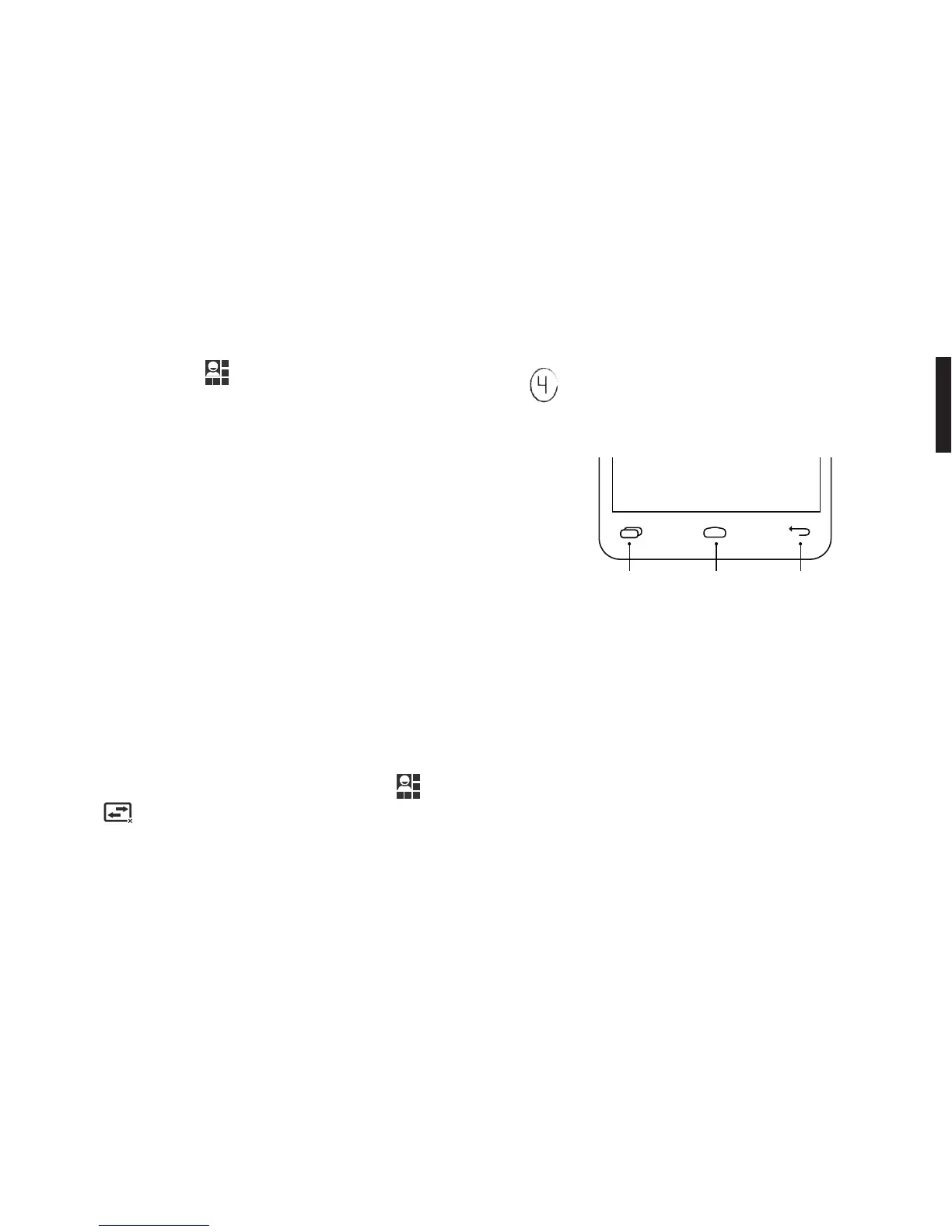
Settings, Home & Back Buttons.
At the bottom of your Fairphone, there are three
buttons:
Settings button. Access the settings of the screen or app
you are currently viewing. For example, by pressing this
button when you are viewing the Home panel, you will
access the general System Settings.
Home button. Tap once to go back to the Home panel.
Press and hold to switch between active apps and swipe
right or left to close any of the apps.
Back button. Press to return to the previous screen.


 To Next Page
 Loading...