EasyManua.ls Logo

Fairphone 2 - Meet Your Fairphone; Front and Back View; Internal Components; Top View

Fairphone 2
22 pages
Print Icon
To Next Page IconTo Next Page
To Previous Page IconTo Previous Page
Loading...
54
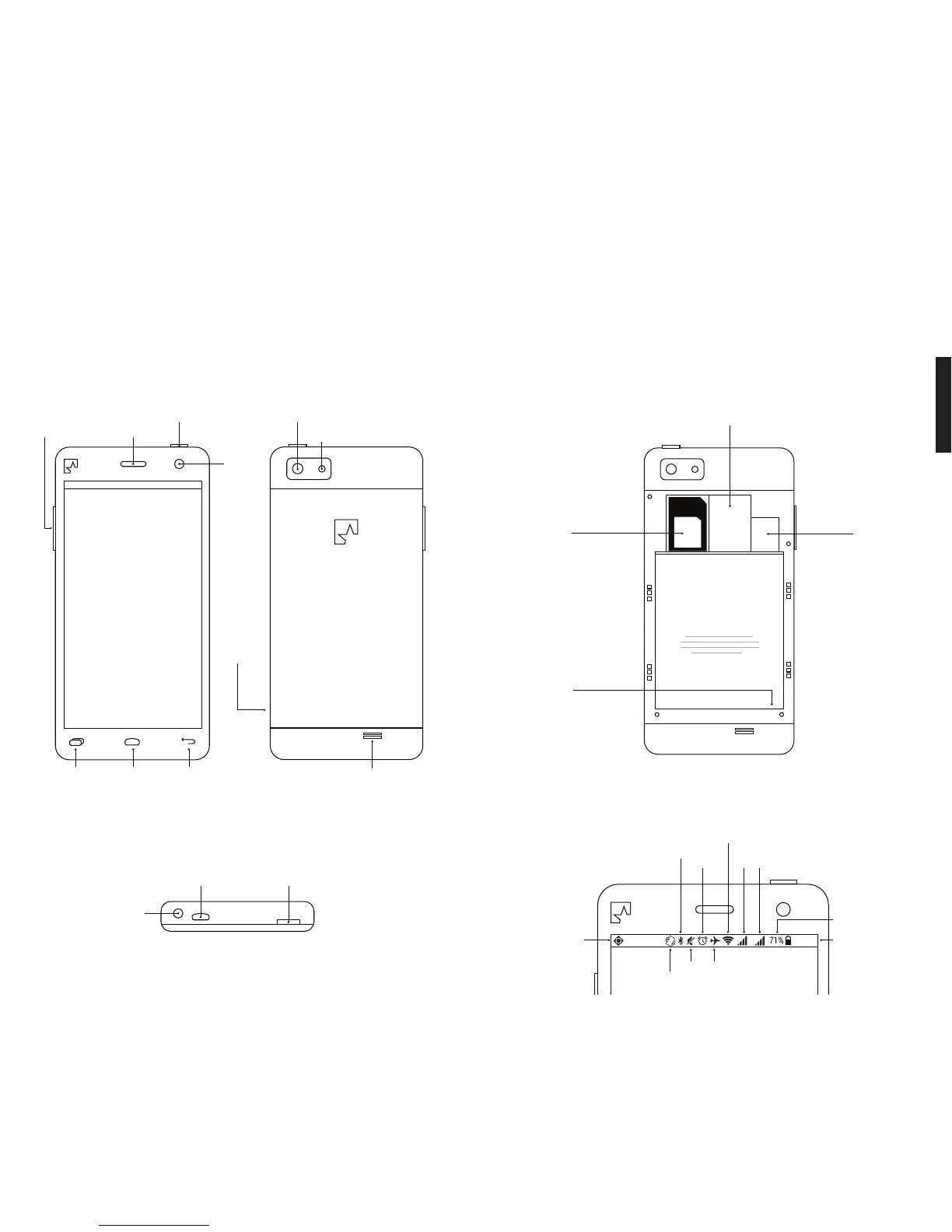
MEET YOUR FAIRPHONE.
The front and back.
Settings
On/off
button
Micro USB
connector
Volume
up/down
Front
Camera
Earpiece
Home Back
Headset
jack
THIS IS YOUR BATTERY.
SIM card slot 1
(Blue SIM adapter
for microSIM included)
SIM and SD
cards not
included
MicroSD
slot
Battery
SIM card slot 2
(Adapter not included)
Fairphone
Back Cover
(open it here)
Rear
Camera
Flash
Speaker
Remove the battery
here before inserting
your SIM card(s)
On/off
button
Apps and
Notifications
(i.e. GPS)
Wi-Fi
Airplane
mode
Silent
Vibrate
Bluetooth Alarm
clock
Time
Battery charge
remaining
Signal strength of
SIM 1 and 2
R H+
11:30
The top.
The inside.
The status bar.
Settings
On/off
button
Micro USB
connector
Volume
up/down
Front
Camera
Earpiece
Home Back
Headset
jack
THIS IS YOUR BATTERY.
SIM card slot 1
(Blue SIM adapter
for microSIM included)
SIM and SD
cards not
included
MicroSD
slot
Battery
SIM card slot 2
(Adapter not included)
Fairphone
Back Cover
(open it here)
Rear
Camera
Flash
Speaker
Remove the battery
here before inserting
your SIM card(s)
On/off
button
Apps and
Notifications
(i.e. GPS)
Wi-Fi
Airplane
mode
Silent
Vibrate
Bluetooth Alarm
clock
Time
Battery charge
remaining
Signal strength of
SIM 1 and 2
R H+
11:30
Settings
On/off
button
Micro USB
connector
Volume
up/down
Front
Camera
Earpiece
Home Back
Headset
jack
THIS IS YOUR BATTERY.
SIM card slot 1
(Blue SIM adapter
for microSIM included)
SIM and SD
cards not
included
MicroSD
slot
Battery
SIM card slot 2
(Adapter not included)
Fairphone
Back Cover
(open it here)
Rear
Camera
Flash
Speaker
Remove the battery
here before inserting
your SIM card(s)
On/off
button
Apps and
Notifications
(i.e. GPS)
Wi-Fi
Airplane
mode
Silent
Vibrate
Bluetooth Alarm
clock
Time
Battery charge
remaining
Signal strength of
SIM 1 and 2
R H+
11:30
Settings
On/off
button
Micro USB
connector
Volume
up/down
Front
Camera
Earpiece
Home Back
Headset
jack
THIS IS YOUR BATTERY.
SIM card slot 1
(Blue SIM adapter
for microSIM included)
SIM and SD
cards not
included
MicroSD
slot
Battery
SIM card slot 2
(Adapter not included)
Fairphone
Back Cover
(open it here)
Rear
Camera
Flash
Speaker
Remove the battery
here before inserting
your SIM card(s)
On/off
button
Apps and
Notifications
(i.e. GPS)
Wi-Fi
Airplane
mode
Silent
Vibrate
Bluetooth Alarm
clock
Time
Battery charge
remaining
Signal strength of
SIM 1 and 2
R H+
11:30

Related product manuals