31
EN
Troubleshooting
NOTE!
Before calling the customer services, check if you can x the problem/error by yourself.
For this purpose, please see the “TROUBLESHOOTING” section. If you cannot solve the
problem/error, please call the customer services. Before calling please make ready the
model name and product serial number. You can nd this information on the TYPE LABEL
of your product. Hotline: (+90 212) 444 0 241
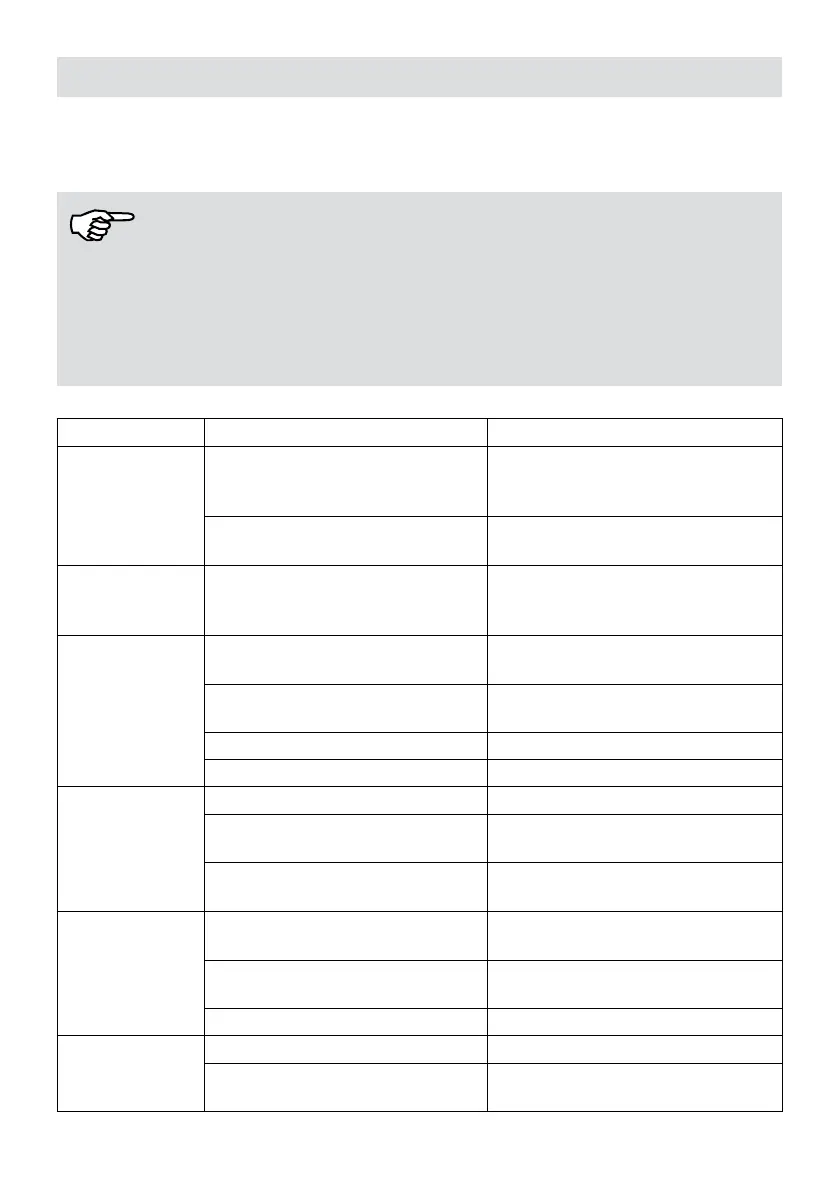
SYMPTOM POSSIBLE CAUSE PORTABLE SOLUTION
Fan and
Compressor
not operating
No power or supply voltage too
low
Check unit connection to
supply or contact the power
supply company.
Plug damaged or power cord
broken
Contact a qualied electrician.
Compressor
running but Fan
is not operating
Motor failure Contact a qualied electrician.
Fan working but
compressor
not operating
Power supply voltage too low
Contact the power supply
company.
Within 3 minutes protection time
The return to normal after 3
minutes.
Compressor failure Contact a qualied electrician.
Unit could be in defrost mode Normal
No
dehumidication
or
low performance
Filter blocked Clean lter
Gas leakage
Contact a qualied
electrician
Temperature & Relative
Humidity too low
Normal
Unit Noise
Uneven surface
Reposition unit on at
surface
Motor or compressor
mountings loose
Contact a qualied
electrician
Sound from water ow Normal, ow of liquid gas
Unit frosted up
Filter blocked Clean lter
Defrost mode not working
Switch off. Contact a
qualied electrician.


 To Next Page