HERCULES
GB
20
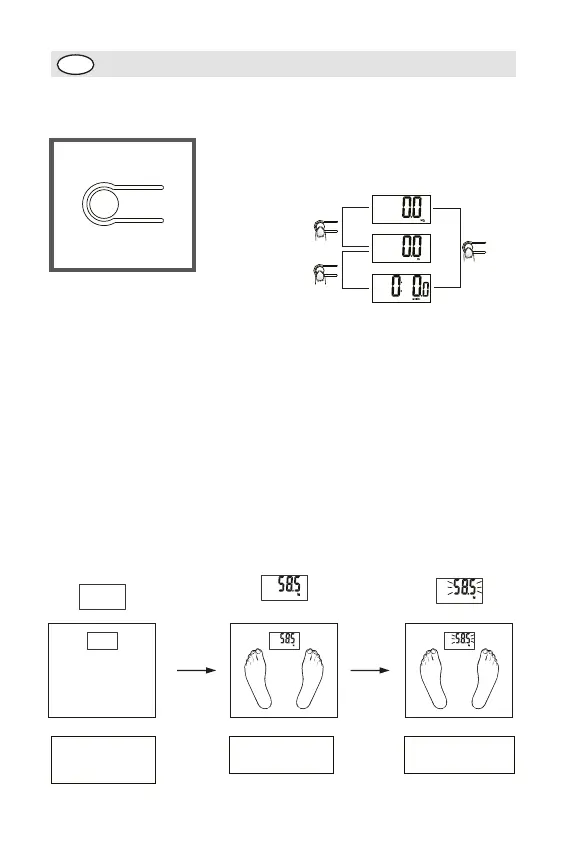
To Set Weight Unit
If your scale is available (or applicable) in kg/lb/st, you can set to the one you prefer
by pressing the unit conversion button. Press the unit conversion button when scale
is power off, LCD shows current weight unit. Press the button again to convert weight
unit.
After selecting the prefered unit, the scale will be auto-off after 3 seconds. Selected
weight unit will be activated when the scale is turned on again.
* When setting lb/st as weight unit, the default height unit is feet/inch;
* When setting kg as weight unit, the default height unit is cm.
Remark: The unit system of scale depends on sales destination or the requirement of
distributor.
Optional Normal Weighing Mode (bypassing parameter setting)
1. Auto step on weighing
At the bottom of scale,you
can find a unit conversion
button as shown in picture.
Basınız
Basınız
Basınız
KG-Kilogram
LB-Pound
ST-Stone
Install battery (please
refer to Page 2), and
place the scale on
flat floor
Display your weight
Digits flash,
stabilized and locked
Step on the
weighing
platform


 To Next Page