18
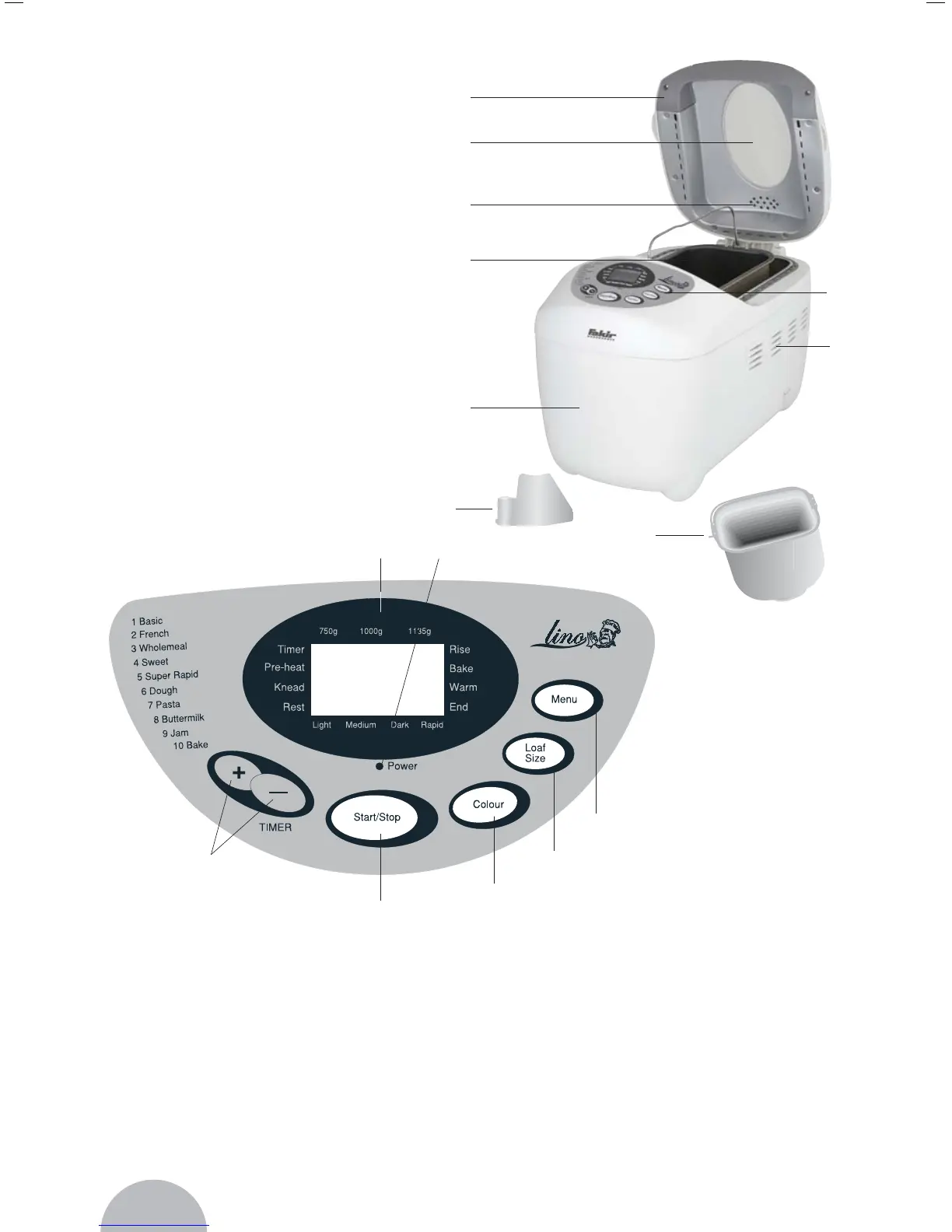
Control Panel
1- LCD display It shows information on the
desired program number, baking level
and bread weight (indicated by an arrow
and the time).
2- START-/STOP key To start and stop the
program
3- TIME keys To set the preprogram timer
4- COLOR key To set the desired level of
browning
5- QUANTITY key To set 3 weight levels as
described below
6- SELECTION key To select the programs
described in the “bread baking machine
programs”
7- POWER- The POWER control light control
light indicates that the appliance is ready
for operation
Parts and Drawings
A- Cover, removable
B- Viewing panel
C- Vent
D- Lateral vent
E- Baking compartment
F- Control Panel
G- Casing
Inside Parts;
H. 2pcs kneading pegs
I. Baking Tin
Accessories (not shown):
1 measuring spoon,
1 measuring beaker
A
B
C
D
E
F
G
2
I
H
1
3
4
5
6
7


 To Next Page