GB
SAFETY
17
NOTICE!
Calory data according to USDA (United States
Department of Agriculture)
• The calorie function does not work in the TARE function
mode.
NOTICE!
Batteries are included in giftbox.
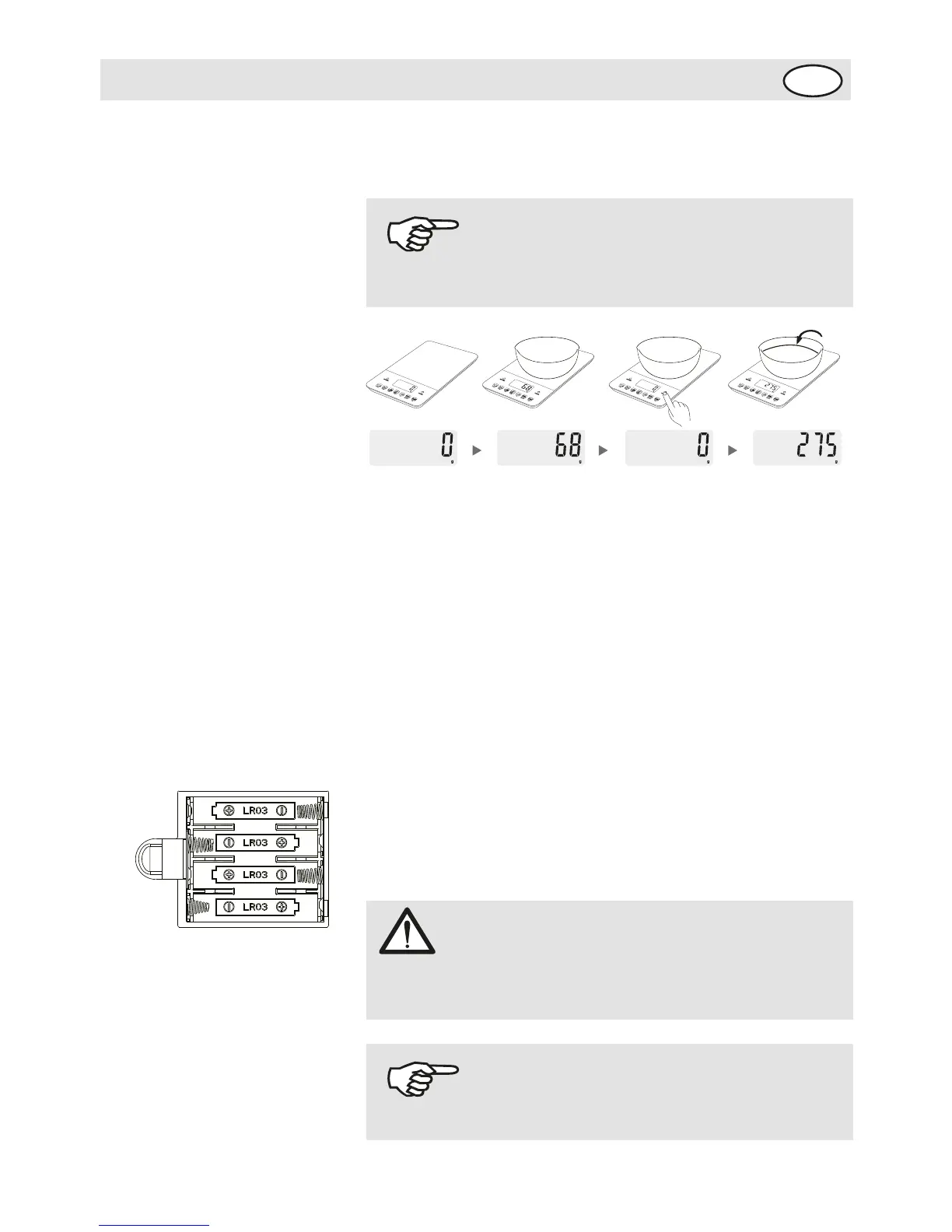
Tare function
Step 1: In weighing mode, put the container on the
platform, the LCD display will
show the weight of the container.
Step 2: Press "TARE" to clear the weight of the container
{reset to zero). Then put
the food into the container, the LCD display will show the
weight of food only.
Repeat press "TARE" to weight more different foods.
Step 3: The LCD display will show the negative value of
container if you remove thefood and container from the
platform together. Please press "TARE" again,
the display will show zero in 3 seconds.
Insert the batteries:
Open the battery cover.
Install 4 x 1.5V AAA batteries as shown.
After installing the batteries, put back the battery cover.
ATTENTION!
Incorrect polarity will cause the permanent impact on the
electronic parts.


 To Next Page