IN / EX
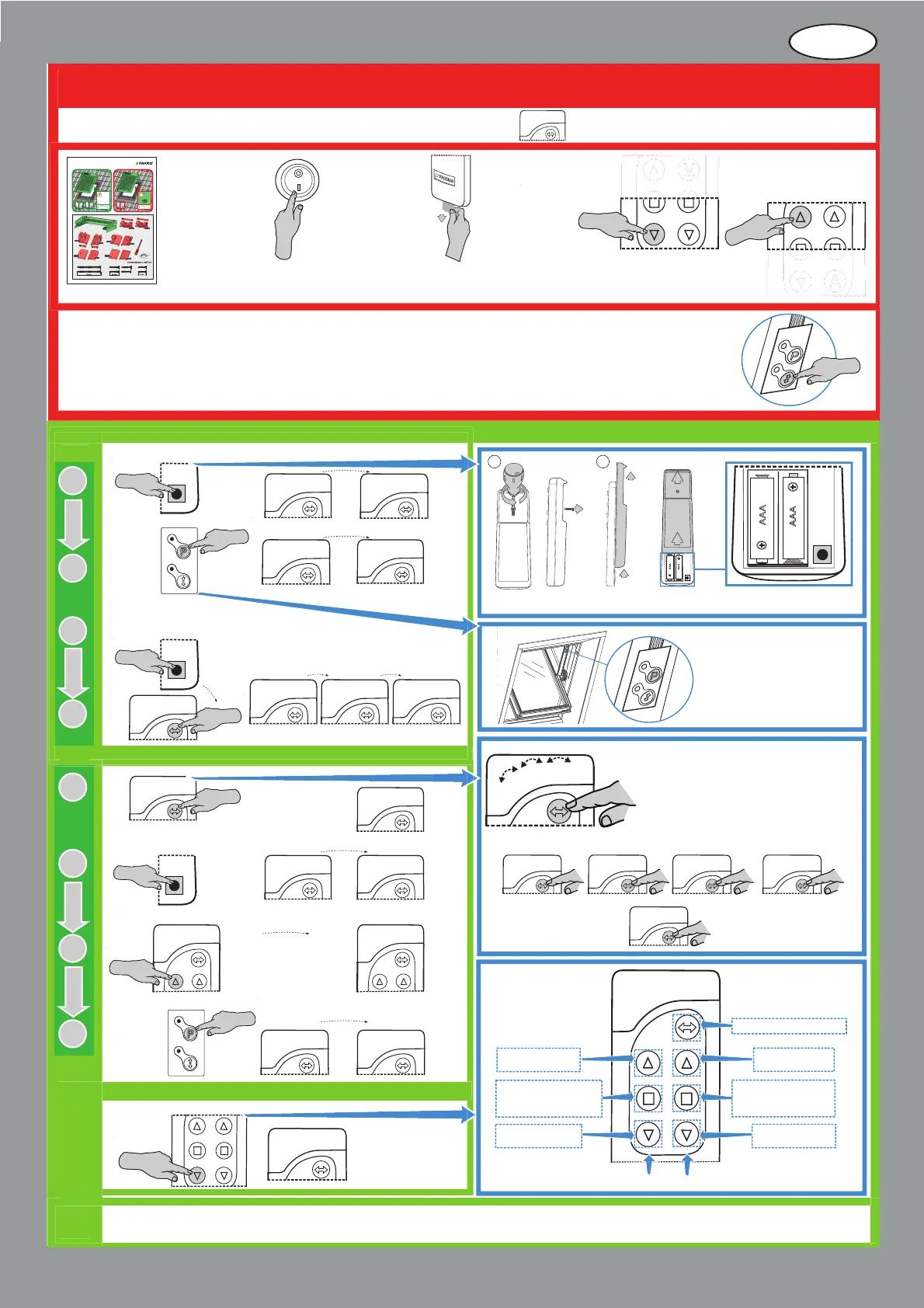
QUICK START OF ARZ SOLAR ROLLER SHUTTER
1. Screw out the screw on the back of the remote control.
2. Pull out up back part of the remote control to access IN/EX programming button.
1
2
The roller shutter is factory programmed on channel No. 1 !!!
Install the roller
shutter in accordance
with installation
instructions of NC93E
Remove foil strip
to unlock the batteries
in the remote control.
The roller shutter is equipped with the manual operating button positioned in its upper part. It enables control
of the roller shutter in case of losing the remote control or wearing off its batteries. If after mounting the roller shutter
cannot be launched via the remote control, check operation from the manual operating button.
If the roller shutter works from the manual operating button, and yet it cannot be launched via remote control,
make RESET and go to PROGRAMMING !!!
ZWP S8 remote control is supplied in one packaging with the roller shutter
1
2
3
4
1
Choose one of four available channels, e.g. No.1
1 – channel one – control of the roller shutter No. 1 and No. 2
2 – channel two – control of the roller shutter No. 3 and No. 4
3 – channel three – control of the roller shutter No. 5 and No. 6
4 – channel four – control of the roller shutter No.7 and No. 8
1 2 3 4 – common channel – control of two groups with
4 roller shutters in each
1
4
I N / E X
2
3
4
x1
1
1
2
3
4
Calling other procedures such as DELETE, EXCLUDE, LEARN MODE, DEVICE CONNECTION is described in programming instructions attached to the ARZ Solar roller shutter.
Information on how to perform programming of Z-Wave devices with the use of remote controllers of other manufacturers is to be found in the manuals of these devices.
Button for folding
the roller shutter
Button for stopping
the roller shutter in
desired position
Button for unfolding
the roller shutter
Button for channel selection
Check the operation
of the roller shutter
unfolding.
Check the operation
of the roller shutter
folding.
Information concerning programming, change of parameters, changes in configuration settings, calling
individual functions is contained in the Programming and Usage Instructions (code NC97C).
1
1
2
3
1
4
1
2
3
1
4
2
3
2
3
4
1
4
RESET
SIGNALLING
PROGRAMMING SIGNALLING
1
2
3
4
1
2
3
4
x2
x1
RESET OF THE REMOTE CONTROL
RESET OF THE ROLLER SHUTTER
max 10s.
x1
x1
x1
x1
1
2
3
1
2
3
4
max 10s.
max 10s.
2
3
max 1.5s.
x1
x1
x1
Make sure that
the main switch
of the roller shutter
is set to channel No.1
Button for folding
the roller shutter
Button for stopping
the roller shutter in
desired position
Button for unfolding
the roller shutter
First group of button of movement
Second group of button of movement
NC9 3E
ARZ Solar
HA288
HA288
HA237
HA242
HA242
HA241
HA241
HA283 HA283
HA233


 To Next Page
 Loading...