Thank you for purchasing FalconEyes’ products.
For further details of our related products, please contact your
local distributor or visit our webpage at www.falconeyes.com.hk
Thank you.
Please read this manual carefully before using this product.
FM1301_TF-L_eng
D)
Technical Data
E)
Attention:
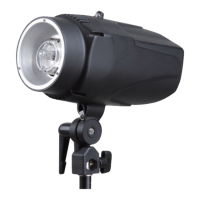
TF-L Series LCD Professional Studio Flash
Instruction Manual
3
(Optional: RC-2L - Wireless Remote Control)
Press the key "Channel" to select the desire channel. (Set from C0 to C9)
Test button "Test":
Click test button "Test" to check if the flash unit is in a normal working status.
Power adjustment knob "Power":
- Turning the power knob can adjust the power of the flash or modeling lamp.
- Press down the "POWER" knob can bring the flash unit into hibernation.
TF-400L
400Ws 600Ws 900Ws 1200Ws
150W
1/32-Full,Remote Control Compable
1/700-1/1700
>55°
5500K±200K
AC110-120 60Hz/AC220-240 50Hz
15m
250Ws 250Ws 250Ws
64
1-2sec. 1-4sec.
70 90 100
TF-600L TF-900L TF-1200L
TF-400L(FT) TF-600L(FT) TF-900L(FT) TF-1200L(FT)
Model:
Power:
Modeling
Power Control
GN.(ISO100/m)
Recycle Time
Flash Duraon(t:0.5s)
Angle Of Illuminaon
Color Temperature
Operang Voltage
Remote Distance
Sync Cord / Photo Sensor / Test Buonl / Remotel Control
Power Cord,sync cord,modeling lamp ,standard reflector
Sobox , Barndoor , (Honeycomb & Color Filter Set),Snoot , Light Stand , Umbrella etc.
Triggering
Accessories Included
Oponal Accessories
1. Do not unplug the cable while power is still supplying.
2. Avoid crashing or any types of impact to the flash unit otherwise it would harm
the flash tube as well as decreasing its life span, especially when it is in a working state.
Please find a professional technician for maintenance. Do not dismantle the
flash unit if it’s not necessary.
3. The product is suitable for dry, clean environment, and should not be used
under moisturized and dusty areas. Keep the flash unit away from inflammable,
explosive, and corrosive gas.
4. Emitting heat is a normal phenomenon when the flash unit is working; please
do not touch it with bare hands.
5. Do not flash directly to the photo sensor to avoid the reduction of its sensitivity.


 To Next Page
 Need help?
 General