The FAME KC MIDI Controller (models KC25/49/61) is a versatile USB-MIDI controller designed for professional use, offering a range of features for portability, playability, and control.
Function Description:
The KC MIDI Controller serves as a central interface for controlling various MIDI-compatible software and hardware. It transmits MIDI data to a PC via a USB cable, which also powers the keyboard. Alternatively, it can be powered by an optional 9V DC power supply, in which case MIDI data is sent out via the MIDI output port. The device appears as a "USB Audio Device" on a PC. It is compatible with Windows XP/Vista and Mac OSX, supporting plug-and-play functionality without requiring additional drivers. The controller is designed to work seamlessly with major audio and sequencer software like Cubase and Cakewalk.
Important Technical Specifications:
- Keyboard:
- KC25: 25 keys (C2-C4) with initial touch.
- KC49: 49 keys (C1-C5) with initial touch.
- KC61: 61 keys (C1-C6) with initial touch.
- MIDI Data: Supports Program Select, Bank Select, Sequencer Control, MIDI Time Code (MTC), Controller Change, GM, GS, XG System Reset.
- Controllable Parameters: Transpose, Octave, MIDI Transmit Channel, Velocity Curve Adjustment, Keyboard Split Point.
- Display: 8 segments, 3 digits LED.
- Input & Output:
- 1x MIDI Out.
- 1x USB Port (USB 1.1 compatible).
- KC25: 1x Pedal Input.
- KC49/61: 2x Pedal Inputs (PEDAL A, PEDAL B).
- 1x DC Input.
- 1x Power Switch.
- Power Supply: 9V DC or USB Power.
Usage Features:
The KC MIDI Controller offers extensive assignable controls and multi-functional keyboard capabilities:
- Keys: 25/49/61 keys with initial touch.
- Assignable Pedals:
- KC25: 1x Assignable pedal interface (PEDAL B), compatible with switch and continuous pedals, assignable as 152 controllers. Initial setting is sustain pedal.
- KC49/61: 2x Assignable pedal interfaces (PEDAL A, PEDAL B), compatible with switch and continuous pedals, assignable as 152 controllers. Initial setting for PEDAL A is soft pedal, and for PEDAL B is sustain pedal.
- Pedal Resistance Curve: Adjustable to work with different pedal specifications. The resistance curve value (PA CURVE or PB CURVE) can be estimated using the formula: (128 * pedal resistance value) / (10K + pedal resistance value). Initial value is 64, suitable for most pedals. DATA +/- buttons or R1~R4/R5~R8 dials can be assigned to adjust these values. Pressing DATA +/- simultaneously resets the curve to 64.
- Pedal Polarity: The system can recognize and change pedal polarity. If the pedal transmits ON when pressed and OFF when released, no adjustment is needed. Otherwise, the pedal can be pressed down while switching on the unit, and released after the unit is turned on. Polarity can also be adjusted via the EDIT button and PEDAL A/B POLARITY functions (KC49/61).
- Assignable Slider: 1x Slider, assignable as 148 controllers. Initial setting is 147th controller (master volume).
- Pitch Bend and Modulation Wheels: Pitch Bend Wheel (WHEEL P) and Modulation Wheel (WHEEL M), both assignable as 148 controllers. Initial setting for WHEEL P is 146th controller (pitch bend wheel), and for WHEEL M is 1st controller (modulation wheel).
- Assignable Data Buttons: 2x DATA +/- buttons, assignable as 160 controllers. Initial setting is 154th controller (octave adjustment).
- Edit Button: 1x EDIT button to switch between play and edit status. The EDIT indicator illuminates when multi-function mode is active.
- Dial Function Group Switching Button: 1x SWITCH button to toggle between two function groups for dials R1~R4 and R5~R8.
- Assignable Dials: 4x Dials (R1~R8), each with an independent channel, assignable as 160 controllers.
- Initial channels for R1~R4 are 0, with initial controller numbers 152, 153, 156, 157 (controlling program, channel, tempo, and keyboard velocity curve respectively).
- Initial channels for R5~R8 are 0~3, with initial controller number 7 (controlling volume of channels 0~3 respectively).
- Dial Function Group Indicator shows which group (R1~R4 or R5~R8) is currently active.
- Multi-functional Keyboard: Activated by the EDIT button, the keyboard provides functions printed above the keys, including program adjustment, dual mode, touch sensitivity adjustment, numeric pads, split mode, tempo control, mute, and snap shot.
- OCTAVE/TRANSPOSE Indicator:
- On: Upper/lower octave adjustment.
- Slow flicker: Upper/lower transpose adjustment.
- Quick flicker: Both octave and transpose adjustment active.
- Off: No octave or transpose adjustment.
- Assigning Controllers:
- Press EDIT to enter multi-function mode.
- Press ASSIGN to enter controller assignment mode (LED shows "CHO").
- Operate the desired controller (e.g., slide SLIDER). LED shows its current controller number.
- Input the desired assignable parameter value using the numeric pad.
- Press ENTER to confirm.
- Tempo Adjustment: Adjusts MIDI Time Code (MTC) tempo. Can be adjusted via DATA +/- (simultaneous press resets to 100) or R1~R4/R5~R8 dials. Also adjustable via EDIT button, TEMPO function, and numeric pad (KC49/61).
- Program Adjustment: Adjusts the voice of the current channel. Can be adjusted via DATA +/- (simultaneous press resets to 0) or R1~R4/R5~R8 dials. Also adjustable via EDIT button, PROGRAM function, and numeric pad.
- MIDI Channel Adjustment: Adjusts the general MIDI channel. Can be adjusted via DATA +/- (simultaneous press resets to 0) or R1~R4/R5~R8 dials. Also adjustable via EDIT button, CHANNEL function, and numeric pad.
- Transpose: Changes pitch up/down by semi-tones (range +/- 12 semitones). Adjustable via DATA +/- (simultaneous press resets to 0), or by holding EDIT and using DATA +/-. Also adjustable via R1~R4/R5~R8 dials.
- Octave: Changes pitch up/down by octaves (range +/- 3 octaves). Adjustable via DATA +/- (simultaneous press resets to 0) or R1~R4/R5~R8 dials.
- Dual Mode: When ON, Keyboard/Wheel/Pedal/Slider send MIDI info on two channels, with adjustable voice/channel for both. Activated/deactivated via EDIT button and DUAL function. Cannot be used simultaneously with keyboard split.
- Split Mode (KC49/61): When ON, Wheel/Pedal/Slider send MIDI info on two channels. The keyboard is split into right and left sections by a split point, each using its own channel. Voice/channel for both sections are adjustable. Activated/deactivated via EDIT button and SPLIT function. Cannot be used simultaneously with dual mode.
- Split Point (KC49/61): Default is central C (MIDI No. 60). User can select a new split point via EDIT button, SPLIT POINT function (LED shows "CHO"), and pressing the desired note.
- MTC: Opens/closes sending MTC message (F8) via EDIT button and MTC function.
- Active Sensing (KC49/61): Opens/closes active sensing message (FE) via EDIT button and ACTIVE SENSING function.
- Lock (KC49/61): Opens/closes lock function via EDIT button and LOCK function. In Lock mode, only the keyboard can be operated.
- Mute: Opens/closes mute function via EDIT button and MUTE function. No messages are transmitted in Mute mode.
- Snap Shot: Transmits all current data (DATA +/-, SLIDER, WHEEL, PEDAL, R1~R4, R5~R8, etc.) at once via EDIT button and SNAP SHOT function.
- Upload/Download: User parameters can be uploaded to/downloaded from a computer via the USB port using system exclusive messages (F0......F7). The manual provides detailed steps for Cubase (Record Style) and Cakewalk (System Message Window Style).
- All Note Off: Transmits "all notes off" message (Controller #123) via EDIT button and ALL NOTE OFF function, to resolve abnormal constant sounds.
- All Sound Off (KC49/61): Transmits "all sound off" MIDI message (Controller #120) via EDIT button and ALL SOUND OFF function, to resolve abnormal constant sounds.
- Reset All Controllers: Transmits "reset all controllers" message (Controller #121) via EDIT button and RESET ALL CONTROLLER function.
- GM/GS/XG ON (KC25): Transmits GM, GS, and XG initialization messages via EDIT button and GM/GS/XG ON function.
- GM ON (KC49/61): Transmits GM initialization message via EDIT button and GM ON function.
- GM2 ON (KC49/61): Transmits GM2 initialization message via EDIT button and GM2 ON function.
- GS ON (KC49/61): Transmits GS initialization message via EDIT button and GS ON function.
- XG ON (KC49/61): Transmits XG initialization message via EDIT button and XG ON function.
- Preset (KC49/61): Returns to factory preset via EDIT button and PRESET function. Initiates SNAP SHOT to transmit preset settings.
- Clean (KC49/61): When using the numeric pad, pressing CLEAN sets the number to 0.
- Reset: Unless otherwise specified, pressing DATA +/- buttons simultaneously sets the controlled parameter to 0.
Maintenance Features:
The manual emphasizes several precautions for maintenance and safety:
- Cleaning: Always remove the electric plug and USB cable before cleaning. Use a soft, dry cloth. Avoid gasoline, alcohol, acetone, turpentine, other organic solutions, liquid cleaners, spray cleaners, or overly wet cloths.
- Repair: Do not disassemble the instrument. Always take it to a qualified service center for repair to avoid electrical shock and ensure proper assembly.
- Environmental Considerations:
- Avoid using near water or moisture (bathtubs, washbasins, etc.).
- Do not place on unstable surfaces.
- Do not block sinks or holes, which are for air circulation to prevent overheating. Avoid placing near heat sinks or areas with poor air circulation.
- Keep away from dust, heat, and vibration.
- Avoid use during thunder to prevent long-distance electrical shock.
- Power Cord Handling: Do not place anything on the power cord. Ensure it is in a safe place to prevent tripping. Do not touch exposed parts of the cord or connector when plugged in.
- Liquid and Object Insertion: Do not insert anything into the instrument or splash any liquid on it, as this may cause fire or electrical shock.
- Troubleshooting: If the power cord/connector is damaged, liquid enters the instrument, it gets wet, doesn't work properly, falls, breaks, or functions poorly, unplug all connectors and take it to a qualified service center.
The manual also notes that FAME is not responsible for damage or data loss due to improper operation, and that images/LED displays in the manual are for demonstration and may differ from the actual instrument.

 Need help?
 General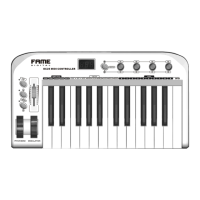

 To Next Page