10 of 30 Manual LactoFAN2
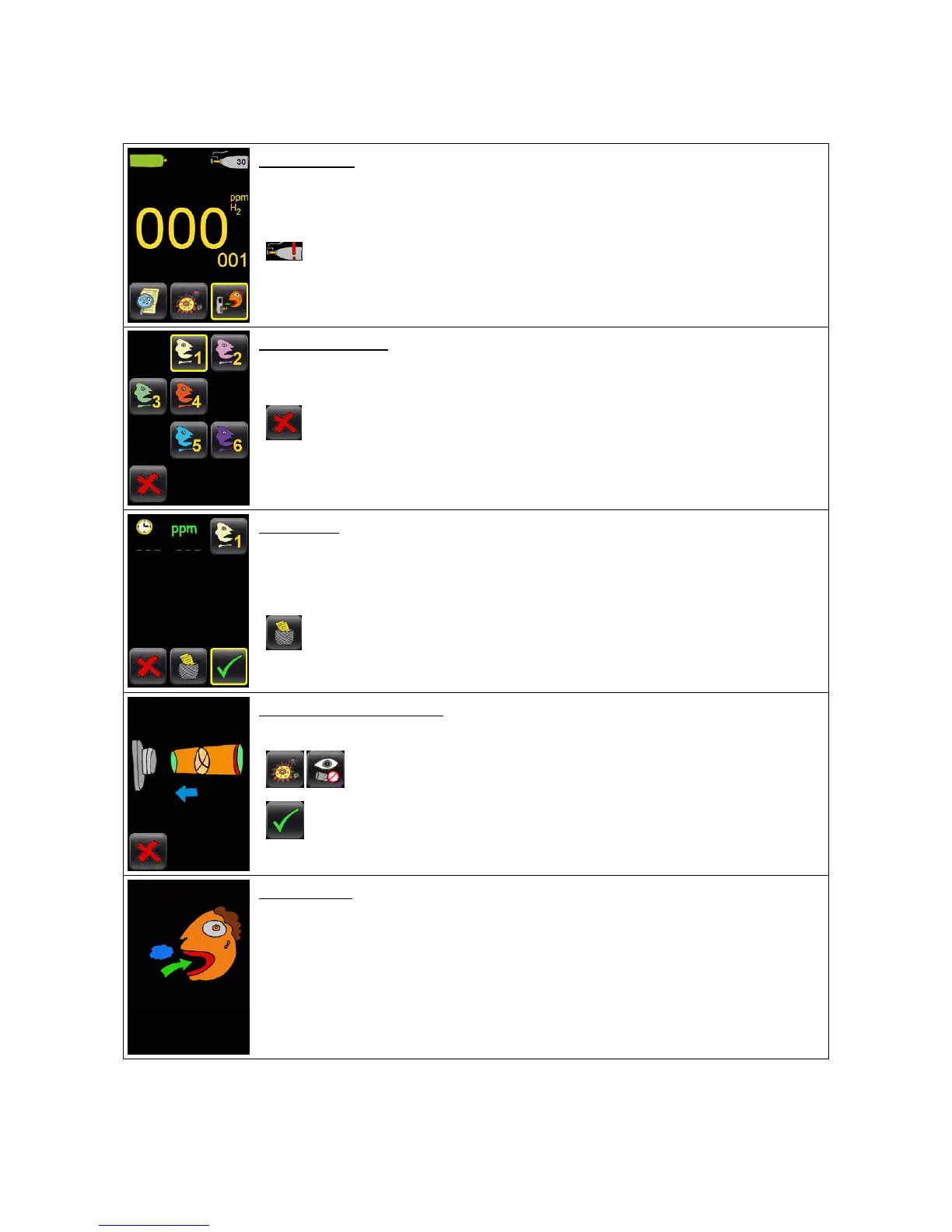
Now switch on the device as described above. The display now shows a step-by-step
graphic guide:
Press the right button to start a measurement.
First start:
Press the center button to switch to the settings screen and check the time and date settings.
In case a red exclamation mark is shown at the calibration gas bottle in the upper right corner,
touch the icon to start the calibration of the device. Follow the graphic guide on the screen.
Please read the regarding chapter of this manual before (see page 14).
Patient selection
Press one of the six buttons to set the table into which the measurement
data of the current patient will be stored.
This button will abort the measurement always.
Verify to have selected the right (patient-) table, then press the OK-
button.
For the first measurement the table will be empty; later here you will see the data already collected.
If you want to start a new table, press the center button.
Make sure the data were saved before (see page 13).
Plug on the mouthpiece
Push the filter mouthpiece firmly into the flange.
Was the mouthpiece detection disabled in the settings, the OK-button is shown.
Breath normally (do not inhale more deep than usual) and stop after
inhaling.
The patient should sit down during the whole procedure; also ask the subject to use the nose clip delivered.


 To Next Page