Connections
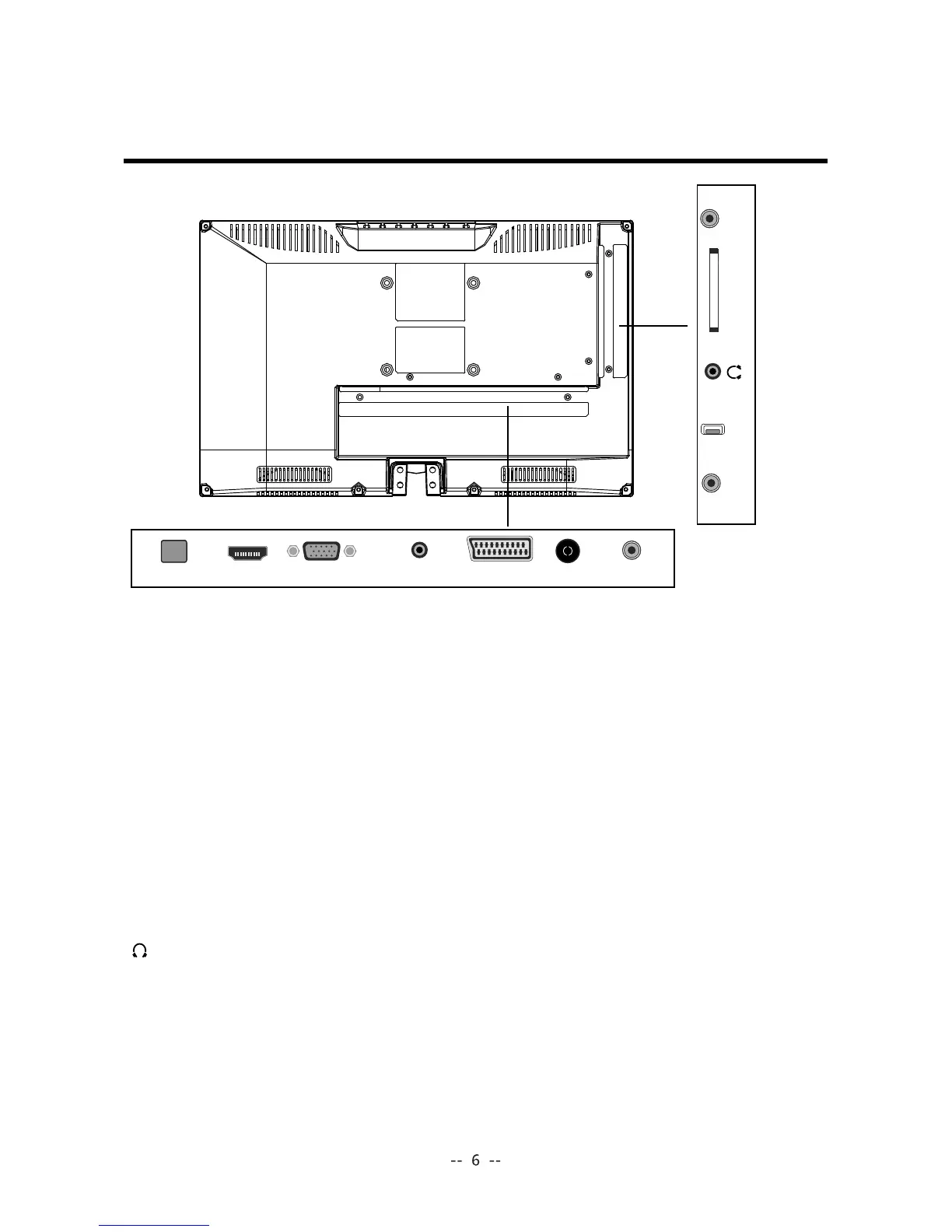
RF: Connect antenna or cable 75 Ohm coaxial to receive TV signal.
COAX:
Connects to the audio jack on the digital/standard 5.1 audio system.
YPbPr: Connects to the DVD player,Digital Set-Top-Box,or other AV equipment
AV:
Connects the Video output jack of DVD or VCR.
USB:
Allows access to digital ontent stored on a USB storage device.
Headphone:
Connect it to your headphone or other audio equipment.
Insert the CI card into the slot.
HDMI: Connect it to the HDMI of DVD or other equipment.
VGA:
For PC display.Connect it to the D-Sub 15 pins analog output connector of the PC.
Connect to the power adaptor.
PC-IN: Connect it to the audio output terminal of PC.
SCART:
Connect to extermal equipment with SCART socket, The SCART interface
offers RGB, AV singals with audio input/output between the TV and extermal video
equipment.
with component (YPBPR) video.
POWER:
COMMON INTERFACE:
COAX
RF
SCARTPC - I NVGAHDMIPOWER
USB
COMMON INTERFACE
YPbPr
AV


 To Next Page