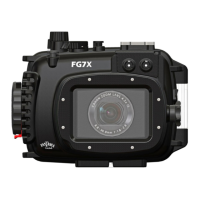
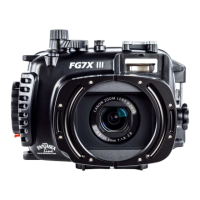
The Fantasea FG7X III VACUUM Housing is a stylish, ergonomic, and durable waterproof housing designed for the Canon G7 X Mark III digital camera, suitable for outdoor and underwater photography. It is depth-rated to 60m/200 feet and offers shock resistance, protecting the camera from water, sand, dust, frost, impact, and other damaging elements. The housing is compatible with a complete accessory system to enhance image quality.
Function Description:
The FG7X III VACUUM Housing allows users to operate their Canon G7 X Mark III camera underwater, providing full access to essential camera controls and functions through clearly marked controls. It incorporates a Hybrid Vacuum Safety System for pre-dive leak detection and a moisture detector for in-dive monitoring. The housing supports various lighting accessories and lens attachments, enabling photographers to capture high-quality images and videos in diverse environments.
Important Technical Specifications:
- Depth Rating: 60m / 200 feet
- Material: Durable injection-molded Polycarbonate
- Sealing: Double O-ring seal
- Weight (with camera on land): 1,134g
- Weight (without camera on land): 830g
- Dimensions (without accessories): 16.5 x 14.5 x 13 cm (W x D x H) / 6.5 x 5.7 x 5.1 inch (W x D x H)
- Lens Port: Features a 67mm thread, compatible with various "wet" accessory filters and lenses.
- Vacuum System: Hybrid Vacuum Safety System with LED indicator for battery status, pre-dive check results (green for ready, red for failed), and leak detection (flashing red with warning alarm).
- Charging: Micro-USB port for charging the vacuum system unit.
Usage Features:
- Ergonomic Design: Ensures comfortable handling and easy access to controls.
- Camera Installation: Simple and secure installation of the Canon G7 X Mark III camera. Users should ensure the camera is off, remove the strap, align mode dials to Auto, and program frequently used underwater photo modes and settings prior to installation. Special care must be taken not to damage the Vacuum System signal board during installation.
- Controls:
- Zoom Control: Activates camera zoom (clockwise for zoom out, counterclockwise for zoom in) and acts as an index/playback lever in playback mode.
- Shutter Release: Activates camera shutter and autofocus.
- On/Off: Powers the camera on/off.
- Mode Dial: Changes shooting modes. It is recommended to align housing and camera mode dials before installation.
- Exposure Compensation Dial: Operates the camera's Exposure Compensation Dial (clockwise for higher value, counterclockwise for lower value).
- Cold-Shoe Mount: For mounting external lighting accessories (flash, video light, torch, focus light).
- Fiber Optic Cable Plate: Allows easy attachment of up to two fiber optic cables for external flashes. It can be removed to use the internal camera flash.
- Flash Up Switch: Rotates clockwise to pop up the camera's built-in flash.
- Control Ring: Activates the function assigned to the Control Ring on the camera. Assignment should be done prior to inserting the camera into the housing.
- Movie (Video Control) Button: Starts and stops video recording.
- Multi-Selector Buttons (Drive Mode/Delete/Up, Flash/Right, Info/Down, Macro/MF/Left): Activate corresponding camera functions.
- Quick Set / Menu Set / Control Dial: Accesses commonly used functions, camera menus, and alters exposure values.
- Latch Dial & Latch Dial Lock: Ensures the housing is properly closed and watertight. The red lever prevents accidental opening.
- Menu Button: Activates the camera menu.
- Playback Button: Enters playback mode to review images/videos.
- Removable Anti-Glare Hood: Improves LCD screen visibility in bright conditions and can be installed/removed during a dive.
- Tripod Mounting Screw Holes: Enables mounting the housing on a tray with three adjustment positions.
- Lanyard Loops: For attaching hand lanyards, straps, or securing accessories.
- Built-in Flash Usage: The housing supports the camera's built-in flash. Removing the Fiber Optic Cable Plate is necessary for internal flash use. The included removable flash diffuser softens flash output, increases coverage, and reduces backscatter.
- Vacuum Safety System:
- Pre-Dive Check: Confirms watertight seal. Requires turning on the unit, locking the housing, removing the Vacuum Valve protective cap, connecting the vacuum pump, and pumping air until the LED indicator turns steady yellow. The system performs a 3-4 minute analysis, indicating "Green flashing" for ready or "Red flashing" for failed.
- Moisture Detector: Monitors the housing seal during a dive. Detects moisture, triggering a flashing red LED and an alarm.
- Vacuum Release: The vacuum must be released using the Vacuum Valve prior to opening the housing.
- Optional Accessories: Compatible with external flashes (slave strobes, fiber optic cables), flash & video lighting sets (trays, flex arms, video lights, focus lights), and lens accessories (Optical Wide Angle Wet Lenses, BigEye Wide Angle Lenses, SharpEye Macro Lenses, RedEye & PinkEye Color Correction Filters, EyeGrabber Lens Holders).
Maintenance Features:
- O-Ring Inspection and Cleaning: The black O-ring on the back door and the white O-ring on the front door should be visually inspected for debris before each closure. The black O-ring can be removed using the O-ring remover for cleaning with a damp, soft cloth.
- Silicone Grease Application: A slight layer of silicone grease should be applied to the O-rings to ensure smooth placement and watertight seal. Over-greasing should be avoided.
- Vacuum Valve Maintenance: The Vacuum Valve should be tightly screwed into its port using the included wrench. The O-ring at the base of the Vacuum Valve should be annually inspected, cleaned, and greased.
- Housing Cleaning: After use, the housing should be thoroughly rinsed with fresh water. The interior of the housing should never be soaked or washed with water to prevent damage to electronic components.
- Battery Care: To extend the battery's lifespan, avoid draining it completely. Store the unit partially charged in a cool, dry area during long storage periods.
- Lens Port Threads: Apply a small amount of silicone grease to the lens port threads and accessory lenses to reduce friction.
- Transport: When transporting by air, the housing should not be locked and should be left slightly open to prevent increased resistance upon opening due to pressure changes.

 Need help?
 General

 To Next Page