Item #: 413900
Rev Date: 013014
To set the humidity level, press and hold the Auto button (gure 1) until the SET icon appears. Press the UP and DOWN arrows to increase or decrease the relative humidity setpoint level. To
conrm the setpoint, either press the AUTO button once or wait for the SET icon to disappear. Once conrmed, the room’s indoor relative humidity level will be displayed.
NOTE: The displayed relative humidity is accurate to +/- 5% relative humidity. The measured relative humidity may be different than what is measured by other instruments in the same room
because of airow currents, local heat sources, etc.
When the room relative humidity measured is above the setpoint, the controller will place the HRV/ERV on Ventilation Mode at normal speed. If there is less moisture in the outdoor air, this
will help lower the indoor relative humidity by providing fresh air from the outside. During summer, when the outdoor air is typically more humid than the indoor air, high speed ventilation may
increase the indoor relative humidity. To prevent this, you can deactivate the humidity setpoint by pressing the AUTO button once. The HUM icon and the indoor relative humidity value icon
disappear, indicating that the setpoint is deactivated. To reset, simply press the AUTO button again and the HUM and indoor relative humidity icons will reappear.
General information
This unit allows you to control your home’s ventilation system. Your ventilation system takes stale air from the inside of your home and replaces it with fresh outdoor air while recovering the
energy of the air that’s exhausted to the outside.
OPERATING INSTRUCTIONS
EDF 7 – ELECTRONIC MULTIFUNCTION DEHUMIDISTAT
*Compatible with SHR/VHR (HRV), SER (ERV) and FLEX Series units
For more information regarding the EDF 7, please visit www.fantech.net.
ICONS AND CONTROL
OPERATION INDICATORS
Ventilatation
Mode
Recirculation
Mode
Stand by
Mode
Fan speed level
Fan operation
Animation
MODES OF OPERATION
There are three (3) modes of operation that can be selected– Ventilation Mode, Recirculation Mode, Stand by Mode using the MODE button (refer to gure 1). Once you’ve selected the operation mode,
the fan speed can be selected. –Reduced, Medium, Normal or 20min/h using the arrow buttons (refer to gure 1).
Ventilation Mode - Your ventilation system takes stale air from the inside of your home and replaces it with fresh outdoor air while recovery the energy of the air that’s exhausted to the
outside.
Recirculation Mode – Your ventilation system takes air from areas of your home and redistributes it in other rooms to avoid stagnant air areas and to distributes heated or cooled air. No
outdoor air is introduced to the building.
Standby Mode - The ventilation system is inactive unless the indoor relative humidity is above the setpoint on the control or a timer switch (installed separately) is activated.
VENTILATION MODE
SELECTION
Ventilation system exchanges
indoor air for outdoor air.
20
min/hr
min/hr
min/hr
FAN SPEED
SELECTION
The indoor air is circulated
within the house.
The ventilation system is on
stand-by
Reduced
Normal
Medium
RELATIVE HUMIDITY
Backlight
Pressing any button once will activate the back LED light but will not change any settings. Pressing
a button a second time within 5 seconds will activate your selection.
Arrow Button
MODE Button
AUTO Button
Figure 1
Figure 2
VENTILATION MODE
SELECTION
Ventilation system exchanges
indoor air for outdoor air.
20
min/hr
min/hr
min/hr
FAN SPEED
SELECTION
The indoor air is circulated
within the house.
The ventilation system is on
stand-by
Reduced
Normal
Medium

 Need help?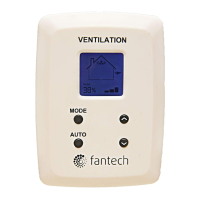

 To Next Page
 General