©Farmstream LTD 2020
Farmstream 360 4G Setup Steps
Step 1: Camera mount and antenna attachment
• Screw the 3 small bolts into the mounting bracket
• Feed the camera cables through the mounting bracket
• Orientate the mount so it is in line with the arrow on the camera body
• Tighten the three bolts to securely attach the mounting bracket
• Carefully screw on the three antennas
Step 2: Inserting sim and SD card
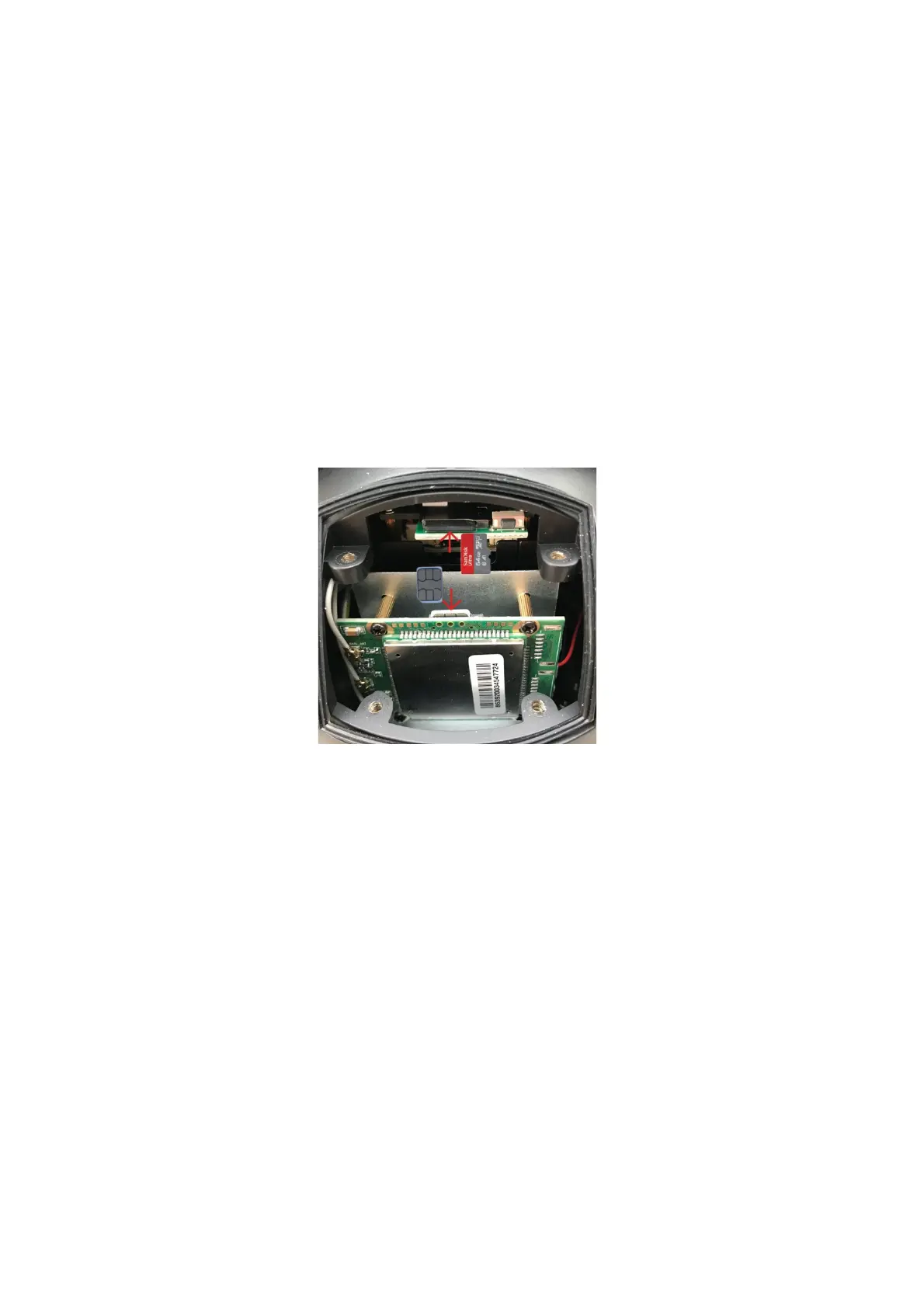
• Insert your new giffgaff sim and SD card (optional) as shown in the photo
below. Both the SD card and the sim card should gently click into place
• Take care to ensure the access panel is securely fastened to ensure water
resistance
Step 3: Giffgaff activation (ignore if using your own network provider)
Note: we recommend checking you have outdoor O2 signal before adding credit – giffgaff operates on
the O2 network. You can find the 4G coverage checker on our website.
• On your phone or tablet download the giffgaff app
• On the giffgaff app select ‘Activate Sim’ (you will then be re directed to a
web browser page)
• Enter the activation code which is a 6-digit code written on the plastic sim
card holder
• Select activate sim and enter your personal details
• Select register
• Choose a data goodybag (we recommend the £10 goodybag)


 To Next Page
 Loading...