This document provides setup instructions for the Farmstream 4G 360 Camera, a device designed to enhance farming efficiency through remote surveillance.
Function Description:
The Farmstream 4G 360 Camera is a surveillance camera that offers 360-degree viewing capabilities, enabling comprehensive monitoring of farm environments. It utilizes 4G connectivity, allowing for remote access and control via a smartphone or tablet application. The camera is designed for outdoor use, with features ensuring water resistance and robust performance in various conditions. It supports both live viewing and recording, with options for motion detection and alerts to enhance security and monitoring efficiency. The camera can be integrated into existing power setups, including battery or solar panel connections, offering flexibility in deployment.
Important Technical Specifications:
- Connectivity: 4G network (operates on the O2 network when using giffgaff SIM).
- Power Supply: Connects to a power supply box; also compatible with 12V battery connection leads.
- Storage: Supports SD card for recording (optional, 64GB SanDisk Ultra shown in images).
- Application: Controlled via the "CamHipro" app available on App/Google Play stores.
- Viewing Angle: 360-degree rotation capability.
- Focus: Auto-focus function.
- Resolution: Defaults to SD, with an option to switch to HD for higher quality.
- Mounting: Secure mounting bracket with three bolts for attachment.
- Antennas: Three external antennas for signal reception.
Usage Features:
- Easy Setup: The setup process involves attaching the camera mount and antennas, inserting a SIM and SD card, activating the SIM (if using giffgaff), powering on the camera, and connecting it to a smartphone via the CamHipro app.
- Remote Access: Users can access and control the camera remotely through the CamHipro app on their phone or tablet.
- 360-Degree Control: The camera's 360-degree movement is controlled by swiping on the screen within the app, allowing users to pan and tilt the view as needed.
- High-Quality Viewing: Users can switch between SD and HD resolution for live viewing and recordings, depending on their preference for quality and data usage.
- Recording Options: The camera supports recording to an SD card, with options to configure "alarm recording" to SD card.
- Motion Detection and Alerts: Users can set up motion detection alarms and customize the detection area and sensitivity. This feature sends alerts to the user's device when motion is detected, enhancing security.
- Password Protection: The camera's password can be changed from the default 'admin' to a custom password for enhanced security. This password is also used for sharing camera access with other devices.
- Sharing Functionality: The camera can be shared with other devices by generating a QR code within the app, which can then be scanned by the second device to add the camera.
- Favourite Positions: Users can save specific camera views as "favourite positions" and recall them later with a single tap, allowing for quick navigation to important areas.
- Image and Volume Adjustment: The app provides options for adjusting image settings and volume.
- Night Vision Mode: The camera includes a night vision mode for surveillance in low-light conditions.
Maintenance Features:
- Water Resistance: The access panel for the SIM and SD card must be securely fastened to ensure water resistance, protecting internal components from environmental elements.
- Troubleshooting: The manual provides basic troubleshooting steps for common issues such as the camera showing offline, including checking SIM activation, rebooting the camera, and attempting to add the camera to a different device. Further support is directed to the Farmstream website.
- Password Management: Users are advised to record their new password safely after changing it, as it is crucial for sharing the camera with other devices.
- Antenna Care: Users are instructed to carefully screw on the three antennas, implying they are user-replaceable or require careful handling during setup.

 Need help?
 General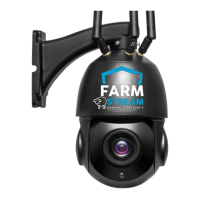

 To Next Page