The AquaM40 (Bluetooth version) is a measuring device designed for detecting leakage-borne noise signals and transmitting them wirelessly to headphones. Manufactured by F.A.S.T. GmbH, this device adheres to state-of-the-art technology and complies with relevant European and national guidelines.
Function Description:
The primary function of the AquaM40 is to identify and transmit leakage-borne noise signals. It operates in conjunction with a connected sensor, extension, tripod, or pot magnet, depending on the local circumstances of the measurement. The central unit processes these signals and transmits them via Bluetooth to a pair of dedicated headphones. The noise level is also indicated on the central unit itself. The device allows for frequency adjustment, which should be set appropriately based on the material of the measured pipe section, the pressure within the pipe, and the size of the leakage.
Important Technical Specifications:
AquaM40 Central Unit:
- Display: Shows level, Bluetooth connection status, battery status, and selected frequency.
- Battery: Rechargeable Li-ion battery.
- Radio Transmission: Bluetooth.
- Resolution: 0-10 noise levels.
- Lighting: LED.
- Dimensions: 114 x 35 x 25 mm.
- Weight: 170 grams.
Headphones:
- Bluetooth Frequency: 2.402-2.480GHz.
- Bluetooth Version: V2.1+EDR.
- Supported Bluetooth Profiles: A2DP, AVRCP, HSP, HFP.
- Supported Codecs: SBC (subband codec).
- Support: Multiple Pair up to 8 devices.
- Range: Up to 10 metres/11 yards on open field (on open field).
- Battery: Li-ion 3.7V, 320mAh capacity.
- Charging Voltage: 5V.
- Charging Time: 3-4 hours max.
- Operation Time: 8-10 hours.
- Audio Input: DC3.5 connection.
- Operation: Controls on the headphones for volume (+/-) and power.
- Weight: 210 grams.
- Operating Temperature: -10°C ~ +55°C.
- Storage Temperature: -20°C ~ +60°C.
Loudspeaker (within headphones):
- Loudspeaker Diameter: 40 mm.
- Impedance: 32 ohm.
- Sensitivity: 114±3dB S.P.L. with 1 KHz.
- Output Power (RMS): 20mW.
- Output Power (PMPO): 50mW.
- Signal-to-Noise Ratio: > 82dB.
- Frequency Response: 20Hz-20,000Hz.
Usage Features:
Scope of Delivery:
The AquaM40 comes in a carrying case and includes:
- Central unit with sensor.
- Bluetooth headphones.
- Tripod.
- Pot magnet.
- Charging unit 220 volt with USB connector.
- Charging unit 12 volt with USB connector.
- Battery charger leads USB for headphones.
- Battery charger leads USB for AquaM40 central unit.
- Extensions.
- Carrying case.
Central Unit Operation:
- Switch On: Briefly press the On/Off button until the battery LED glows.
- Switch Off: Press and hold the ON/OFF key for approximately 3 seconds until the level indicator shows "Maximum value," then release.
- Mute Function: Briefly press the On/Off button during operation.
- Frequency Selection: Briefly press the frequency push-button.
- In-built Lighting: Press and hold the frequency push-button for a longer duration to switch the lighting on/off.
- Noise Level LEDs: Indicate the intensity of the acquired noise. These are for guidance only and do not necessarily correlate with a full-scale indication of leakage.
- Bluetooth LED: Indicates Bluetooth connection status. A permanent glow means a connection is established. Flashing indicates "Pairing Mode." If off, there is no Bluetooth connection, and the device will attempt to re-activate the last active connection.
Headphone Operation:
- Switch On: Press and hold the Power push-button [5] for about 4 seconds until the blue LED flashes.
- Switch Off: Press and hold the Power push-button [5] for about 4 seconds until the red LED flashes.
- Volume Adjustment: Use VOLUME+ [6] to increase volume (a tone indicates maximum) and VOLUME- [7] to decrease volume (a tone indicates minimum).
- Other Buttons: Pause [1], Previous [2], Next [3], Audio input [4], USB connection [8], Microphone [9]. The red/blue LED [10] indicates status.
Bluetooth Connection (Pairing):
- Initial Connection: To initiate pairing, press and hold the frequency button on the central unit and the On/Off button simultaneously. The Bluetooth LED will flash, and any old connections will be deleted. The central unit will then be in pairing mode.
- Headphone Pairing: To pair the headphones, press the "Power" key for 7 seconds until the red and blue LED flashes alternately. The headphone will then be in pairing mode.
- Connection Confirmation: During pairing, both the headphone and central unit will glow permanently when a connection is established. The Bluetooth LED on the central unit will flash with a double "Prep" and then glow permanently.
- Re-activating a Bluetooth Connection: Once paired, the devices will find each other automatically after being switched on.
- Additional Information for new Headphones (Marmitek Boom Boom 560): The Bluetooth connection between the Aqua M40 and Marmitek Boom Boom 560 needs to be established as follows: First, switch on Aqua M40, then press and hold the power button on the headphone until the Bluetooth-LED on the Aqua M40 indicates connection (LED is lighting). If you release the power button too early, there will be a long beep tone audible, and the Aqua M40 will indicate Bluetooth connection, but no sound will be audible. If this happens, switch the headphone off and repeat the process.
- Delete a Bluetooth-connection: To delete an established connection, or to connect the central unit with a different headphone, push and hold the frequency button and afterwards the On/Off button. Wait until the Bluetooth LED flashes, then release both buttons. All connections are deleted.
Maintenance Features:
Battery Voltage and Charging:
- Central Unit: The Battery LED indicates the accumulator's voltage status. A permanent glow means sufficient voltage. A slow flash indicates the accumulator needs recharging.
- Charging is done via charging units [5] and [6] and charger leads [8].
- Recharging takes 2-3 hours, after which a low current maintains the charge.
- Remove charger leads when the green LED glows.
- Headphones: The red LED on the headphones flashes when they need charging. An audio warning will sound, and the headphones will switch off 3-5 minutes later due to insufficient power.
- Charging is done via charging units [5] and [6] and charger leads [7].
- The device is fully charged when the red LED goes out.
- Battery Replacement: The in-built battery should only be replaced by F.A.S.T. GmbH. Users should not attempt to replace or remove the battery themselves.
- Disposal: Dispose of the device in accordance with local regulations.
- Safety Instructions:
- Do not expose the device to extreme temperatures or powerful light sources.
- Unauthorized modifications or repairs by parties other than F.A.S.T. GmbH will void the warranty and product liability.
- The device is not a toy and is not suitable for children.
- Avoid listening to high acoustic noise levels for extended periods to prevent hearing disorders.
- The manual must be read carefully and observed fully before using the AquaM40.
- The operator is solely responsible for interpreting measuring results and deriving conclusions; F.A.S.T. GmbH excludes liability for the correctness of results or any resulting damage.
Environmental Protection:
The device is marked with a crossed-out wheeled bin symbol, indicating that it should not be disposed of with unsorted municipal waste. It must be disposed of separately from regular household waste. This applies to the device and any other electrical and electronic equipment. Proper disposal prevents potential negative consequences for the environment and human health. Contact local authorities or your dealer for information on waste disposal services.

 Need help?
 General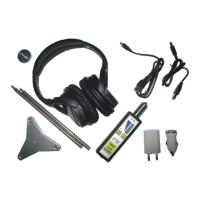

 To Next Page