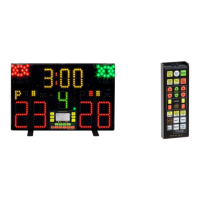
ENGLISH
FLEUR.-ÉPÉE-SABRE key. It displays which weapon is being used, on the left-side hit-counter. The three
weapons are designated by the following abbreviations:
• FL - FLEURet
Foil
• EP - ÉPÉE
Épée
• SA - SABRE
Sabre
The type of weapon activated is displayed for three seconds. You may change the weapon by pressing the key in
question during this three-second period.
VERSION key. It displays for three seconds, on the right side hit-counter, the program version for the weapon
activated. You may change the version by pressing the VERSION key again during this three-second display.
Three programs may be selected for the sword.
These are:
• EP 1 - Épée 1
As per FIE standards, with automatic increase of the hits.
• EP 2 - Épée 2
It signals rapid hits. Useful for signalling several hits in rapid succession during training.
• EP 3 - Épée 3
As per FIE standards, with manual increase of the hits.
TEMPS RÉARM. key. It displays how much time elapses between hits and rearmament. If the key is pressed
again during the display period, the time is changed.
The times that may be selected are 1, 3 and 5 seconds, or manual rearmament, as designated by a dash (-) on
the display.
VOLUME SON key. It displays the volume level of the sounds. If the key is pressed again during the display
period, the volume is changed. There are 4 levels: v0 (off), v1 (low), v2 (medium) and v3 (high).
MINUTES CHRONOM. key. It displays the amount of time set for the match, in minutes. If the key is pressed
again during the display period, you can change that figure from 1 to 9. The set figure is the one that is loaded into
the chronometer by using the SET key on the remote control.
F1 Key. Non-activated function key.
2
E
FONCTION key. It activates the auxiliary function written in red below the keys so prepared.
In the ensuing text, these will be described as "secondary" functions.
2
E
FONCTION + TEST keys. These keys make it possible to control the correct functioning of all the lights.
Furthermore, a short-circuiting between all of the 7 weapon sockets (3+3+piste) will produce a continuous sound
indicating that the circuits controlling the weapons are functioning correctly.
If the TEST key is pressed again, the lights on the apparatus will change pattern, which is an effective way to
attract the attention of the potential buyers of the FA05.
To stop the test phase, press the ON-OFF key.
2
E
FONCTION + AQUIS.TÉLÉC. keys. These keys make it possible to acquire a new remote control. Once these
two keys are pressed in succession, it is necessary to press the TELEC.AQUIS. key on the remote control within
no more than 5 seconds.
2
E
FONCTION + ÉCHANGE keys. These keys provide the exchange of two point scores and are useful when the
fencers change position.
2
E
FONCTION + F2 keys. A function not utilized at the moment.
4. REMOTE CONTROL KEYBOARD
The functions carried out by the 18 keyboard keys are described below.
TELEC. AQUIS. key. It enables the FA05 to acquire the code number of the remote control in order to recognize it
later. The remote control supplied with the FA05 is already enabled, so acquisition becomes necessary only when
the remote control is changed. In order for the new remote control to be recognized, the 2
E
FONCTION +
AQUIS.TÉLÉC. keys must be pressed in succession on the FA05 keyboard and then, within no more than 5
seconds, the TELEC.AQUIS. key on the remote control must be pressed (see Chapter “3. Full-Arm-05
Keyboard”).
SET key. It loads the length of the match on the chronometer in minutes (programmed with the MINUTES
CHRONOM. key of the FA05 keyboard). In order for this to occur, the chronometer must not be in the process of
counting.
If the SET key is pressed again within 1s, it allows to load 1 minute; this function is useful to load the additional
time in case of tie.
FAVERO ELECTRONICS SRL
5 / 28
00831-M01-04 - Full-Arm-05 User Manual


 To Next Page
 Loading...