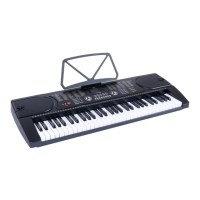
Need help?
Do you have a question about the FAZLEY FKB-120 and is the answer not in the manual?
Introduces the keyboard and lists included items, advising inspection for damage.
Provides contact details and assistance procedures for user support.
Highlights electrical hazards and general safety precautions for device operation.
Details guidelines for operating, storing, and transporting the device safely.
Explains operational symbols and provides crucial battery handling advice.
Identifies and explains the function of all physical controls on the keyboard.
Details the LCD display elements and rear panel ports for connectivity.
Introduces the keyboard, its features, and essential preparation steps.
Guides on positioning the keyboard and maintaining good playing posture.
Explains power adapter use, battery installation, and cable management.
Discusses using built-in speakers and headphones safely.
Covers turning the device on/off, USB MP3 playback, and USB MIDI.
Guides on choosing sounds and layering them using Dual Voice.
Explains how to use effects, touch sensitivity, tempo, and transpose.
Details using the metronome and selecting rhythm accompaniments.
Covers Auto Chord, Pitch Bend, Sync, Intro/Ending, Fill In, and song playback.
Explains the recording function and saving user presets.
Details adjusting sound parameters and balancing instrument volumes.
Introduces the built-in lesson function and its benefits.
Provides in-depth descriptions of the three lesson modes.
Guides on using the USB port for playing personal MP3 files.
A comprehensive list of the keyboard's built-in instrument sounds.
A comprehensive list of the keyboard's built-in rhythm patterns.
A list of the keyboard's built-in demo songs.
Provides solutions for common keyboard problems like power and sound output.
Addresses distorted sound, balance, and note registration problems.
Lists the technical specifications, connectors, and physical dimensions.
 Power
Power| speaker power output | 2x 5 W |
|---|---|
| power consumption | 120 mA |
| power supply | 115 - 230V AC, 50 - 60 Hz |
 Ports & Interfaces
| MIDI output | 5-pin DIN |
|---|---|
| microphone input | TRS mini jack |
| headphone output | TRS mini jack |
| USB stick input | USB A female |
 Weight and Dimensions
| dimensions | 1008 x 431 x 171 mm |
|---|---|
| net weight | 5.4 kg |

 To Next Page