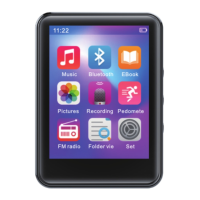
Main interface
Main interface includes music, Bluetooth, e-book, picture,
recording, pedometer, FM radio, document folder, setting
and other applications. Click the application icon to enter.
Description of music interface
1.In music application, click the list to enter function items. In
the music list, click the up and down arrows at the bottom of
the screen to browse the song list through rolling , click the
song names to play, and click the back button at the upper
left corner of the screen to return. In the interface of music
playback, click the menu button at the upper right corner to
enter the menu. In the menu interface, click the up and down
arrows at the bottom of the screen to select options.
Description of document folder
In the document folder browsing, click the up and down
arrows at the bottom of the screen to browse the document
folder list through scrolling, and click the middle button at
the bottom of the screen to enter the delete operation.


 To Next Page