6
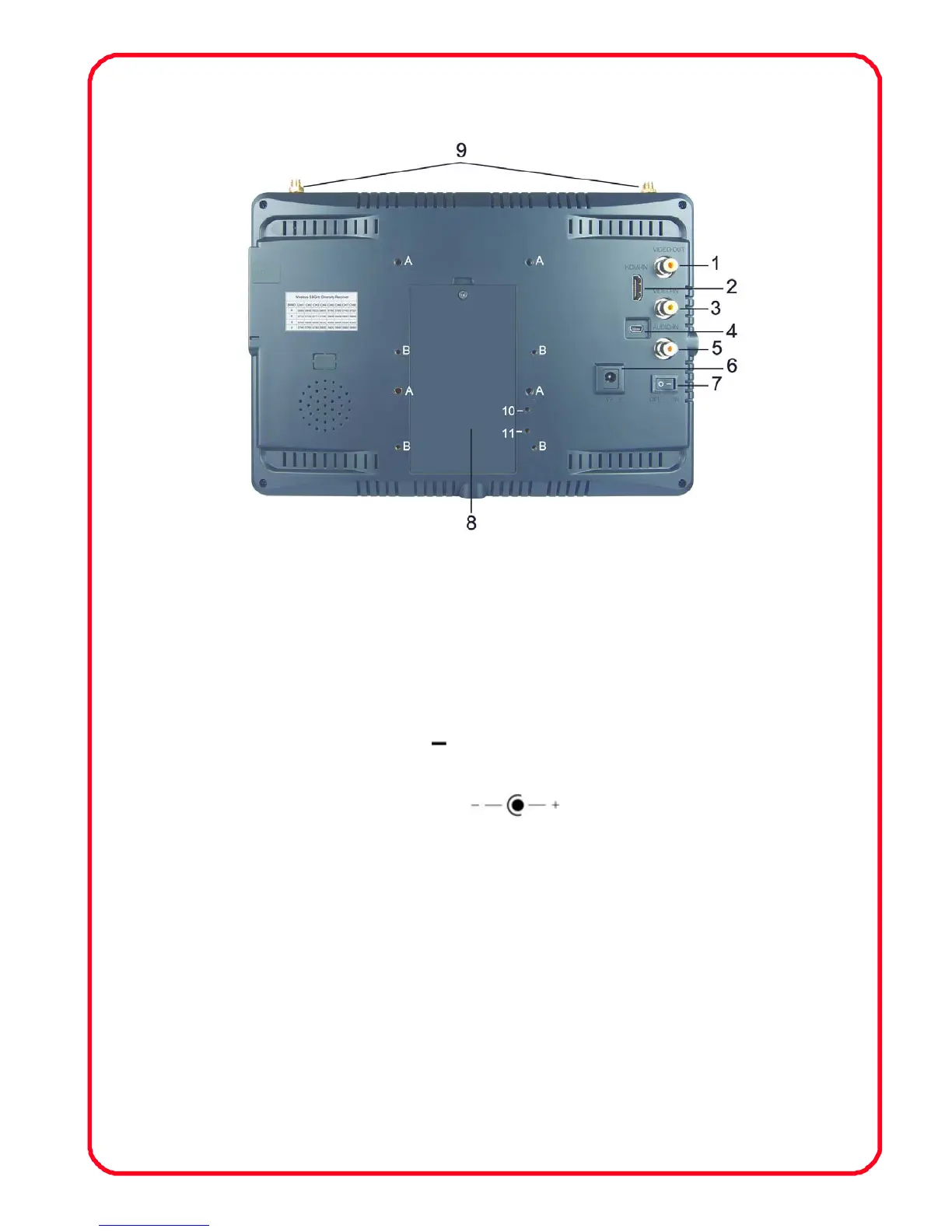
1.2 Rear battery plate instruction:
1、 VIDEO OUT: Composite video signal output
2、 HDMI: HD HDMI signal input
3、 VIDEO IN: Composite video signal input
4、 USB data ungraded port
5、 AUDIO IN: Audio signal input
6、 Power switch “
”Indicates that the power is turned,
“O” means Disconnect the power
7、 Power input jack
8、 Battery Pack
9、 Antenna
10、11: It is a screw hole for battery plate, when you use battery
external, 10 is“+”, 11 is“-”, Copper Screw size:M3×9.5mm
A:Battery plate locking screw hole, 4 holes, Copper Screw
size: M3×5.0mm
B: 75×75mm VESA, Screw size: M4×5.0mm


 To Next Page