The Baseline Hydraulic Hand Dynamometer with Digital LCD Gauge is a medical device designed to accurately measure a patient's grip strength. It serves as a crucial tool for evaluating the initial and ongoing impacts of hand trauma and dysfunction, making it ideal for physical therapy and rehabilitation professionals. The device measures isometric force and peak strength, allowing for the tracking of strength and rehabilitation progress over time.
Function Description
The primary function of this dynamometer is to quantify grip strength. It operates on a hydraulic and bellows-operated internal mechanism, similar to the Jamar® Hydraulic Hand Dynamometer, ensuring reliable and consistent measurements. The digital LCD gauge provides clear and precise readings, enhancing the user experience and data collection process.
Important Technical Specifications
- Capacity: The device has a maximum capacity of 300 lb (136 kg), accommodating a wide range of patient strengths.
- Grip Adjust Range: The grip can be adjusted over a range of 1.35 inches (3.35 cm), allowing for five adjustable grip positions to suit different hand sizes and comfort levels.
- Weight: The dynamometer weighs 22.6 oz (638 gm), making it relatively lightweight and portable for clinical use.
- Accuracy: The device boasts an accuracy greater than 97%, ensuring reliable and trustworthy measurements for clinical assessment.
- Components:
- Handle, Post, and Body: Machined from aluminum for durability and a comfortable grip.
- Bellows: Made of bronze, integral to the hydraulic measurement system.
- Hydraulic Tubing: Constructed from stainless steel for robustness and longevity.
- Bushings: Made of Teflon, contributing to smooth operation.
- Hydraulic Pump Fluid: Non-toxic mechanical fluid ensures safety and consistent performance.
- Digital Gauge: Provides clear LCD readings of grip strength.
Usage Features
The dynamometer is designed for ease of use with several intuitive features:
- 5-Level Adjustment: The handle can be adjusted to five different positions to ensure a comfortable and appropriate grip for each patient. This is achieved by manipulating the handle clamp.
- Digital LCD Gauge: The integrated digital display provides immediate and easy-to-read measurements.
- MENU Button: Used to navigate through the device's settings and options.
- ON/ENTER Button: Serves multiple purposes, including turning the unit on/off, confirming selections, and entering data.
Instructions for Use:
- Setting the Handle: Adjust the handle to a comfortable grip position for the patient using the 5-level adjustment mechanism.
- Resetting Max Indicator: Before each test, reset the maximum indicator to zero to ensure accurate measurement of the current squeeze.
- Performing the Test: Instruct the patient to squeeze the dynamometer with maximum force.
- Noting the Reading: Observe and record the reading displayed on the digital LCD gauge.
- Resetting for Next Test: Reset the device to zero after each test in preparation for subsequent measurements.
Detailed Operational Instructions:
- How to turn on/off unit: Press the ON/ENTER button to switch the unit on or off.
- How to zero out unit:
- Hold the MENU button.
- The screen will display "ZERO UNIT".
- Hold the ON/ENTER button.
- The LCD will display "----", indicating the unit is zeroed and the Zero Offset is saved.
- How to view max:
- Hold the MENU button.
- The screen will display "ZERO UNIT".
- Press the MENU button.
- The screen will display "MAX".
- Hold the ON/ENTER button.
- This action exits without changing anything.
- How to clear max:
- Hold the MENU button.
- The screen will display "ZERO UNIT".
- Press the MENU button.
- The screen will display "MAX".
- Hold the ON/ENTER button.
- The screen will display "MAX CLR".
- Hold the ON/ENTER button.
- The screen will display "CLR YES?".
- Hold the ON/ENTER button.
- The LCD will display "----", indicating that MAX is cleared to 0 and the MAX value is saved.
- How to switch between LB and KG:
- Hold the MENU button.
- The screen will display "ZERO UNIT".
- Press the MENU button.
- The screen will display "MAX".
- Hold the ON/ENTER button.
- The screen will display "MAX CLR".
- Press the MENU button.
- The screen will display "LBKG SEL".
- Hold the ON/ENTER button.
- Press the MENU button.
- Hold the ON/ENTER button.
- The LCD will display "----", indicating the weight unit (LB or KG) is switched and saved.
Maintenance Features
- Warranty: The Baseline® Hydraulic Hand Dynamometer with Digital LCD Gauge comes with a 2-year warranty covering parts and labor from the date of purchase.
- Repair Services: In case the unit requires repair, users are advised to contact their local dealer or Fabrication Enterprises, Inc. for assistance.
The device is manufactured and distributed by Fabrication Enterprises Inc., a leading provider of physical therapy and rehabilitation products. The internal workings of the Baseline dynamometer are comparable to the Jamar® Hydraulic Hand Dynamometer, and normative data collected with the Jamar® dynamometer can be justifiably used with the Baseline device, provided the same standard procedures are followed. This is supported by research from Dr. Virgil Mathiowetz, indicating interchangeability for practical purposes.

 Need help?
 General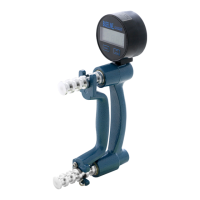

 To Next Page